
Inspiring
September 27, 2017

P: Gradient Fill and Artboards

  • September 27, 2017
  • 35 replies
  • 13655 views

When creating an artboard with a gradient fill, adjust as needed, then export via export artboards to files, what exports doesn't match what is shown in PS.

This is in PS:

These are the settings:
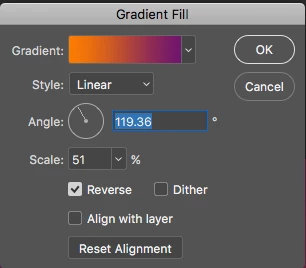
This is what it looks like when exporting:

This topic has been closed for replies.

35 replies

Mohit Goyal
Community Manager
Community Manager
June 20, 2022

Hi all,


Thank you for the feedback. I have forwarded your feedback to our engineering team and they’re looking into it.


Changing the status back to "Investigation"


Thanks,

Mohit 

gregseth
Known Participant
June 18, 2022

I hoped 23.4.1 would have fixed this, alas, it's not. I hope this bug is not burried in the backlog for six more years. Anyway, for what it's worth I did further digging. Here are my findings.


Base document: one artboard with one simple gradient layer (notice that the scale is set at 100%)


Now, I created an artboard by selecting its name in the layer panel and clicking the plus sign under the initial artboard. I then created a gradient layer on this new artboard. Look at the scale, look at the gradient aspect. Notice something different?

I then tried a first export (using File > Export > Arboards to files…) here's the result:


Right! You got it, the export is "correct" according to the values, its the view inside Photoshop that is broken. That can be verified by setting a value for an acceptable visual match:


which gives the exports:


The same behavior occurs if I duplicate the original artboard by right-clicking on its name on the layer panel and selecting duplicate:

To summarize: there's a mismatch between the values of scale/position of the gradient layer and what is shown in the Photoshop UI. Which leads to correcting those values to make it visually acceptable, but breaks the export since it's using the values and not the preview.

PLEASE FIX THIS!

gregseth
Known Participant
June 14, 2022

@Earth Oliver Here's the screenshot setting. Not sure that's the reason…

@MrGlennJones thanks for the advice, I also can flatten the image, but it's only a workaroud, the feature is broken.

For what it's worth the example I've shown in my previous post is the third (and last) artboard of my document. They are vertically stacked.


Earth Oliver
Legend
June 14, 2022

@gregseth how about a screenshot of your Export settings?

MrGlennJones
Known Participant
June 14, 2022

you're welcome. it's a perfect workaround for the moment! 🙂

gregseth
Known Participant
June 14, 2022

just updated, tried, and it's not fixed at all (see images below):

expected render:

actual render:

Mohit Goyal
Community Manager
Community Manager
June 14, 2022

Hi all,


We're happy to announce the release of Photoshop 23.4. This update includes the fix for this issue. To see the list of all fixed issues, click here


To update Photoshop to 23.4, click "Update" in the Creative Cloud desktop app next to Photoshop. More detailed instructions for updating


Let us know if the update resolves the problem for those affected, and share your feedback.


Thanks,

Mohit

Participant
June 3, 2022

Thanks MrGlennJones, I converted my gradient layers to Smart Objects and artboard images exported fine.

gregseth
Known Participant
May 24, 2022

In 2017, davescm said: "This was acknowledged as a bug in this thread in  2016, but still exists : Re: Art boards and gradients issue"

So it wasn't. How to be sure that bugs are properly reported (or filed, or tagged, … whatever)?