
Inspiring
September 27, 2017

P: Gradient Fill and Artboards

  • September 27, 2017
  • 35 replies
  • 13655 views

When creating an artboard with a gradient fill, adjust as needed, then export via export artboards to files, what exports doesn't match what is shown in PS.

This is in PS:

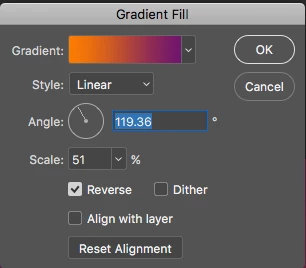
These are the settings:
This is what it looks like when exporting:

This topic has been closed for replies.

35 replies

PECourtejoie
Community Expert
Community Expert
May 24, 2022

@Earth Oliver it took a bit more than 5 month, once the thread was properly labeled as a bug report, and not lost in a sea of other discussions.

Earth Oliver
Legend
May 23, 2022

did it really take FIVE YEARS to fix this bug?

ClaudiaR99
Community Manager
Community Manager
May 23, 2022

Hello @roboroaster , I apologize this is causing inconveniences. The issue has been fixed in June release. Please make sure to updare once this new release is out to the public. In the meantime, the option Export As is exporting the png with the correct gradient fill angles.

gregseth
Known Participant
May 22, 2022

Five years no fix? This is a joke.

MrGlennJones
Known Participant
February 25, 2022

btw if i select the artboard and do "quick export as png" it also saves the gradient fine without prior converting to a smart object

MrGlennJones
Known Participant
February 25, 2022

hi guys, i have also stumbled on this bug this morning...

it appears if i use a gradient on a shape layer and a layer style gradient on a pixel layer, the 'export artboards to files' process seems to export the incorrect gradient but if i convert the shape layer or pixel layer to a smart object it exports ok.

ClaudiaR99
Community Manager
Community Manager
January 4, 2022

This issue has been reproduced with the file provided. Ps engineers are looking into it. 

ClaudiaR99
Community Manager
Community Manager
January 4, 2022

@PECourtejoie I'll be creating a ticket for this issue. Thanks for bringing it to our attention.

roboroaster
Participant
March 24, 2022

Photoshop 2022 23.2.2

Mac OS Monterey 12.2.1


This only started happening after updating to 2022. For example, I have 4 artboards with the same square with gradient like below.


When i choose "export > artboards to files" and expot PNGs of each artboard, the gradient shifts on each one when it should all be the same. see output files below with the shifted gradient.


This never happend to me before until the update so im assuming is a bug, but a very specific bug which can go unnoticed. I use this feature a lot instead of the "export as" because it allows me to customize my settings a bit better. Please adobe team help resolve this issue :), thank you.

ClaudiaR99
Community Manager
Community Manager
January 4, 2022

Hello @PECourtejoie , @J453 , if there is a jira ticket, please assign to clrodrig. Thanks!

Participant
December 15, 2021

Hi @J453, here is the link with PSD.
Those export images are from my iMac. Now I've tried to open it over the Creative Cloud on a MacBook and it's a lot better there, but still not without problems.