


Inspiring
June 18, 2020

P: Grid is drawing too thick when zoomed out

  • June 18, 2020
  • 70 replies
  • 2381 views

The new grid in 21.1. Oh my God. I can't stand it. Whose idea was it to make the grid be a compulsory 2px thickness?

It looks actually very nice in zoomed-in mode:
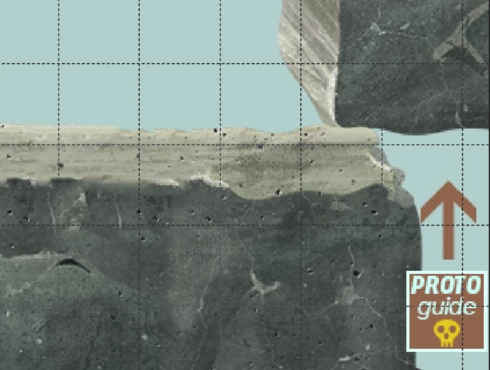


But it's just horrible when you zoom out. What used to be a feather-thin lattice of lines has become a solid 2px-thick mess that overwhelms everything else. When you use use lots of artboards like me (and therefore need to frequently navigate around in zoomed-out mode) it becomes quite problematic. 

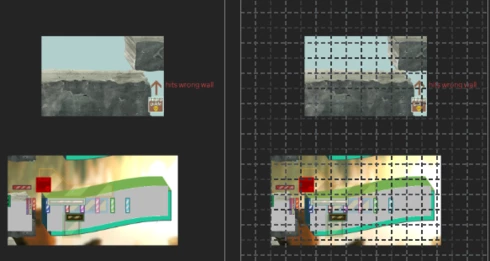
Here's the same portion of a document with the new grid and without. Even though it's zoomed out, you can clearly make out the content of it when there's no grid. But once you show the new grid, you can barely see anything but the thick gridlines. Some of the smaller shapes that are easily visible on the left are now hard to make out, as are the translucent ones; the text is much harder to read too. Plus the whole thing is just straining on your eyes.

The old grid didn't have these problems. Dammit, Adobe, this reminds me of the shift+transform debacle. Why fix things that aren't broken, when there are already plenty of things that are broken but remain unfixed year after year? These updates are exasperating sometimes.  


I can't find any setting anywhere to revert to a more sensible 1-px grid, but I'm just really really hoping that I've missed it somehow. If not, please, for the love of God, let us choose a 1px version in the settings!

This topic has been closed for replies.

70 replies

Earth Oliver
Legend
June 22, 2020
Jeff, i can confirm both the size and slowness issues on Win10.
Inspiring
June 22, 2020
Yes, new version is terrible - crazy grid and nightmare perfomance on my PC (Win10; i7; 16G; GTX1650) Rollback to version 21.1.3
dblejaAuthor
Inspiring
June 21, 2020
Glad I'm not the only one! The performance is astronomically bad. For example:

Dragging a guide from the ruler to the canvas took 12 seconds in total, between the time I started and the time the cursor finally returned to its normal state. 

Just moving the rectangle marquee around is very laggy too. 

Photoshop is basically unusable at the moment for me. There's something very abnormal going on with this update.
Inspiring
June 20, 2020
I'm going to bump this. Two grid-related issues that I'm experiencing:

1. If the grid or guides are turned on, performance is terrible. Very slow, laggy, jagged screen panning, etc. The first time I experienced this I thought that Photoshop was going to crash. For reference, my specs are: Windows 10; AMD 1800x; 1070 GTX; 32 GB RAM; Samsung M.2 SSD

2. The grid and guides look terrible. Both are blurry and their colors are not as vibrant/high contrast. I have cyan guides, for example, and they look washed out and blurry now. The zoomed-out view of the grid as David Bleja demonstrated looks awful, not crisp at all. We should have a way of reverting back to the more solid grid prior to this latest update.
Legend
June 19, 2020
Thanks. Will add those notes for engineering
dblejaAuthor
Inspiring
June 19, 2020
I just reinstalled 21.2 in case something had gone wrong with the first install. Unfortunately, the slowdown and the thick grid is still there. I'd estimate that dragging a canvas (with some 40+ smallish artboards on it) is about:

~5 times slower on 21.2 than 21.1.3. when the grid is off.
~10 times slower on 21.2 than 21.1.3 when the grid is on.

That's not hyperbole by the way, those are my best estimates based on feel, when trying it in 21.1.3, then trying it a few minutes later on 21.2.
dblejaAuthor
Inspiring
June 19, 2020
By the way, the new grid caused very significant slowdown when it was on.

The performance of 21.2 was already very bad (so bad that it makes me think there's a driver conflict or bug going on...I doubt you would have released the update if it caused this much slowdown for everyone). But when I turned on the grid, it became even worse - dragging around was almost like a slideshow. 

I don't notice much, if any, slowdown by showing the grid in 21.1.3.

Just a guess: perhaps Photoshop is rendering and re-rendering the grid multiple times? That could explain both the heavy thickness and the performance load.
dblejaAuthor
Inspiring
June 19, 2020
Oh, thank goodness! 🙂
Legend
June 18, 2020
I don't think this is intentional. I will log an issue for engineering.
dblejaAuthor
Inspiring
June 18, 2020
and here's the same portion with the old grid (reverted to previous PS version just now). As you can see, it's much more civilised: