


Inspiring
June 18, 2020

P: Grid is drawing too thick when zoomed out

  • June 18, 2020
  • 70 replies
  • 2381 views

The new grid in 21.1. Oh my God. I can't stand it. Whose idea was it to make the grid be a compulsory 2px thickness?

It looks actually very nice in zoomed-in mode:
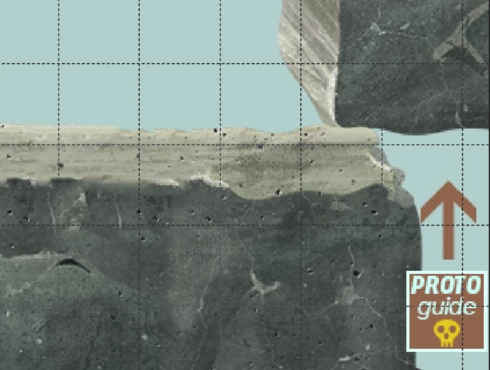


But it's just horrible when you zoom out. What used to be a feather-thin lattice of lines has become a solid 2px-thick mess that overwhelms everything else. When you use use lots of artboards like me (and therefore need to frequently navigate around in zoomed-out mode) it becomes quite problematic. 

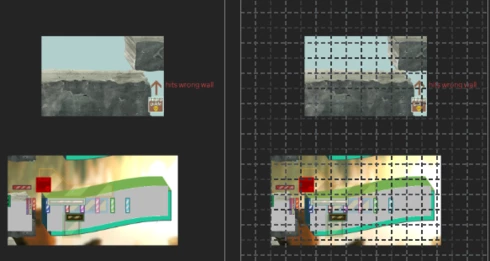
Here's the same portion of a document with the new grid and without. Even though it's zoomed out, you can clearly make out the content of it when there's no grid. But once you show the new grid, you can barely see anything but the thick gridlines. Some of the smaller shapes that are easily visible on the left are now hard to make out, as are the translucent ones; the text is much harder to read too. Plus the whole thing is just straining on your eyes.

The old grid didn't have these problems. Dammit, Adobe, this reminds me of the shift+transform debacle. Why fix things that aren't broken, when there are already plenty of things that are broken but remain unfixed year after year? These updates are exasperating sometimes.  


I can't find any setting anywhere to revert to a more sensible 1-px grid, but I'm just really really hoping that I've missed it somehow. If not, please, for the love of God, let us choose a 1px version in the settings!

This topic has been closed for replies.

70 replies

Earth Oliver
Legend
July 30, 2020
the grid thickness was fixed in 21.2.1. Is that the version you're running?
Inspiring
July 30, 2020
Here's the same portion of a document with the new grid and without. Even though it's zoomed out, you can clearly make


ADOBE_SUPPORT_NUMBER_+1-8-44-42-O-0*2*1*7....


out the content of it when there's no grid. But once you show the new grid, you can barely see anything but the thick gridlines. Some of the smaller shapes that are easily visible on the left are now hard to make out, as are the translucent ones; the text is much harder to read too. Plus the whole thing is just straining on your eyes.... .

Known Participant
July 30, 2020
Am trying the grid in version 21.2.1 and I'm still getting this thick grid.  I was just using the grid for a project back in April and everything was fine.  Now the grid is useless.  And yes I'm also getting the massive slowdown when using the grid.  Hope we fix this in 21.2.2  ....
Inspiring
July 22, 2020
Hi, same problem here with 2070S and RTX studio drivers. Terrible performance and thick unusable grid.
Inspiring
July 22, 2020
Hi,

I found out that I have the same problem with support for GPU. There is option to turn offantialising for graphic cart if guides and grid are too thick but it does not work. Beside guides and grids look terrible, performance with thick grid is very bad. I tried to turn off GPU support and grids backs to normal (thin) but performance is not so good as with GPU. This started to occurs in version before 21.1.3. I am using RTX studio drivers with Nvidia 2070S.
Earth Oliver
Legend
July 21, 2020
so the grid looks fine now, but performance with it active is really bad. I go from 30fps to 3fps when i turn the grid on.
Win10, Nvidia 2070
I'll add a note to the officials bug report.
Akash Sharma
Legend
July 21, 2020

We are happy to announce the release of Photoshop 21.2.1 that should resolve this issue.

This update includes fixes to some of the top customer reported issues among other bug fixes. See Bug fixes and security updates

To update Photoshop to 21.2.1, click "Update" in the Creative Cloud desktop app next to Photoshop. 

More detailed instructions for updating

Let us know how it goes.

Thanks,

Akash
Todd Shaner
Legend
July 7, 2020
Try 16.6 % Zoom View.....Totally unusable.

Gridline every 1 inch with 4 Subdivisions 5616 x 3744 with 300 ppi setting


Inspiring
July 7, 2020
The performance regression here is genuinely unbelievable — sometimes it takes up to a minute for the grid to appear on my 2018 MacBook Pro, and moving the canvas becomes completely unresponsive. Please please please fix this ASAP Adobe, and work on your quality control.
dblejaAuthor
Inspiring
July 2, 2020
I've since reverted back to 20.0.9. 

Wow. It's so much faster! If 21.1.3 was ~5 times faster than 21.2, then 20.0.9 is ~5 times faster still (so ~25 times faster than 21.2). Turning the grid on/off makes no discernible difference - it's lightning fast either way. I'd forgotten Photoshop was ever this fast!

Of course, the irony is that many of the changes between 20.0.9 and 21.2 included alleged "performance improvements". Mind boggling.

After being a vocal proponent of the subscription model since day 1, I'm now having decidedly second thoughts. Who knows when or if Adobe will fix these problems, so for the foreseeable future I'll be using the 1+ year-old 20.0.9 while continuing to pay monthly for a 'service' I don't use, as it seems to break more than it fixes.