


Inspiring
June 18, 2020

P: Grid is drawing too thick when zoomed out

  • June 18, 2020
  • 70 replies
  • 2381 views

The new grid in 21.1. Oh my God. I can't stand it. Whose idea was it to make the grid be a compulsory 2px thickness?

It looks actually very nice in zoomed-in mode:
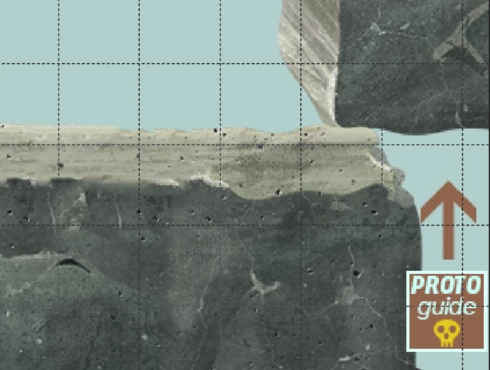


But it's just horrible when you zoom out. What used to be a feather-thin lattice of lines has become a solid 2px-thick mess that overwhelms everything else. When you use use lots of artboards like me (and therefore need to frequently navigate around in zoomed-out mode) it becomes quite problematic. 

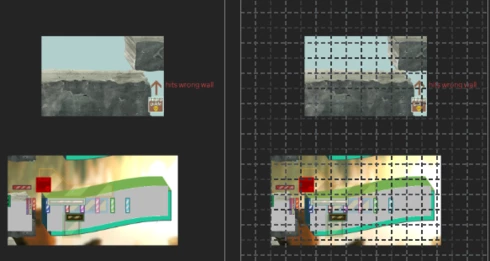
Here's the same portion of a document with the new grid and without. Even though it's zoomed out, you can clearly make out the content of it when there's no grid. But once you show the new grid, you can barely see anything but the thick gridlines. Some of the smaller shapes that are easily visible on the left are now hard to make out, as are the translucent ones; the text is much harder to read too. Plus the whole thing is just straining on your eyes.

The old grid didn't have these problems. Dammit, Adobe, this reminds me of the shift+transform debacle. Why fix things that aren't broken, when there are already plenty of things that are broken but remain unfixed year after year? These updates are exasperating sometimes.  


I can't find any setting anywhere to revert to a more sensible 1-px grid, but I'm just really really hoping that I've missed it somehow. If not, please, for the love of God, let us choose a 1px version in the settings!

This topic has been closed for replies.

70 replies

Inspiring
August 18, 2020
The bad thing for me is that I have CC subscription and I cannot go back to older versions. Annoying!
Participating Frequently
August 18, 2020
It is really annoying, don't know why Adobe changes a running system. Or at least let us choose how thick we would like the grid lines. It is not possible to work with the grid, as everything jumps around, the performance can't keep up. Thank god I still have 2019 Installed, so I have to swap whenever I work with the grid.
Inspiring
August 18, 2020
Hi,

Installed this morning version 21.2.2. of Photoshop, but problem is still present. Performance is still very poor. For me doing web graphics this grid it is totally useful and annoying.


Participating Frequently
August 15, 2020


Since I updatet to 20.2., if I activate the grid, it
shows thicker lines shaped like an L or so. I can't zoom, it just jumps around,
the dynamic zoom doesn't work at all. It is a horror, I can't work with grids,
which I need all the time. With version 20.0.9 everything was fine. Can the
problem be the graphic driver? I have an Eizo FS2333 monitor and the graphic
card NVIDIA GeForce GTX 670, dirver vers. 451.67. It doesn't work on either of
our 2 desktops, but is fine on the old laptops.I reset the preferences, no change.


But the perspective crop
grid works ok


Inspiring
August 11, 2020
Just updated it today to 21.2.1, reading the patch note said this bug was solved, but nope, the problem is still there : very thick grid when zoomed out, and very very low performances when drawing with brush.

Nvidia GeForce GTX 1080, Win 10x64.
Inspiring
August 6, 2020
I'm on 21.2.1 and thick grid lines are still there 😞
Earth Oliver
Legend
July 31, 2020
bummer guys! i'll make sure the devs see that this is still buggy.
Inspiring
July 31, 2020
Yes, you are right. Problem is not solved at all. And you are also right for the performance. I use RTX 2070S, and performance is very poor. I contacted support, they told me to write post here, because programmers are reading posts. Maybe we should open new post because they maybe think this is really solved?
Elisei Kulikovsky
Known Participant
July 31, 2020
Same here: guides and grid are still thick (2 px wide) with GPU on (I'm on 21.2.1), and panning with guides and grid on is becoming very sluggish.

PS 21.2.1, Asus GeForce GTX 780, Win 10 x64.

The problem is marked as solved but it's not!
Inspiring
July 31, 2020
I am running 21.2.1 and grid is still thick and useless. By the way, guides are useless, too. I am using GPU support. Without GPU support grid is thin, but when you put guides, they are below grid, not above grid, so the guides are useless, too in this case.