


Participating Frequently
March 3, 2016

P: Group linear dodge may acts different from the layer linear dodge

  • March 3, 2016
  • 15 replies
  • 482 views

Hi everyone. I found that when choosing group blending mode as linear dodge, it would act in a differently from simply apply a linear dodge layer. An example:

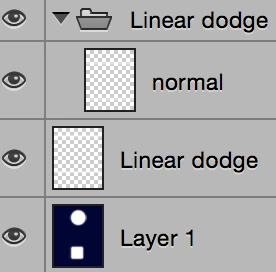


Upper one the adjust layer, lower one the 'adjust group'. (in case these helps: Layer 1 consists of deep blue& white, the two layers are white rectangles blurred using Gaussian blur.)


The group only contains one layer in normal mode which has identical pixels as the adjust layer does.

Same thing happens for color dodge mode, but not for lighten, screen and lighter color. Seems blending type related.


Searched for blending methods and group blending mode, but came to that in this case they should work in the exactly same way... Did I missed or misunderstood anything? 

This is a quite interesting feature but I'm curious about the mechanism.

Thanks in advance.

This topic has been closed for replies.

15 replies

Inspiring
March 4, 2016
Ok, we have the file and will take a look.
Participating Frequently
March 4, 2016
Not yet. Actually I was following a tutorial posted at least 2 years earlier and found this behaviour in step4... note that the author used this 'feature' on purpose (with no explanation).
Here's a sample PSD doc, hope it helps.
(Edited for a typo)
Inspiring
March 4, 2016
Have you installed the 16.1.2 update?

We'd still need to see the PSD document to check all the structure options...
Participating Frequently
March 3, 2016
CC2015 and OS X 10.10.5 yosemite, running on a macbook pro with retina. Didn't test for other PS versions yet.
I posted in general forum too and there found that if we turn off the "Transparency Shapes Layer" in the Layer Style, the adjust layer would work as the linear dodge group does. Did some further search but still lost. Groups  have the checkbox on for default, layers too.
Inspiring
March 3, 2016
Which specific version of Photoshop are you using?
Which OS version?

Yes, the blend modes should behave the same way, but some of the behavior depends on precisely what settings you have applied to each layer and group.