
Participant
June 17, 2015

P: Has stopped working on launch (librarylookupfile)

  • June 17, 2015
  • 68 replies
  • 1291 views

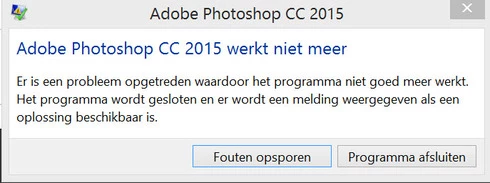
Yesterday I updated to the new Adobe Cloud CC 2015 version. After that Photoshop and Illustrator 'have stopped working' when i load them up.

Windows Version 8.1 Latest patches and updates. Graphics card AMD Radeon 295x2. Updated last version. No crash log, only windows event log.

I have already contacted the indian support guys, but they were not that helpfull and just plain rude but I will make a written complaint for that also. They made me create a new 'admin' user on my system and all should work, well thats just a bogus solution. This update was issued by Adobe and this has nothing to do with userdata. I cant create new users every time software updates, this should be tested by Adobe. I suggest adding a better 'cleaning' tool that also cleans user/roamdata.

I uninstalled, used the cleaner tool, cleaned registry , reinstalled still the same bug.
Muse , Lightroom CC 2015 all work apart from Photoshop and Illustrator.

So please fix this!!
This topic has been closed for replies.

68 replies

DreemlifeAuthor
Participant
June 24, 2015
Thnx Corne, this fixed for me, so as i stated it was obvious it had to do with the roaming data. I am glad youhave the solution. This worked for me.... so please Adobe fix this in an update for everyone
Inspiring
June 24, 2015
same issue for me this AM. No functionality inside Photoshop CC. Menu choices all there, but nothing happens when I click on them...

I tried deleting the librarylookupfile file and restart the app but nothing changed. I can get into the application but nothing is functional.
Inspiring
June 24, 2015
I have the same problem. After I updated to Adobe Photoshop 2015 (CC) it crashes on start up. Very frustrating.
Participating Frequently
June 23, 2015
Hi guys,

I spent a little time investigating this issue. Here is a blog post with a solution (work around) that gets Photoshop back up and running.

http://www.vandrielmedia.com/articles...

For those not interested in heading out there, here is a direct bit of info:

So, here is a temporary fix while we wait for Adobe to properly fix the issue.
Photoshop CC 2015 Crash At Startup
The problem file is librarylookupfile, which can be found in %USERPROFILE%\AppData\Roaming\Adobe\Creative Cloud Libraries\LIBS

Renaming or deleting this file immediately resolves the issue for me.
DreemlifeAuthor
Participant
June 23, 2015
I cleaned registry, only new profile seems to work... but thats not a real solution. I aint gonna create new user every time Adobe brings out a patch so please look into this!
Inspiring
June 23, 2015
I'm having the same problem as Jimmy; in fact, it's happened to me four times in just the last hour! In addition, after restart, the welcome screen is sometimes blank.

I also had similar problems, at first, opening up InDesign; at one point, it wouldn't open due to me not having any privileges with folders, or something like that. Now, it appears that issue has fixed itself and I have no trouble turning it on.

I did think of uninstall/reinstall until I saw Jimmy's post. Now I wonder if I can do anything about it. Anyone with better luck?
DreemlifeAuthor
Participant
June 18, 2015
Naam van toepassing met fout: Photoshop.exe, versie: 16.0.0.88, tijdstempel: 0x55681d39
Naam van module met fout: Photoshop.exe, versie: 16.0.0.88, tijdstempel: 0x55681d39
Uitzonderingscode: 0xc0000005
Foutmarge: 0x000000000385514d
Id van proces met fout: 0x188c
Starttijd van toepassing met fout: 0x01d0a9ec556805e9
Pad naar toepassing met fout: C:\Program Files\Adobe\Adobe Photoshop CC 2015\Photoshop.exe
Pad naar module met fout: C:\Program Files\Adobe\Adobe Photoshop CC 2015\Photoshop.exe
Rapport-id: 95b8355a-15df-11e5-82bd-54271e91083e
Volledige pakketnaam met fout:
Relatieve toepassings-id van pakket met fout:

That doesent explain why Muse would start it it was my admin user account. Noonetheless, this needs to be fixed.
Inspiring
June 17, 2015
We need to see the detailed crash report, from the system event viewer, or reliability reports.

If a new admin user works, then the error is most likely in bad preferences (Photoshop's or the OS).