


Known Participant
October 18, 2017

P: Healing and Spot Healing Brush Lag

  • October 18, 2017
  • 282 replies
  • 7290 views

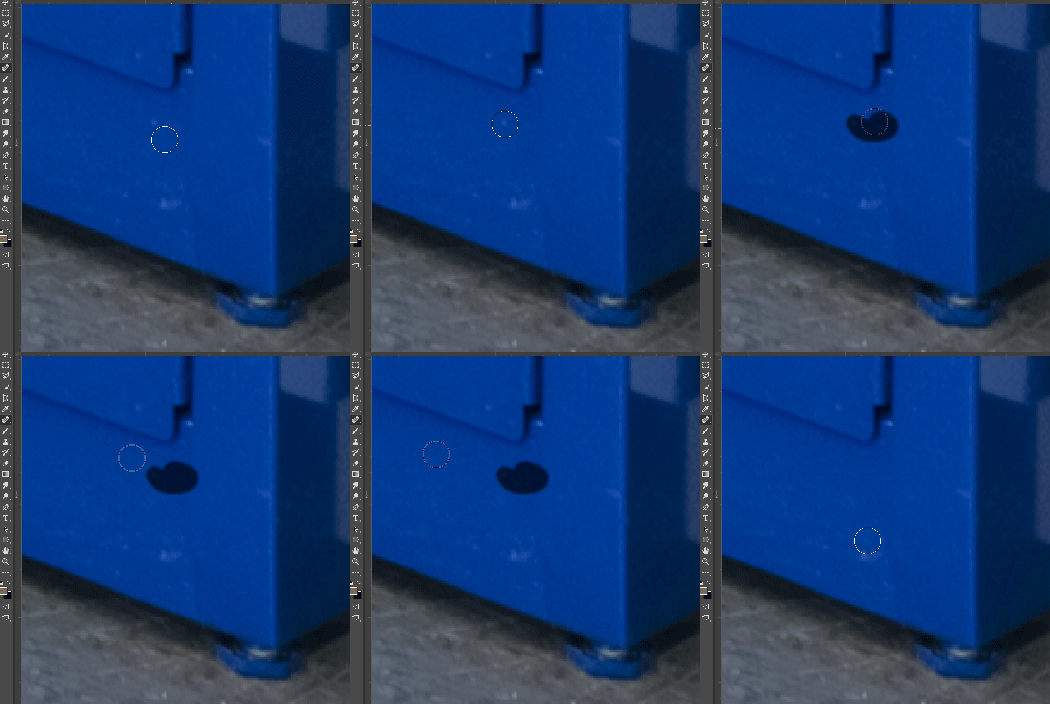
In most recent 2018 update, healing and spot healing brush have become much less responsive, sometimes taking multiple seconds after completion of stroke to affect the image.

Late 2016 Macbook, up to date OS and Software

I've done the regular things like turning off OpenCL and changing other performance options... no change.
GIF framerate is sped up 2x 
 

This topic has been closed for replies.

282 replies

Inspiring
October 29, 2017
I'm done with finding ways to fix it, just uninstalled it and reinstalled CC2017, back to normal now, feel so fast after few days of struggle...Happy!
johnc70738738
Participant
October 28, 2017
Same problem, just wasted the whole morning trying to finish a retouching job. Going back to 2017 version. Adobe get your head out of the cloud and fix your software!
Inspiring
October 28, 2017
It solves the lag problem, temporarily, but it adds another issue... when removing the Smoothing as described by Hannah, the Healing Brush tool doesn't work properly. It seems to work just like a Clone Stamp.

I have the basic Creative Cloud plan (LR+PS). How can one revert to the previous version (PS 2017)? These last days have been a nightmare and my retouching work is getting delayed because of this bug.
Inspiring
October 28, 2017
Works fine if I don't use the brush first but as soon as I use the brush and go back to spot healing it gets slower and slower. File size is makes no difference.  
Inspiring
October 27, 2017
I did that and still not working; not even with lag - just plain not working at all now.
Inspiring
October 27, 2017
Spot healing tool in latest update of Photoshop is totally unusable due to lag. Working on 16 bit, ProPhoto RGB,  over 1 Gb files, on Mac Pro with 64 GB memory, running MacOS 10.12.6. 
Switching back to CC 2017 to meet deadlines.
Hannah Nicollet
Community Manager
Community Manager
October 27, 2017
Please try these steps and let us know if this gets spot healing working at a normal speed for you.

***Remember it is necessary to disable smoothing with every launch of Photoshop***

To disable smoothing:
  1. Disable the smoothing feature in your Brush Settings (Image 1).
  2. When spot healing tool is active, drag smoothing to 0% (Image 2).

1.


2. 


Thank you,
Hannah Nicollet
bellevue scott
Inspiring
October 27, 2017
I can now confirm that on two machines, even if you turn smoothing off, eventually it starts lagging again. Eventually it slows down again. So we're pretty much back to 2015.5 until this gets resolved. 
Inspiring
October 27, 2017
For me, turning xmoothing to 0 on the paint brush slider seems to have done the trick — the box is still ticked as on, but the 0 setting holds from one launch and session to another. If there is any lag, it is so low as to be unnoticable with both spot and standard healing brush (in Legacy mode). No space bar/hand tool issues,. I have used the new bluetooth and older wireless Intuos tablet with no difference.
danielh79617739
Participant
October 27, 2017
I also have this issue. The tool lags several seconds between clicks. Sometimes it behaves as it I'm Shift-clicking (the healing brush makes straight lines between click points). I've restarted my computer several times since the update, and the only remedy seems to be restarting Photoshop when the symptoms occur. I thought it could be a Wacom driver issue, but it doesn't seem to be the case.

2014 5K 27" iMac
4GHz Intel i7
32GB RAM
AMD Radeon R9 M290X w/ 2048MB of memory
250GB SSD