


Known Participant
October 18, 2017

P: Healing and Spot Healing Brush Lag

  • October 18, 2017
  • 282 replies
  • 7290 views

In most recent 2018 update, healing and spot healing brush have become much less responsive, sometimes taking multiple seconds after completion of stroke to affect the image.

Late 2016 Macbook, up to date OS and Software

I've done the regular things like turning off OpenCL and changing other performance options... no change.
GIF framerate is sped up 2x 
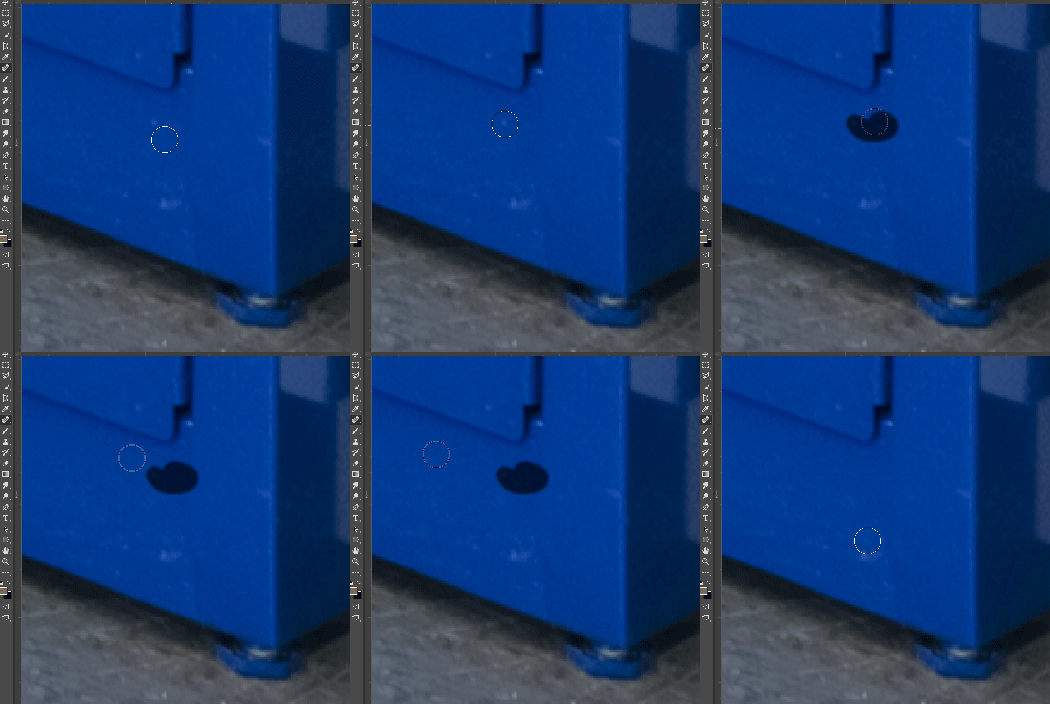
 

This topic has been closed for replies.

282 replies

Participant
October 27, 2017
I was having the same experience with the Spot Healing brush On Win10. I tried all the suggestions here minus resetting my preferences, and none of that worked. I jumped back into CC2017 to work on a restoration. After some time I closed CC2017, and went back to CC2018 and the Spot healing brush was working as expected. I double checked to make sure I was on 2018, be switching over to the brush tool and saw the new Smoothing and Symmetry settings. I confirmed I was in 2018. but when I switched bach to the Spot healing Brush the lag had returned.

It appears the something with the smoothing gets switched on when using the brush tool and never turns off when going back to the Spot Healing.
Inspiring
October 27, 2017
Hi everyone,
Just reporting I've got the same problem.
bellevue scott
Inspiring
October 26, 2017
8bit and 16bit uncompressed TIF files, color space is Adobe 1998. Files are typically 11,000px X 14000 pixels, created with a Betterlight 8K 4x5 scanback camera. 
Known Participant
October 26, 2017
I've had the exact same problem. I cursed at my screen all day and finally tapped out. Uninstalled and back to CC 2017.
Inspiring
October 26, 2017
I have this problem too and the tool gets stuck showing black on the subject. Rubbish update period. 
Inspiring
October 26, 2017
no diff
Known Participant
October 25, 2017
Considering it takes 5 minutes to reinstall, professionals should feel free to uninstall or not at their discretion.
Participant
October 25, 2017
I am  having the same problem which never existed with prior versions.  I have a very high end PC with all SSD drives .... this is crazy.  Editing has become a nightmare.  Please fix this ASAP.  Reboots, resets, turning off GPU card, etc. makes no difference.  Unacceptable.
Inspiring
October 25, 2017
> t would help if Adobe didn't have the remove checkbox marked automatically.>

What would help even more is if they didn't hide the whole thing under Advanced. Just put all the options out in the open as soon as you click Update or Install.
Edward Caruso Photography
Participating Frequently
October 25, 2017
No one should ever remove the previous version when updating - if you use Photoshop professionally you should know this. It would help if Adobe didn't have the remove checkbox marked automatically.