


Known Participant
October 18, 2017

P: Healing and Spot Healing Brush Lag

  • October 18, 2017
  • 282 replies
  • 7290 views

In most recent 2018 update, healing and spot healing brush have become much less responsive, sometimes taking multiple seconds after completion of stroke to affect the image.

Late 2016 Macbook, up to date OS and Software

I've done the regular things like turning off OpenCL and changing other performance options... no change.
GIF framerate is sped up 2x 
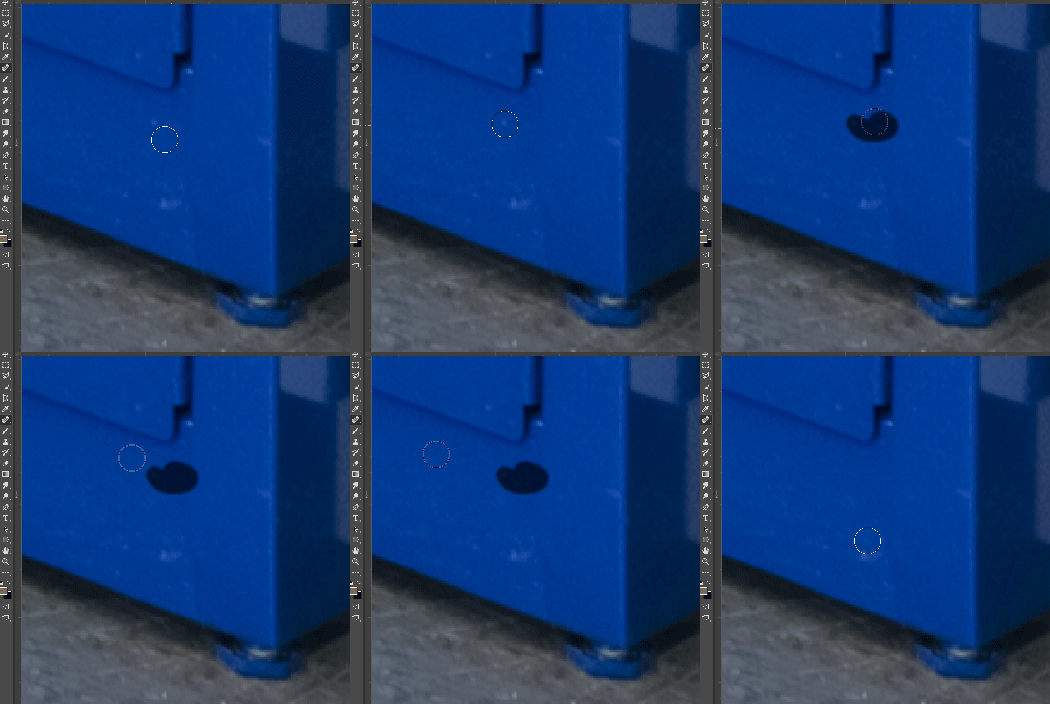
 

This topic has been closed for replies.

282 replies

JodyLand
Participant
October 22, 2017
Hi Adam, I did this about an hour ago (Reset Prefs on Quit) and so far so good
Participating Frequently
October 22, 2017
This is happening to me too, I've called tech support twice, I hope Adobe comes up with a solution quick because it's costing many of us time and money for this insane lag, restarting PS over and over again is a lame option and not realistic. Tech support told me to reset brush settings to default but this is a pain too that doesn't always work. I use a Wacom Cintiq 13 touch tablet but it does the lag even without the tablet.

I'm about to go back to 2017 version because this one should never have been released with these glitches. Next time they should have full time professional retouchers and artist use the products before they release them. It would have been discovered in minutes...
rogéz
Participating Frequently
October 21, 2017
16bit, RGB, 25MPix, mouse.
Lag starting after around 25 clicks (+3000Mb of RAM / working set).
GPU peak to 25% during each lag
CPU peak to 30% during each lag

System:
Adobe Photoshop Version: 19.0 20170929.r.165 2017/09/29: 1138933  x64
Number of Launches: 306
Operating System: Windows 10 64-bit
Version: 10 or greater 10.0.14393.1198
System architecture: Intel CPU Family:6, Model:12, Stepping:3 with MMX, SSE Integer, SSE FP, SSE2, SSE3, SSE4.1, SSE4.2, AVX, AVX2, HyperThreading
Physical processor count: 4
Logical processor count: 8
Processor speed: 3999 MHz
Built-in memory: 32716 MB
Free memory: 2 MB
Memory available to Photoshop: 29447 MB
Memory used by Photoshop: 60 %
Surface Dial: Enabled.
Alias Layers: Disabled.
Modifier Palette: Enabled.
Highbeam: Disabled.
Image tile size: 1024K
Image cache levels: 4
Font Preview: Medium
TextComposer: Latin
Display: 1
Display Bounds: top=0, left=0, bottom=1440, right=2560
Display: 2
Display Bounds: top=0, left=2560, bottom=1440, right=5120
OpenGL Drawing: Enabled.
OpenGL Allow Old GPUs: Not Detected.
OpenGL Drawing Mode: Advanced
OpenGL Allow Normal Mode: True.
OpenGL Allow Advanced Mode: True.
AIFCoreInitialized=1
AIFOGLInitialized=1
OGLContextCreated=1
NumGLGPUs=1
NumCLGPUs=1
NumNativeGPUs=0
glgpu[0].GLVersion="4.1"
glgpu[0].IsIntegratedGLGPU=0
glgpu[0].GLMemoryMB=6144
glgpu[0].GLName="NVIDIA GeForce GTX 1060 6GB"
glgpu[0].GLVendor="NVIDIA Corporation"
glgpu[0].GLVendorID=4318
glgpu[0].GLDriverVersion="22.21.13.8494"
glgpu[0].GLRectTextureSize=32768
glgpu[0].GLRenderer="GeForce GTX 1060 6GB/PCIe/SSE2"
glgpu[0].GLRendererID=7171
glgpu[0].HasGLNPOTSupport=1
glgpu[0].GLDriver="C:\WINDOWS\System32\DriverStore\FileRepository\nv_dispi.inf_amd64_24ddebfb518b5a55\nvldumdx.dll,C:\WINDOWS\System32\DriverStore\FileRepository\nv_dispi.inf_amd64_24ddebfb518b5a55\nvldumdx.dll,C:\WINDOWS\System32\DriverStore\FileRepository\nv_dispi.inf_amd64_24ddebfb518b5a55\nvldumdx.dll,C:\WINDOWS\System32\DriverStore\FileRepository\nv_dispi.inf_amd64_24ddebfb518b5a55\nvldumdx.dll,C:\WINDOWS\System32\DriverStore\FileRepository\nv_dispi.inf_amd64_24ddebfb518b5a55\nvldumd.dll,C:\WINDOWS\System32\DriverStore\FileRepository\nv_dispi.inf_amd64_24ddebfb518b5a55\nvldumd.dll,C:\WINDOWS\System32\DriverStore\FileRepository\nv_dispi.inf_amd64_24ddebfb518b5a55\nvldumd.dll,C:\WINDOWS\System32\DriverStore\FileRepository\nv_dispi.inf_amd64_24ddebfb518b5a55\nvldumd.dll"
glgpu[0].GLDriverDate="20170718000000.000000-000"
glgpu[0].CanCompileProgramGLSL=1
glgpu[0].GLFrameBufferOK=1
glgpu[0].glGetString[GL_SHADING_LANGUAGE_VERSION]="4.50 NVIDIA"
glgpu[0].glGetProgramivARB[GL_FRAGMENT_PROGRAM_ARB][GL_MAX_PROGRAM_INSTRUCTIONS_ARB]=[65536]
glgpu[0].glGetIntegerv[GL_MAX_TEXTURE_UNITS]=[4]
glgpu[0].glGetIntegerv[GL_MAX_COMBINED_TEXTURE_IMAGE_UNITS]=[192]
glgpu[0].glGetIntegerv[GL_MAX_VERTEX_TEXTURE_IMAGE_UNITS]=[32]
glgpu[0].glGetIntegerv[GL_MAX_TEXTURE_IMAGE_UNITS]=[32]
glgpu[0].glGetIntegerv[GL_MAX_DRAW_BUFFERS]=[8]
glgpu[0].glGetIntegerv[GL_MAX_VERTEX_UNIFORM_COMPONENTS]=[4096]
glgpu[0].glGetIntegerv[GL_MAX_FRAGMENT_UNIFORM_COMPONENTS]=[4096]
glgpu[0].glGetIntegerv[GL_MAX_VARYING_FLOATS]=[124]
glgpu[0].glGetIntegerv[GL_MAX_VERTEX_ATTRIBS]=[16]
glgpu[0].extension[AIF::OGL::GL_ARB_VERTEX_PROGRAM]=1
glgpu[0].extension[AIF::OGL::GL_ARB_FRAGMENT_PROGRAM]=1
glgpu[0].extension[AIF::OGL::GL_ARB_VERTEX_SHADER]=1
glgpu[0].extension[AIF::OGL::GL_ARB_FRAGMENT_SHADER]=1
glgpu[0].extension[AIF::OGL::GL_EXT_FRAMEBUFFER_OBJECT]=1
glgpu[0].extension[AIF::OGL::GL_ARB_TEXTURE_RECTANGLE]=1
glgpu[0].extension[AIF::OGL::GL_ARB_TEXTURE_FLOAT]=1
glgpu[0].extension[AIF::OGL::GL_ARB_OCCLUSION_QUERY]=1
glgpu[0].extension[AIF::OGL::GL_ARB_VERTEX_BUFFER_OBJECT]=1
glgpu[0].extension[AIF::OGL::GL_ARB_SHADER_TEXTURE_LOD]=1
clgpu[0].CLPlatformVersion="1.2"
clgpu[0].CLDeviceVersion="1.2 CUDA"
clgpu[0].IsIntegratedCLGPU=0
clgpu[0].CLMemoryMB=6144
clgpu[0].CLName="GeForce GTX 1060 6GB"
clgpu[0].CLVendor="NVIDIA Corporation"
clgpu[0].CLVendorID=4318
clgpu[0].CLDriverVersion="384.94"
clgpu[0].CLBandwidth=1.42807e+11
clgpu[0].CLCompute=1627.64
License Type: Subscription
Serial number: 90970897118203259305
GUIDBucket:
Application folder: C:\Program Files\Adobe\Adobe Photoshop CC 2018\
Temporary file path: C:\Users\rogez\AppData\Local\Temp\
Photoshop scratch has async I/O enabled
Scratch volume(s):
  E:\, 5,46T, 585,2G free
  D:\, 188,9G, 47,1G free
Required Plug-ins folder: C:\Program Files\Adobe\Adobe Photoshop CC 2018\Required\Plug-Ins\
Primary Plug-ins folder: C:\Program Files\Adobe\Adobe Photoshop CC 2018\Plug-Ins\
rogéz
Participating Frequently
October 21, 2017
have the exact same situation on Win10 with Intell 8core, 32gb ram and nvidia 1060 6gb. The bug is in the (Spot) Healing Brush tool, the Patch tool works perfectly like with PS18.
paulFinchley
Participating Frequently
October 21, 2017
Definitely helps to have smoothing turned off i.e. at 0 but I found I have to set the brush smoothing to zero and then close Ps and reopen. Just changing the smoothing to zero on the brush and going back to the healing brush whilst still in an image had no effect.

By the way has anyone else lost the ability to use the space bar to get the hand tool to quickly move the document?
paulFinchley
Participating Frequently
October 21, 2017
.dng file (from Canon 5D3) opened from Lightroom i.e. no layers. I add a single transparent new layer above to do healing. The first heals are ok for a short while then it just gets very slow as reported by others. Have to close and re launch Ps every few minutes to get the speed back. It used to be as close as possible to real time but now it's worse than Lightroom. Using Wacom on MacOs Sierra
Inspiring
October 21, 2017
how to disable brush smoothing?
Inspiring
October 21, 2017
Turned smoothing off and restarted and it definitely helped. Still a tiny lag much more than the 2017 version though but definitely better with smoothing off.
Known Participant
October 21, 2017
Still have a problem on my Win10 PC (last update,16GB RAM), even when a smoothing is off. I have to restart PS, then everything goes fine for a hour or so.....then horrible healing brush lag appears again.... 😞 
Everything worked fine in PS 2017 
Known Participant
October 21, 2017
doesn't work for me......still have a lag on healing brush, even when I disable a smoothing option in brush window (win10,16GB)