


Known Participant
October 18, 2017

P: Healing and Spot Healing Brush Lag

  • October 18, 2017
  • 282 replies
  • 7449 views

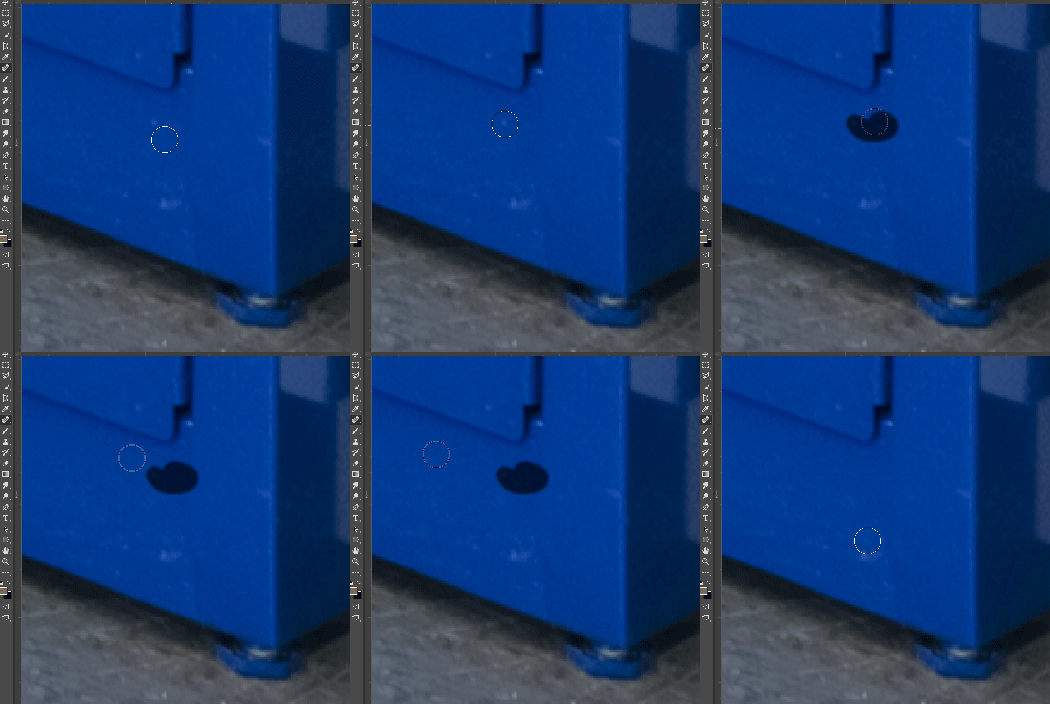
In most recent 2018 update, healing and spot healing brush have become much less responsive, sometimes taking multiple seconds after completion of stroke to affect the image.

Late 2016 Macbook, up to date OS and Software

I've done the regular things like turning off OpenCL and changing other performance options... no change.
GIF framerate is sped up 2x 
 

This topic has been closed for replies.

282 replies

Inspiring
October 20, 2017
>  And then use the healing brush again. Is it still slow?>

It was for me. I had to turn it off in the Brush Settings panel.
rob.c
Participating Frequently
October 20, 2017
Just tested myself, this works for me. Thanks!
BiJeiTi_Ph
Known Participant
October 20, 2017
8bit, psd format, 2 layer, 7300x4900px, RGB image
mathews47130492
Participating Frequently
October 20, 2017
I am also glad to finally have a smoothing option. I can't tell you how many times I did something in illustrator just to get a smoother look i couldn't achieve in photoshop.
Known Participant
October 20, 2017
Thanks for confirming, Adam! 
Really stoked about the new smoothing options. The new pull-string option will be much appreciated for the times it becomes necessary for precision work. Thanks!
Adam Jerugim
Community Manager
Community Manager
October 20, 2017
Adobe folk here - we can confirm brush smoothing being enabled triggers the slowdown.  Disabling it should get the healing brush working again as it did in PS CC 2017.  In the meantime we'll continue to debug the issue here and try to get a fix out asap.  Thanks again for everyone's help with this.
Inspiring
October 20, 2017
I can confirm. I had no problems until using the Paintbrush with smoothing at 0 in the Options bar, but enabled in the Brush Settings. Then all heck broke loose.
Adam Jerugim
Community Manager
Community Manager
October 20, 2017
Looks like my suggestion came a few minutes late 🙂

I'm glad we have a workaround for now, we'll see about getting a proper fix out asap.  Thanks again for everyone's help getting to the bottom of this.
Adam Jerugim
Community Manager
Community Manager
October 20, 2017
Try turning off paint smoothing from the tool options bar when the brush tool is active (the default is 10%, change that value to 0%).  And then use the healing brush again. Is it still slow?
Inspiring
October 20, 2017
+1
Turning off smoothing on the brush works! ...providing you restart PS afterwards and then keep smoothing off.