


Known Participant
October 18, 2017

P: Healing and Spot Healing Brush Lag

  • October 18, 2017
  • 282 replies
  • 7449 views

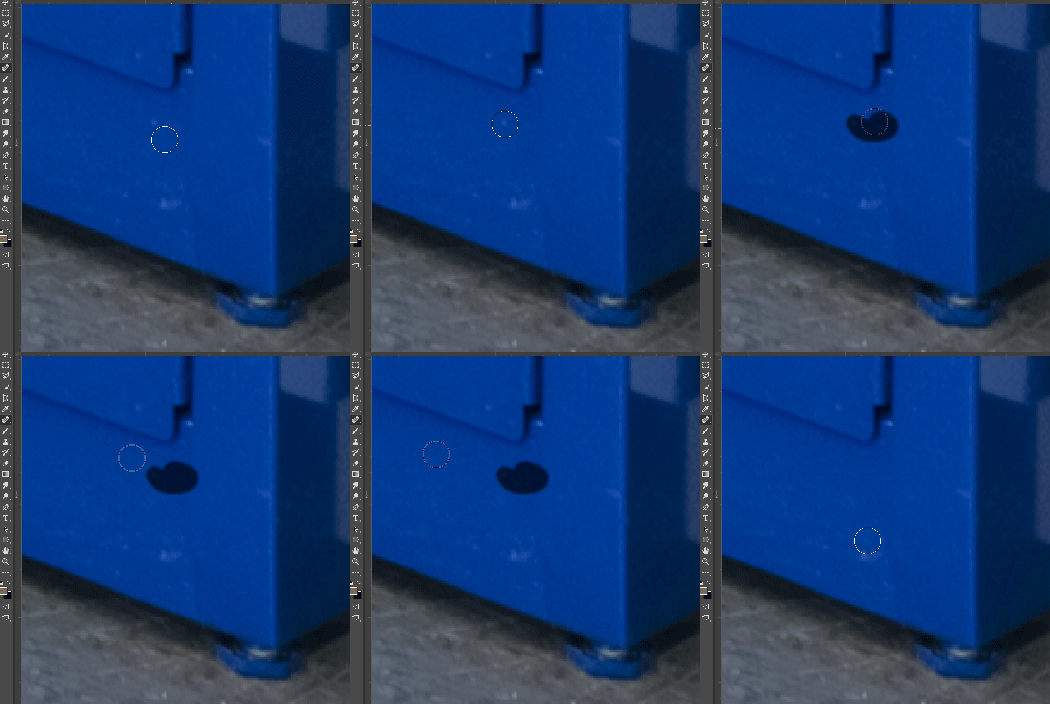
In most recent 2018 update, healing and spot healing brush have become much less responsive, sometimes taking multiple seconds after completion of stroke to affect the image.

Late 2016 Macbook, up to date OS and Software

I've done the regular things like turning off OpenCL and changing other performance options... no change.
GIF framerate is sped up 2x 
 

This topic has been closed for replies.

282 replies

mathews47130492
Participating Frequently
October 19, 2017
I always work in 8bit, usually RGB.

I've experienced this problem on images ~10,000 x 7,000 pixels (155 dpi), single layer.

Also experiencing this on smaller 1200x1200 multi-layered TIF files (~8 layers), regardless of the toggle sample all layers being on or not.

I counted just now and it took over 20 seconds to clean up a single "spot" (20 pixel brush) on the 10,000x7000 flat image. The time on the smaller one is 3 seconds.
Adam Jerugim
Community Manager
Community Manager
October 19, 2017
Can the people affected by this please help us by providing what type of file they're seeing this on?  8bit, 16bit? RGB, large, small, amount of layers?  Any info would be helpful for us in trying to reproduce this.  Thanks.
Participating Frequently
October 19, 2017
Sorry for the FALSE HOPE everyone . . . 

Well whatever fixed it did not last,  just a couple of hours use and it's now as bad as it ever was - Looks like its something Adobe broke and I can't fix it!!! I'm so far behind now this is now costing me money.
Adam Jerugim
Community Manager
Community Manager
October 19, 2017
We've had other reports of slow brush performance fixed with a preference reset and restart. If you haven't tried this yet, please do: use the button "Reset Preferences on Quit" from Preferences > General, then restart your system.  Does the lag still occur?  Please let me know.  Thanks.
Participating Frequently
October 19, 2017
After a day of messing about I appear to have overcome this issue - I'm not the methodical type unfortunately so I'm not exactly sure what I did to fix the problem but I recommend you persevere. Lots of reboots and checking drivers - "one of" the last things I did was unplug the Wacom art pad all together then reboot - after this I found the spot brush to be working nice a fast, and after I plugged the art pad back in with everything still running - it has been OK since then, (I'm not touching anything else until I have finished this job).
Participating Frequently
October 19, 2017
Same issue here people - the spot healing brush is now totally unusable with one simple click on the smallest specs of dust taking 10 seconds (I have timed it a couple of times) to complete it's healing.

Ironically the healing brush in Lightroom that I have complained about being too slow and unusable for years is now faster and more usable than the one in Photoshop! (though still no wear near good enough for Adobe to brag about it as an improvement the way they have been, it's still poor).

I've hit the Me Too button - and hope they can fix this soon I have hundreds of macro shots of micro chips to work through and although they were cleaned extensively every spec of dust on the product looks huge!
Inspiring
October 19, 2017
Did you trash your Prefs when you installed CC 2018?
I had problems with the Healing Brush until I trashed my Prefs and rebooted the computer.
Known Participant
October 19, 2017
Love the new algorithm for the Select and Mask tool, but healing brush makes it unusable... have to switch back to 2017, don't have time to keep testing.
Known Participant
October 19, 2017
Technically a restart of OS or Photoshop reset the problem, but it comes back after a short time of working every time.
Known Participant
October 19, 2017
Technically a restart of OS or Photoshop reset the problem, but it comes back after a short time of working every time.