


Known Participant
October 18, 2017

P: Healing and Spot Healing Brush Lag

  • October 18, 2017
  • 282 replies
  • 7290 views

In most recent 2018 update, healing and spot healing brush have become much less responsive, sometimes taking multiple seconds after completion of stroke to affect the image.

Late 2016 Macbook, up to date OS and Software

I've done the regular things like turning off OpenCL and changing other performance options... no change.
GIF framerate is sped up 2x 
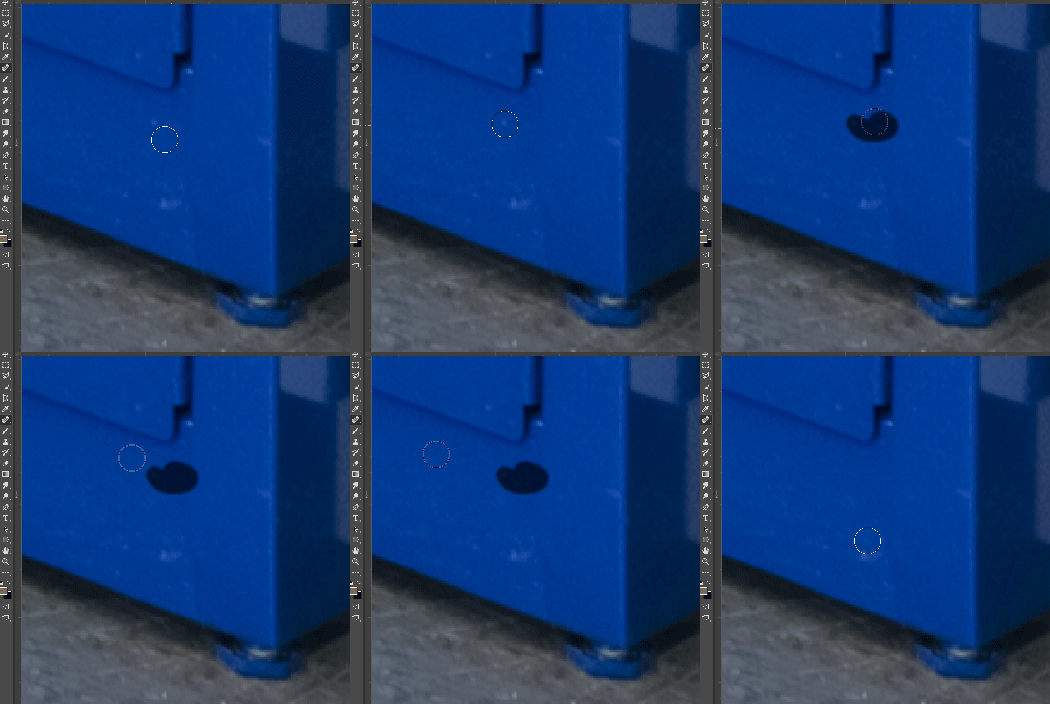
 

This topic has been closed for replies.

282 replies

Inspiring
December 4, 2017
stop blaming others and work on fixing this.
this is a version 2018 error and has nothing to do with settings or hardware.
Inspiring
December 4, 2017
I'm having the same problem with the spot healing brush.  It works fine in my CS6 version and 2017, but not in 2018 version 19.0.0.  I can't download 19.0.1 version.  I also rebooted my computer, I'm using Mac 27" 2013, Sierra 10.12.6, Memory 32 GB, and Graphic Card NVIDIA Get Force GTX 775M 2048 MB.  What do I need to to fix my problem.
Inspiring
November 20, 2017
I just wanted to clarify that I believe that the issue with the initial lag that this thread started on has been resolved with the latest update to 19.0.1. Because I had that performance drop so soon after I installed the update I assumed it was the bug not being fixed.

I also want clarify that I don't have to be accessing a file from a network location, but it seems if there is any hang or disconnect of a mapped network dive it totally hoses Bridge and any running Adobe app. So I always know where certain people have left the office for the day.


I'm definitely going to start a new thread. It seems like these hangs vary in situation for many users, but they are happening and with greater frequency than I remember with any of the CS versions.
basaski
Participating Frequently
November 20, 2017
I went back to 2017  - won't upgrade until resolved. I didn't soup up my machine for speed only to have it feel like a G3 ... this bug can turn 5 min into an hour...
Inspiring
November 20, 2017
> . So, my question is basically to know if all those people experiencing hangs use Bridge and if you jump over to Bridge during these hangs is it also unresponsive? >

For me it's Bridge that is unresponsive, not the other apps. It's just tolerable on an SSD (not good, but tolerable), but my desktop computer is older (soon to be mothballed, hopefully) and it's awful on that. I frequently have to force quit after the first launch of the day (I, too, run it all day long, using it extensively most days), in order to get it to start responding in any reasonable amount of time. It also hangs badly if left neglected for too long. I've wondered if it's related to having Firefox open most of the time as well, or if it might not have something to do with the Purge cache after X days command. I haven't been in the mood to troubleshoot more, but I think I'll turn off the Purge cache command and see if it doesn't improve, at least in returning to active duty after sitting idle, since that's when it's supposed to purge cache.

I'm afraid if I'm doing a lot of work with numerous folders, I'm unfaithful enough to 2018 to go back to 2017. No prize for speed there, either, but it doesn't hang while opening another folder for exceptionally long periods of time. I really wish Adobe would recognize the importance of Bridge and throw sufficient resources at it to redesign and fully modernize the app. They treat it like the unwanted stepchild instead of a critical bridge between all the apps.<sigh>

As for PS or CR, I didn't experience any serious lag until I tried mixing brush types. I'm not experiencing any slowdowns now, but I'm still on El Capitan.
Inspiring
November 20, 2017
So far I've been lucky... issue resolved after turning off smoothing, and still fine after 19.0.1!
Couple of thoughts though... I too have bridge open all the time, all work is on a series of thunderbolt RAIDs  and there are several Macs on the network (does this count as network?)
However I'm using Bridge 2017 (can't update lack of web galleries)
I also downgraded to ACR 9.12 - while using ACR 10 I had all the symptoms, freezes, unresponsive, and had to force quit over & over again!
So it seems to me as though there may be many issues at play here, and please Adobe, this isn't an attack, we all want to get to the bottom of this.
Finally, it's great to find so many who use Bridge "all day every day"!
Peter
Known Participant
November 20, 2017
No bridge open here, and no network transfers or writing of any kind. When Lightroom syncs to the cloud things slow down considerably, but that's not happening much on my end.
Participating Frequently
November 20, 2017
Interesting thoughts Douglas. I just had another slow down, and went straight to Bridge, but it did not seem to be affected.... I have bridge open all the time whilst working also. Will keep a close eye on this though.
Inspiring
November 20, 2017
I have a question for you all that are experiencing these intermittent hangs. I initially thought this was still a bug with the healing brush, but I think it goes beyond Photoshop. When I am at work and am loading images in from other network drives I get a total hang in all Adobe programs that are open (mainly Photoshop, Bridge, and Illustrator) if someone on the network shuts down their computer for the day, or some other glitch in the network occurs. However, If I close Bridge It will instantly free up Photoshop etc.

I feel like many of the hang issues are related to the way the Cloud system connects to these apps. Because I rely heavily on Bridge I always leave it open while working. So, my question is basically to know if all those people experiencing hangs use Bridge and if you jump over to Bridge during these hangs is it also unresponsive? Also if you are working in an environment where you are accessing files from network locations?

If there's any correlation than I will start a new thread and see if Adobe can get to the bottom of this. I want to say that I've been having this issue since CC2015 bit it has become more frequent, and yes it is embarrassing to have this happen in front of a client.
Known Participant
November 20, 2017
I haven’t had chance to test fully so far. Will do this week and report.
But I had this exact same with first version of 2017 , it would just freeze for 30sec to 2 mins .
It was so annoying and embarrassing when you’ve got a client sitting in with you.
- and you’re on a £4000+ new MAC PRO.
Check it’s not something to do with auto save being set to every 10mins I think by default .
And try open GL prefs.
That’s all I could think it was Or some terrible caching scripts.