


Inspiring
January 24, 2018

P: Histogram behaviors are different from prior versions

  • January 24, 2018
  • 104 replies
  • 3328 views

I am experiencing problems with the histogram in 19.1.0. I am a mid-career fine art photographer by profession, and have been a PS user since Version 2. I am also a member of the Authors Guild, and write on photography for various publications. I have been purposely hanging back at PS 2015.5.1, as it has served me well. Yesterday, I decided enough, is enough, and installed 19.1.0.

This first histogram is at Cache Level 1 for the file values of a 36Kx24K pixel 16-bit grayscale file.
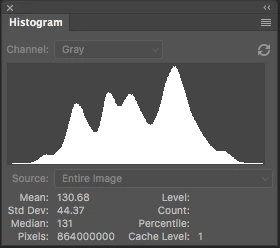
 

Please notice how there are "tails" (lines) out each side of the main body of data, indicating that there are small levels of data almost to the limits of range. For me, it is important to know about these tails exist so that I do not end up creating a clipped condition when applying a curve function. We use S-curve limiters to compact the tails without clipping.

Here is the exact same file at Cache Level 1 for the same 36Kx24K pixel 16-bit grayscale file, but this time in 19.1.0.
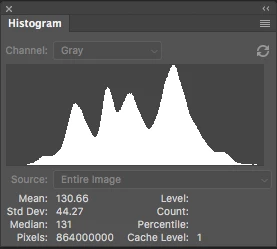
 

Please notice how there is no tail indicating data extending to the left, and rather a botched one going to the right. This is not helpful! You will also notice that the Mean and Standard Deviation values differ.

Further, it use to be nice to be able to take the cursor and scan across the histogram with a display of level and count showing up for whatever was under he cursor. This seems to have gone away in 2015.5, and is even worse in 19.1.0.

Thanks for your help.

Pete

This topic has been closed for replies.

104 replies

Todd Shaner
Legend
May 7, 2020
Gentlemen, this post is quickly going down the rabbit hole! One of the requisites of this forum is to keep requests to one specific issue or new feature. Since the disappearing curves issue has been solved that leaves us with the Histogram accuracy. Please use a separate post to discuss these other issues.

Using *Ronald Chambers file the histogram looks identical to his screenshot on my system. *Pete Myers what are you seeing? *Jeffrey Tranberry what are you seeing?

"All of the live bins should be different height but the same intensity."

If you calculate the height as a percentage of the 512x512 area that is mid-gray (117) the 64x64 area is 1.6%. On my system the Histogram is 123 px in height. .016 x 123 px = 1.968 or about 2 px, which is what I see displayed. The 32x32 area is .40% or .004 x 123 px = .49 px (less than 1 px). On my display it shows as one pixel because that as low as it can go and still be visible correct? The 16x16 area is .10% or .001 x 123 px = .123 px. So how do you show these differences using 1 px? Adobe has done this by by lowering the brightness. It makes sense to me and appears to be working properly on my system.


Having said that *Pete Myers histogram using *Jeffrey Tranberry file shows NO tails, but both my and Jeff's system show the tails. Please scroll up to see for yourself. No need to copy & paste them here! Clearly something is different with Pete's systems when using a non-scientific image file. That is in fact what *Pete Myer complained about...poofing histograms aside! *Ronald Chambers do you see the tails using Jeff's image file?
Inspiring
May 7, 2020
I believe that diagnostics should be at a scientific standard in all Adobe programs and operating systems.  I also believe that the backbone of all Adobe programs should be 32 bit floating point or higher.  Most of the problems occur because the coder is not familiar with what the tool is used for.  If you work on histograms your should find out how Adobe's clients use histograms.   I'm afraid Adobe management doesn't see what needs to be maintained and not. 
I don't think there are 30k pixel limits in PS if from Adobe but most third  party older plugins are always suspect.  Floating point was a very poor kludge thinking it was for HD type work only and not the whole image business.  
I would say the top management at Adobe is so consumed with how much they make that it is a moot point.
 Enough philosophy.
RONC
Inspiring
May 7, 2020
I agree Ron. We need to be able to use tools in PS that give us scientific precision, not just approximations for cosmetic betterment of our photos. LightRoom can take on that other voice. Further, PS should not be a "design" platform either---it should be about precision imaging. Just like LightRoom, I think the "design" elements need to be taken out of PS proper, and have their own platform. PS needs to be about imaging, imaging, and imaging.

And if floating point is too complicated to maintain views in histograms, then 32-bit fixed point would be logical. I think jumping forward to floating point backfired horribly.

I can understand LightRoom on an iPad. I can understand a design version of PS on an iPad, but I sure can't understand why PS proper needs to be on an iPad. It does not lend itself to precision imaging.

The Curves function and the Histogram function in PS are archaic. The concepts are correct, but the tools are so small and limited that one cannot get the precision they need in a 16-bit world. These simply look like the same concepts that were produced before PS Version 7. Competitors are showing vastly improved histogram and curves functions, but they are not complete because of the lack of precision and save curve functions---a saving opportunity for Adobe to get it done right before they are leapfrogged.

Also, just to understand, I am doing math processes that are as wide a 200,000 pixels on my photos. More testing needs to be done before release to make sure that PS is operating correctly with these large file sizes. Every time I run into a 30K pixel limitation, I wonder why we are in the dark ages.

Similarly, there shouldn't be anything in PS that can't be run at 16-bit, and sadly this is not the case. That should have been resolved post Version 7.

I was working on making complex split tones of my monochrome works using color gradients, and it finally dawned on me that the color graduations were throwing 8-bit data against my 16-bit monochrome images---not 16-bit X 16-bit. The concept was great, but thwarted by internal limitations in PS.
Inspiring
May 7, 2020
I don't believe testing with real data is appropriate as we don't know what should be showing in any part of the histogram.  Here is a file to test:  https://www.dropbox.com/s/3h02hzeyw2xsara/grayFlat512gray16.tif?dl=0 and the display of the histogram from my system.    This file has four squares of data.  each is colored so it is separate from the others.  The large square does contain the other three.  The histogram is scaled by the area in the large square minus that of the three smaller ones.


All of the live bins should be different height but the same intensity.  Viewing in levels or curves has the same problem.  This is not the same type of display as an image where edge effects etc are accepted.  This is a diagnostic and it should display the ground truth.  Photoshop is used to do cosmetic changes to photos but it still should be maintained on a scientific level.   

RONC
Inspiring
May 7, 2020
I successfully downloaded the file and opened it up on my system. PS was reporting that the original file was using a "Dot Grain 20%" setting for the saved photo, and I opened it "as-is" (no changes) on a Gamma 2.2 curve.

With the probe, I could sense data down to Level 1 (Count 10), and Level 246 (Count 01). I had a count of 762 pixels and 0.01% below what was visible in the Cache 1 histogram, and 4881 Count and 0.04% above what was visible. So a lot was missing---the tails.

Here is the Cache 1 histogram:

Todd Shaner
Legend
May 7, 2020
"Jeff, I guess we are down to the intersect line  in Curves and the histogram tails (Curves, Levels, et al). Have everything you need from me?"

Pete & Ronald you need to provide histogram screenshots using a shared test file that demonstrates the issue so Jeff and I can check it on our systems. I'm seeing tails in the histogram in Jeff's file as I posted earlier here. You can use his file or provide your own with screenshots. But either way we need a "reference" test file that we can all use for evaluation purposes.


https://shared-assets.adobe.com/link/0b69dc6d-9649-4c70-4bef-58523b1dd1c7
Inspiring
May 7, 2020
Thank you Ron! Yes, that did solve the problem of the disappearing histogram function when touching curves.
PS Prefs--->Workspace---> uncheck "Auto-Collapse Iconic Panels"

Grateful to you Ron! Gold star. Much cheering! Thought I was loosing what little is left of my pea-sized brain. Happy Happy Happy

OK, so it was a "feature."

Jeff, I guess we are down to the intersect line  in Curves and the histogram tails (Curves, Levels, et al). Have everything you need from me?

And I would add cheer towards the suggestion of a much larger version of the Curves Function and the Histogram windows for greater accuracy and ease of use.

Pete
Inspiring
May 7, 2020
Pete,
Please peruse my comments above relating to tails in the histograms.  I also think there has been a change in the display of the histograms and it subdues the tails (low count bins).

RONC
Inspiring
May 7, 2020
Per Jeff's request:

Steady state before selecting Curves (Cache 1)
Curves function selected, histogram Cache 1
Just after curves point moved---poooooof, gone
I will go and try Ron's suggestion.


Inspiring
May 7, 2020
Thanks Ronald---that looks solid. I will give it a go, and I bet it will work.