


Inspiring
January 24, 2018

P: Histogram behaviors are different from prior versions

  • January 24, 2018
  • 104 replies
  • 3328 views

I am experiencing problems with the histogram in 19.1.0. I am a mid-career fine art photographer by profession, and have been a PS user since Version 2. I am also a member of the Authors Guild, and write on photography for various publications. I have been purposely hanging back at PS 2015.5.1, as it has served me well. Yesterday, I decided enough, is enough, and installed 19.1.0.

This first histogram is at Cache Level 1 for the file values of a 36Kx24K pixel 16-bit grayscale file.
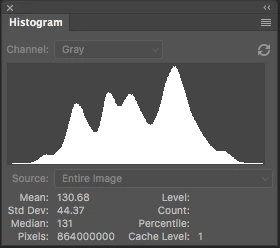
 

Please notice how there are "tails" (lines) out each side of the main body of data, indicating that there are small levels of data almost to the limits of range. For me, it is important to know about these tails exist so that I do not end up creating a clipped condition when applying a curve function. We use S-curve limiters to compact the tails without clipping.

Here is the exact same file at Cache Level 1 for the same 36Kx24K pixel 16-bit grayscale file, but this time in 19.1.0.
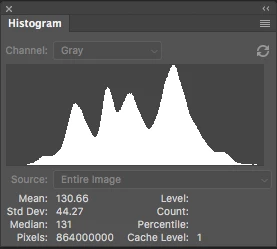
 

Please notice how there is no tail indicating data extending to the left, and rather a botched one going to the right. This is not helpful! You will also notice that the Mean and Standard Deviation values differ.

Further, it use to be nice to be able to take the cursor and scan across the histogram with a display of level and count showing up for whatever was under he cursor. This seems to have gone away in 2015.5, and is even worse in 19.1.0.

Thanks for your help.

Pete

This topic has been closed for replies.

104 replies

Inspiring
May 7, 2020
Did you look for this?   I posted it above.

For the disappearing Histogram see this parameter:


Open Histogram and right click on the >> on its title bar.  Bet if turned off the panel won't go away.  Might want to ask for another option.

RONC
Inspiring
May 7, 2020
Will do!

Pete
Legend
May 7, 2020
That's a good clue. It sounds like bug - but I can't repro offhand even having the histogram on that side. There might be other ingredients to make it happen. Can you make a screenshot of your entire screen with the curves dialog and histogram open before you touch it to make it disappear and one after? That might give me more clues.
Inspiring
May 7, 2020
Hi Jeff:

It could be "my bad" on the disappearing histogram function, but I don't know the intent of the designers. I did figure out what is going on and the work around.

I have a single column tool bar on the right side of the display where I dock commonly used functions, such as the histogram.

If I press on the histogram icon in the tool bar, the histogram pops up on the edge of the tool bar as planned.

If I use the Curves function, Levels function, filtering, etc, the moment I have those functions up and touch them, the histogram pooooooooooofs and goes away.

If I take the same histogram function, and drag it anywhere else on the desktop, it stays up and there are no issues (other then the intercept line not working on the Curves function, and the tails not showing properly on the histogram).

So is this "as designed" with the tools column? Are those functions suppose to disappear the moment some other function is used? If so, then totally my bad for not understanding that.

This is working in both portrait and landscape mode, so it is a solid diagnosis. Whether a bug, I don't know. In my little pea-sized brain, if you click on a tool column icon and the function comes up, it should stay up until dismissed. But perhaps it is design to minimize "clutter" on the desktop?

Pete

So we are down to the issue of the intercept line in Curves not working, and the trail not properly showing in the histograms (main histogram, Curves, Levels). As a minimum, we need a "show tails" option for the histograms, and obviously the intercept line needs to work in Curves. Need more info or are we good to go on those issues?
Todd Shaner
Legend
May 7, 2020
Pete, I can not duplicate this issue on my Windows 10 system. The histogram does not disappear with the display rotated to portrait mode when adjusting the Curves palette or the Curves Adjustment layer. Perhaps it is a Mac issue, which *Jeffrey Tranberry can check.
Todd Shaner
Legend
May 7, 2020
Pete, we are trying to help you, but can only do so if we can duplicate the issues you are seeing on our systems.

First step towards doing that is to share an image file and compare screenshots of the Histogram displays. I'm asking again for you to please download *Jeffrey Tranberry's image file (see below link) and post screenshots of the Histograms as seen on your system. If you prefer to use one of your own files please do so and post the share link and histogram screenshots as viewed on your system. This is the minimum of what's need to assist with your observations and request.

https://shared-assets.adobe.com/link/0b69dc6d-9649-4c70-4bef-58523b1dd1c7
Inspiring
May 7, 2020
Hi Jeff:
Trying again this morning, darn if the histogram function goes away once again in both horizontal and vertical modes! I can't believe it. I clearly saw the histogram function stay in place when I oriented in landscape mode and adjusted the Curves function last night. And frankly, I was so excited at the discovery that I forgot to look and see if the intersection line was work or not.

So this morning, I powered up in landscape mode, and the same disappearing Histogram function occurred as soon as I touched the Curves function.

I switched back to Portrait orientation, and the same thing happened. Then back to landscape, and the same thing happened.

But I DID see the Histogram function stay up while the Curves function was in use last night, and it was only in landscape mode. Why the heck it isnt working this morning is part of the grand mystery.

Pete
Inspiring
May 7, 2020
I have an update on the disappearing histogram function. It only does so when the screen is rotated 90 degrees and is in portrait mode. It does NOT disappear in normal horizontal orientation.

OK, lets see if that helps. I do a lot of vertical work, so most often have the screen rotated into portrait mode---hence why the bug is bugging me and not most users. 🙂

Pete
Inspiring
May 7, 2020
Sorry for the delay---out of the office today. Will get to the screen recording done tomorrow.

I knew someone was going to say "this will help determine if something in your files is causing the issue." I told my wife that was going to come up. NOT the issue.

The irritation is that I have been using PhotoShop since Version 2. I have 26-years in as a fine art photographer and all of my work has undergone digital post production in PS from the get-go. I pioneered digital monochrome photography in 2002 with the Kodak DCS 760m. I have written for most of the major photo magazines over the years. There isnt anything wrong with my image files, and I would never suggest an issue without testing across a vast array of image file types. What I have posted are typical examples of those failures.

The histogram issue has been a mess since 2015.5.

I sincerely doubt I have anything oddly configured in PS 2020 or the OS given that the computer is new, Apple installed the OS, and PS is installed fresh. My wife is a Director of Information Technology, use to work for Apple (among others), and watched in amusement as the histogram completely disappeared from the desktop each time I made an adjustment with the Curves function yesterday.

Just saying....

Pete
Inspiring
May 7, 2020
For the disappearing Histogram see this parameter:


Open Histogram and right click on the >> on its title bar.  Bet if turned off the panel won't go away.  Might want to ask for another option.

RONC