
Inspiring
November 5, 2017

P: How do I see just the Brush Tip Preview?

  • November 5, 2017
  • 45 replies
  • 1436 views

The brush preview in PS 2018 has changed so now it shows a dragged preview of the brush. I have many a custom brush that are meant to be singularly clicked, not dragged, like stencils. I cannot see which brushes are which anymore, because of this new preview and cannot find a way to change it back. 

PLEASE FIX THIS WITH AN UPDATE ADOBE, IT WAS FINE THE WAY IT WAS.
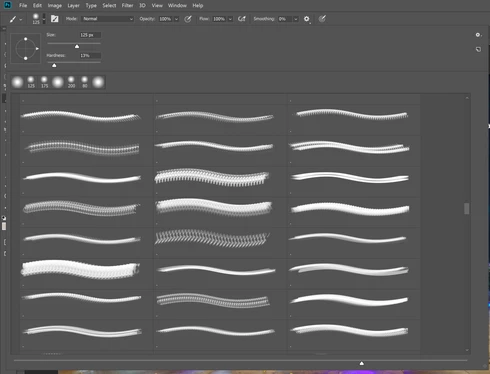
As you can see, there is NO WAY for me to tell which brush I am using.

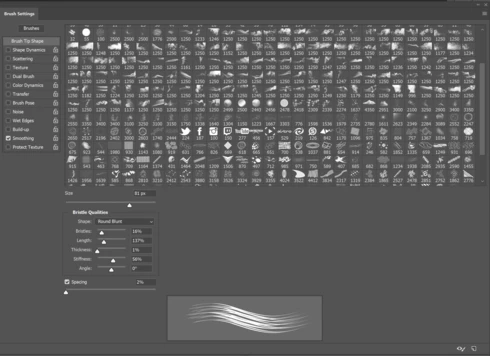
The only work around is to go into the detailed brush settings but this is hassle for me when I need to quickly choose a brush. 
45 replies

Participating Frequently
January 10, 2018
how do i get to the detailed brush settings to change things like bristles?  I can't find that now?
Inspiring
January 4, 2018
so unbelievably frustrating and time wasting. all i want to see is the brush tips, standard as photoshop has been for years, now i have a list, dry media, wet media...takes too long to find the brushes i like to use, and i still cant find them. is there anyway of going back to the simple brush palette billions of us like???
Hannah Nicollet
Community Manager
Community Manager
December 19, 2017
Oh don't feel foolish! It is simple but there is just so much to know in such a large application.
shutterbug600
Participating Frequently
December 19, 2017
Thank you so much Hannah, I felt foolish after I realized how easy it was to find! lol.
shutterbug600
Participating Frequently
December 19, 2017
are looking under the brush panel options - that's where you choose what you want to view. Other than that, I'm not sure
Inspiring
December 19, 2017
Hi Dale.... I'm wondering if I'm totally missing something. I've been all over the preferences and can't seem to find what I'm missing. But, I'm sure it's a simple fix, but as I said, I can't seem to figure it out.
shutterbug600
Participating Frequently
December 19, 2017
Rats.
Inspiring
December 18, 2017
Thank you Dale for the tip (no pun intended). I took your suggestion and the brush size is still the same. Nothing changed. 
shutterbug600
Participating Frequently
December 18, 2017
Select only brush tip - deselect stroke and name - this should make your brush preview bigger
Inspiring
December 18, 2017
Hi Hannah,

Thank you so much wanting to help me. If I may, in previous versions of PS, and on my older 21" iMac, the brush preview seemed (were) larger. I could preview the brushes to see what they looked like fairly easily. As I mentioned in my post, they (the preview) aren't as easy to preview. I've added an arrow to where slider sits currently. Maybe I'm missing something altogether. Thank you for your help.