
Inspiring
November 5, 2017

P: How do I see just the Brush Tip Preview?

  • November 5, 2017
  • 45 replies
  • 1431 views

The brush preview in PS 2018 has changed so now it shows a dragged preview of the brush. I have many a custom brush that are meant to be singularly clicked, not dragged, like stencils. I cannot see which brushes are which anymore, because of this new preview and cannot find a way to change it back. 

PLEASE FIX THIS WITH AN UPDATE ADOBE, IT WAS FINE THE WAY IT WAS.
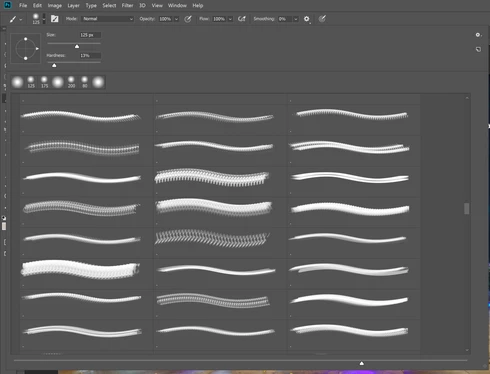
As you can see, there is NO WAY for me to tell which brush I am using.

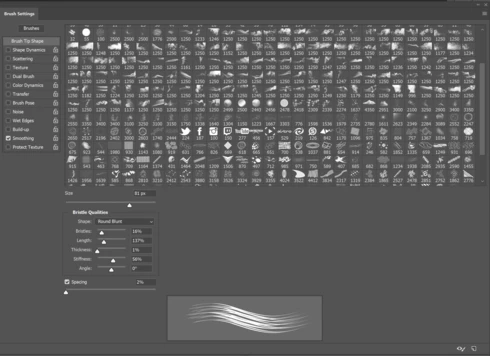
The only work around is to go into the detailed brush settings but this is hassle for me when I need to quickly choose a brush. 
45 replies

Hannah Nicollet
Community Manager
Community Manager
December 18, 2017
Hi Ed,

You're in the brushes panel and the preview size slider is dragged to the largest size, correct? I went on a 27" iMac to try and replicate what you're seeing but the brush previews seemed large. Would you mind attaching a screenshot so I can be sure we're both looking at the same thing? 

Thanks,
Hannah
Inspiring
December 18, 2017
Despite using the slider, the preview is still rather small, smaller than it used to be. I have a 27 inch iMac, and it's still smaller than it should be. Haven't been able to figure out how to make it larger than it is. (I have used the slider, it doesn't help much!)
Inspiring
December 18, 2017
You can change the icon size by using the slider at the bottom of the dialog box. The best part about this update is you can create your own folders. 

Inspiring
December 15, 2017
I've made the changes to view the brushes as suggested. However, the brush preview is still pretty damn small even though I use the slider to make the preview larger.. I have 27 inch Mac and they're still hard to see. Is there any way to make the preview larger as it was before. I really dislike the way brushes are displayed now. It sucks big time.....worse than big time.

Please, any suggestions would help.
Rudy CH
Inspiring
December 13, 2017
shutterbug600
Participating Frequently
December 12, 2017
omg, I feel like such an idiot. THANK YOU SO MUCH!
Rudy CH
Inspiring
December 12, 2017
Rudy CH
Inspiring
December 12, 2017
just slide slider on bottom 
shutterbug600
Participating Frequently
December 12, 2017
if there was a way to make the preview larger, that would be great
Rudy CH
Inspiring
December 12, 2017
select only brush tip,....deselect stroke and name.....
It's not 100% like before, but close,....have same issue