
P: Image changes don't show on screen or in navigator
Issue: Various edits made to the current document do not refresh the screen preview or the navigator panel until the canvas is clicked again, or a keyboard shortcut is invoked. This includes such interactions as showing and hiding a layer, entering quickmask mode, making a lasso selection, and using the Undo command.
After trying numerous fixes, I eventually narrowed it down to a single preference which is causing the problem for me. The issue seems to be caused by disabling the "Start" Workspace in Preferences > General. I fixed the problem by re-enabling the "Start" Workspace. As soon as I re-enable it and restart, the issue goes away. I can reliably reproduce the issue by again disabling the option.
Note: This issue began for me a couple weeks ago using CC 2017 18.1.1, and is still occurring after updating to CC 2018 19.0. I am on Mac OS X 10.11.6.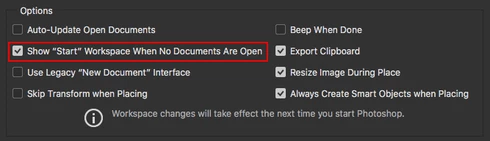
See the video below for a comparison of the normal with the default setting ("Start" Workspace Enabled), and then with the option disabled.
A similar issue for Photoshop CC 2017 is discussed here with no resolution: https://feedback.photoshop.com/photoshop_family/topics/problem-photoshop-cc2017-the-edited-image-isn...


 AdChoices