
Participating Frequently
November 1, 2017

P: Image changes don't show on screen or in navigator

  • November 1, 2017
  • 63 replies
  • 1100 views

Issue: Various edits made to the current document do not refresh the screen preview or the navigator panel until the canvas is clicked again, or a keyboard shortcut is invoked. This includes such interactions as showing and hiding a layer, entering quickmask mode, making a lasso selection, and using the Undo command.

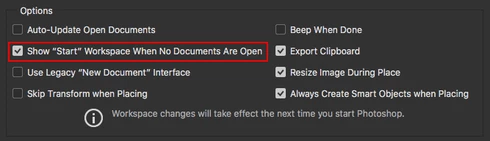
After trying numerous fixes, I eventually narrowed it down to a single preference which is causing the problem for me. The issue seems to be caused by disabling the "Start" Workspace in Preferences > GeneralI fixed the problem by re-enabling the "Start" Workspace. As soon as I re-enable it and restart, the issue goes away. I can reliably reproduce the issue by again disabling the option.

Note: This issue began for me a couple weeks ago using CC 2017 18.1.1, and is still occurring after updating to CC 2018 19.0. I am on Mac OS X 10.11.6.


See the video below for a comparison of the normal with the default setting ("Start" Workspace Enabled), and then with the option disabled.


A similar issue for Photoshop CC 2017 is discussed here with no resolution: https://feedback.photoshop.com/photoshop_family/topics/problem-photoshop-cc2017-the-edited-image-isn...

This topic has been closed for replies.

63 replies

Participant
February 6, 2018
I am not, just keyboard + mouse.
Hannah Nicollet
Community Manager
Community Manager
February 6, 2018
Hey Everyone,

Do any of you happen to be using a Wacom tablet for your drawing and/or do any of you have a Wacom driver installed on your machine?

~Hannah
Inspiring
February 3, 2018
19.1.0, Same problem, Disable GPU won't work either.
Inspiring
February 1, 2018


when using the lasso and moving the image using the mouse, the image navigator is not updated
Hannah Nicollet
Community Manager
Community Manager
January 25, 2018
Hey Everyone!

Would you please help us get more information on this issue by running a test? Please disable your GPU*** and then let me know if you still see this behavior.

Thank you!!!
Hannah

*** Disable GPU *** Photoshop > Preferences > Performance and then uncheck "Use Graphics Processor"
Hannah Nicollet
Community Manager
Community Manager
January 25, 2018
Does Select All (⌘A) still work?
Participating Frequently
January 25, 2018
The workaround regarding the start screen does not work anymore. Currently on El Capitan, Mac Pro 2013.
Participant
January 24, 2018
This issue just came back for me after I updated to the January 2018 version of Photoshop CC 2018. The difference with mine is that I already had "Show Start Workspace When No Documents Are Open" checked.

I'm running MacOS High Sierra 10.13.2 on a 15" mid-2015 MacBook Pro.
Hannah Nicollet
Community Manager
Community Manager
January 22, 2018
Hey Everyone,

I've tried to reproduce this on a MacBook Pro and a 27" iMac with both CC 2017 and CC 2018 but so far I haven't seen it. My machines are running 10.13.2 so I'm curious to know what OS the rest of you are on.

Thanks for offering the workaround Tim and Marcia.

Regards,
Hannah
Participating Frequently
January 19, 2018
When I click into a window with an image that is not being displayed correctly I can press command-a (select all) and the image appears. It's still a PITA because I don't like "Start Workspace" either.