

Charismatic_yogiB82A
Known Participant
November 13, 2016

P: Image shifted on second monitor

  • November 13, 2016
  • 26 replies
  • 1208 views

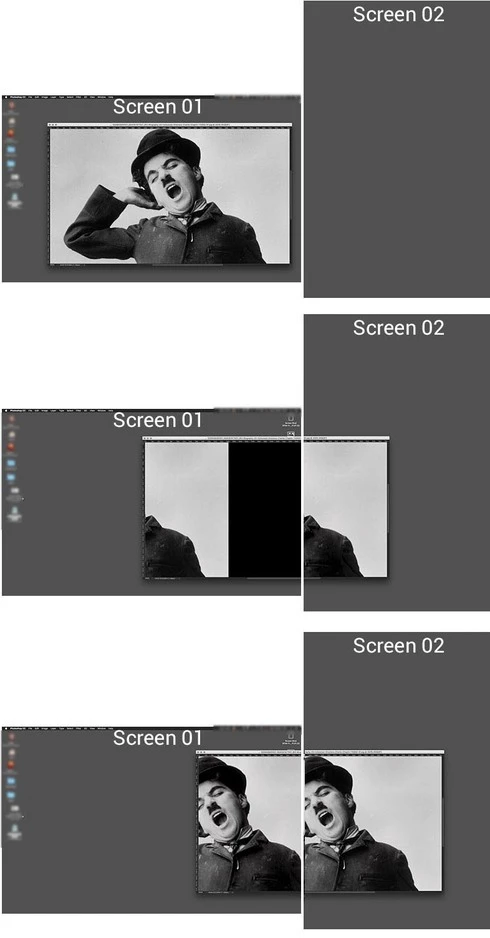
since the CC 2017 update, when i move an image even only slightly to my second monitor it gets shifted. see example images below. it shows only the part of the images wich is on the second monitor, the rest is black. if i move the image deeper in the second monitor, it shows tow equal parts of the images on both monitors.

i still have the previous version of photoshop installed an made a test there. this is definitely not happening there.

please advise or remove the bug. otherwise the second monitor is not working properly.

many thanks!
This topic has been closed for replies.

26 replies

Inspiring
October 20, 2017
I have just installed the new release and I am very pleased to find this issue has now been fixed!
Charismatic_yogiB82A
Known Participant
October 20, 2017
FIXED! Thanks Jeffery! Thanks Adobe!
Legend
October 19, 2017
Inspiring
June 28, 2017
I also reported this issue to Adobe four months ago and they acknowledged it was a bug due to be fixed. It wasn't fixed in the recent upgrade however. I have found that the issue goes away if you turn off  the graphics processor in the performance menu of photoshop preferences. This isn't a practical solution as it turns off lots of photoshop features.
Inspiring
April 27, 2017


i use two screens (27" samsung monitor on top, and macbook retina mid2012 on bottom). when i open an image in photoshop, it starts up just fine. but moving a window over the edge between the two screens, a glitch happens in the windwos. most part of the window goes black. it's fine on both windows, but just moving it a bit over the screen edge creates the glitch.
Charismatic_yogiB82A
Known Participant
April 20, 2017
issue still not resolved in 2017.1???
why? it is an obvious bug?!
Inspiring
February 16, 2017
 I also have the issue discussed above and have another issue that MIGHT be related. The window magnification changes when I move to a different monitor. I have it at 100% in the main monitor and move it to the laptop and PS changes it to 50% and if I zoom in to 100%, it gets blurry, like it's at 200%. If it's at 150%, it goes to 75%. If I launch PS on the laptop the file appears very tiny and when I zoom in, it gets blurry. I do not have this issue with any other program. I have checked the resolution on both monitors and also looked into PS preferences but can't find anything. I have also searched online and have not seen this.
Inspiring
February 16, 2017
 I also have the issue discussed above and have another issue that MIGHT be related. The window magnification changes when I move to a different monitor. I have it at 100% in the main monitor and move it to the laptop and PS changes it to 50% and if I zoom in to 100%, it gets blurry, like it's at 200%. If it's at 150%, it goes to 75%. If I launch PS on the laptop the file appears very tiny and when I zoom in, it gets blurry. I do not have this issue with any other program. I have checked the resolution on both monitors and also looked into PS preferences but can't find anything. I have also searched online and have not seen this.
Inspiring
January 18, 2017
OK. If it is the same thing, then it sounds like Eric Ching was able to reproduce and log a bug. I hope fixed in CC 2017.0.2
Charismatic_yogiB82A
Known Participant
January 18, 2017
exactly the same here