



P: In fullscreen mode, canvas moves to upper left corner and 3/4 of the canvas is unusable
Hej Hannah,
thank you guy for your support & the solution today. I think it solved the issue with the floating Screen somehow, but... something new is happening 😕😕
I think it depends if I work “with“ or “without“ the graphic-card-support and/or the Application-Frame On/Off (just on MAC).
I am using PS on a MacBookPro here with a Nvidacard on 2screens. I always work in PS on the bigger 2nd screen which is a Wacom-Cintiq:
1. I open a PSD-file here (a test-file orange/yellow)
2. it opens in the upper-left corner – ok so far!
3. i changed the screen-mode (F), and...
4. the the hole canvas appears in a small rectangle in the upper-left corner and the other 3/4 of the canvas is just black and not useable?!! (see screenshot)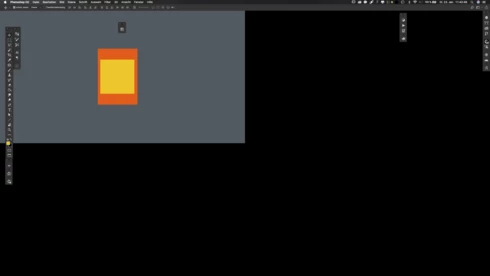
...thats absolutely useless here. When i switch OFF the graphic-card-support is seams to work fine in the frameless PS. Or i have to switch the PS-Application-Frame ON to use the graphic-card-support again. But use “graphic“ and “frameless“ at the same time it cause this new issue?!
This was not an issue in CC2017!
– help?!
Note: This conversation was created from a reply on: Photoshop CC 2018: Floating document windows in fullscreen w/menu bar causes wind....
 AdChoices