


cyplot
Participating Frequently
January 23, 2018

P: In fullscreen mode, canvas moves to upper left corner and 3/4 of the canvas is unusable

  • January 23, 2018
  • 62 replies
  • 1261 views

Hej Hannah,

thank you guy for your support & the solution today. I think it solved the issue with the floating Screen somehow, but... something new is happening 😕😕
I think it depends if I work “with“ or “without“ the graphic-card-support and/or the Application-Frame On/Off (just on MAC).
I am using PS on a MacBookPro here with a Nvidacard on 2screens. I always work in PS on the bigger 2nd screen which is a Wacom-Cintiq:

1. I open a PSD-file here (a test-file orange/yellow)
2. it opens in the upper-left corner – ok so far!
3. i changed the screen-mode (F), and...
4. the the hole canvas appears in a small rectangle in the upper-left corner and the other 3/4 of the canvas is just black and not useable?!! (see screenshot)
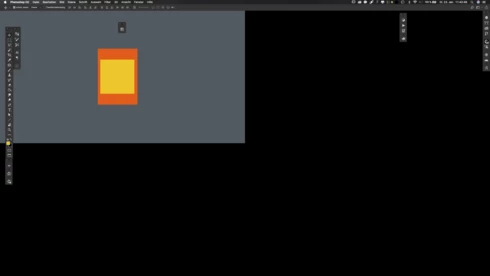


...thats absolutely useless here. When i switch OFF the graphic-card-support is seams to work fine in the frameless PS. Or i have to switch the PS-Application-Frame ON to use the graphic-card-support again. But use “graphic“ and “frameless“ at the same time it cause this new issue?!

This was not an issue in CC2017!
 
– help?!

Note: This conversation was created from a reply on: Photoshop CC 2018: Floating document windows in fullscreen w/menu bar causes wind....

This topic has been closed for replies.

62 replies

Hayden Wood Photography
Participating Frequently
January 24, 2018
Haha, awesome! Aiyaiyai, what's going on Adobe?
Inspiring
January 24, 2018
I prefer to temporarily deactivate the GPU acceleration rather than move my primary screen to the 2x monitor (my laptop)... — this workaround is acceptable so far...
Hannah Nicollet
Community Manager
Community Manager
January 24, 2018
Hi David,

It appears that this bug is only encountered where there is a 1x display combined with a 2x, with the 1x as primary. Is this your situation? If it is, would it interfere with your workflow for you to make your 2x monitor primary as a temporary workaround?

Thanks,
Hannah
Dki
Participating Frequently
January 23, 2018
Hi Hannah, that glitch seems better with the 2019 update.
But unfortunately, with frustration and dissapointment a new problem.
I'm working with a MacBook pro and an apple thunderbolt 27in display. When in 'full screen mode with menu bar' the image is displayed very small with a large space of black.
When zoomed the image enlarges up behind the black space.
What seems to be happening is that in 'full screen mode with menu bar' it sizes the image for the MacBook screen not the thunderbolt screen.
Not a problem in 'standard mode' or 'full screen mode' without menu bar. I still have the previous version of photoshop and there is no problem there with screen mode displaying of images.
But that version glitches over the panels and does the very annoying snapping of image to centre when working.
Are we going to get past this era of frustration with photoshops glitches and unreliability? Or is it time to look at the alternatives?
After all this is a paid for service and it doesn't work as it should.
Inspiring
January 23, 2018


Delighted to see Adobe has fixed the real-time text-adjustment issue with version 19.1.0, but suddenly any image viewed in "Full Screen Mode With Menu Bar" mode on my secondary display is much reduced in size, and slammed into the upper right corner, with black bars below and to the right (which I assume is the result of an incorrect resolution value being passed somehow).

Unchecking "Use Graphics Processor" rectifies the problem, but I'd rather not lose this functionality (it's all or nothing; toggling off individual items within the graphics processor prefs and restarting Photoshop doesn't fix the problem).

Have system requirements changed in 19.1.0? Assume it's related to the new Photoshop build and not a random video card quirk, given the timing.
Hannah Nicollet
Community Manager
Community Manager
January 23, 2018
That's so helpful Morris. Thank you 🙂 
Inspiring
January 23, 2018
Hi,
Below, I posted a video to better understand the issue.
Inspiring
January 23, 2018
I have the same issue on my Mac after the latest update (Photoshop CC 19.1.0). As you said, if I turn the GPU off in my PS settings (preferences/performance), the issue goes away. As soon as I tick the "Use Graphic Processor" back on, the issue comes back!
Inspiring
January 23, 2018


Since the latest update (v 19.1.0) if you toggle (w/ the F key) between screen modes, the content of your window doesn't refresh. In Photoshop I use floating windows (not tabbed) and when I want to put a window in full screen for example, the windows gets bigger but the content itself gets smaller and cropped (like a window-in-a-window)... Even if you zoom in, your content still cropped, it doesn't update the window size... Very bothering for my daily workflow...

https://drive.google.com/file/d/1ArQdvTSfjYhx1SD1oL-vf5ZJ64rp5siz/view?usp=drivesdk

macOS 10.11.6
Macbook Pro Retina 15-inch Mid 2014
2,8 Ghz Intel Core i7
16 Gb 1600 Mhz DD3
NVIDIA GeForce GT 750M 2048 MB
cyplot
cyplotAuthor
Participating Frequently
January 23, 2018
Hej Hannah,

this are my setting here:

MacBook Pro (Retina, 2012) 15inch (2880 x 1800)
with macOS High Sierra (10.13.2)
2,7 GHz i7 with 16GB Ram
graphic-hardware:
Intel HD Graphics 4000 1536 MB

and a NVIDIA GeForce GT 650M 1 GB with the latest drivers:
CUDA Driver Version: 387.99
NIVIDIA Web Driver: 378.10.10.10.25.104

(https://support.apple.com/kb/SP653?locale=de_DE&viewlocale=de_DE)

the 2nd Display is a WACOM Cintiq 27GHDT (2560 x 1440)
It is connected via an elgato Thunderbold 2 Dock to my MacBookPro.


Let me know if you need more info – thanks!
Cyprian Lothringer /// mai@cyplot.de