
Inspiring
August 16, 2012

P: Incorrect bahavior of Warp Transformation of Smart Object when distorted past a certain degree

  • August 16, 2012
  • 29 replies
  • 2676 views

I believe there is a bug within the Photoshop CS6 Warp Transformation when working with Smart Objects.
In trying to warp a smart object to conform to an upward facing, slightly curved surface, the warp control handles/points respond incorrectly in reverse; moving one on the lower left outwards warps the image outwards on the upper right. All control point movements result in this backwards behavior.
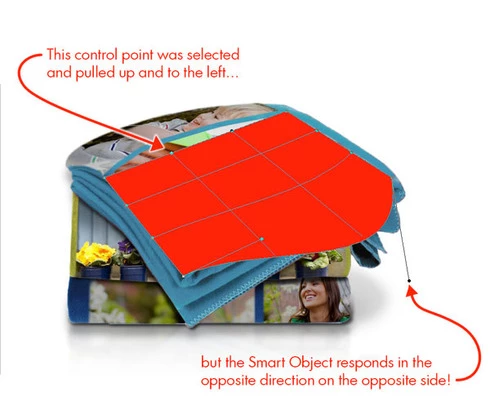
This topic has been closed for replies.

29 replies

elolaillustrator
Participant
May 9, 2023

I found an answer in another forum, if someone sees this, I'll leave the answer here, it worked for me.

As workaround, go to Preferences > Technology Previews... and enable "Older GPU mode (pre 2016)" - Restart Photoshop.

elolaillustrator
Participant
May 9, 2023

it's 2023 i have Adobe Photoshop Version: 24.3.0 and the same bug still there

Legend
October 19, 2017
c.pfaffenbichler
Community Expert
Community Expert
September 11, 2017
It is a strange bug. 
And I had not known the work-around, so thanks for sharing! 

And to needlessly mention a pet peeve of mine:
The Illustrator team has not released a fix for the Scripts-in-Actions bug in the more than a decade it has been with the application.
Supposedly it will be fixed with the next release, but still, it seems to show that Adobe’s bug-fixing priorities might appear somewhat eclectic. 
Inspiring
September 11, 2017
I just found this thread after just recently running into this issue, and I found that rotating the whole image (Image > Image Rotation) one more 90 degree rotation in the same direction as the rotated warped layer seems to let the warp tool correctly address the point the cursor is addressing.  Definitely just a workaround, but this still gets around that weird bug for the time being (which could be another 5 years given Adobe's lack of interest in fixing this...).
c.pfaffenbichler
Community Expert
Community Expert
June 28, 2017
I think there are Adobe employees who do want to fix this bug (or any bug that falls into their field of work). 
But I suspect the people responsible for resource allocation have no interest in an idea like »fixing mistakes simply because they are mistakes«.  

So keeping a bug in an application for more than a decade is an option ... 
Inspiring
June 27, 2017
It seems no one at adobe is interested in solving this issue...
Inspiring
May 3, 2017
Hey guys, I had the same problem. I found it always happened after I used distort, and then warp. If that helps. 
Also, if you rasterize the layer that tends to get rid of the problem. Not sure if that helps either, but its a start I guess.
Inspiring
November 13, 2016
I'm currently having this problem while trying to create mockups for my website/portfolio. It's very frustrating! Sigh.
c.pfaffenbichler
Community Expert
Community Expert
September 18, 2016
Thanks for the feedback. 
Seems like a strange one and while it seldom affects me personally it’s nice to know it has not been forgotten.