


SteverB1
Participant
May 3, 2021

P: JPG from themoviedb dot org opening purple with horizontal lines

  • May 3, 2021
  • 17 replies
  • 8802 views

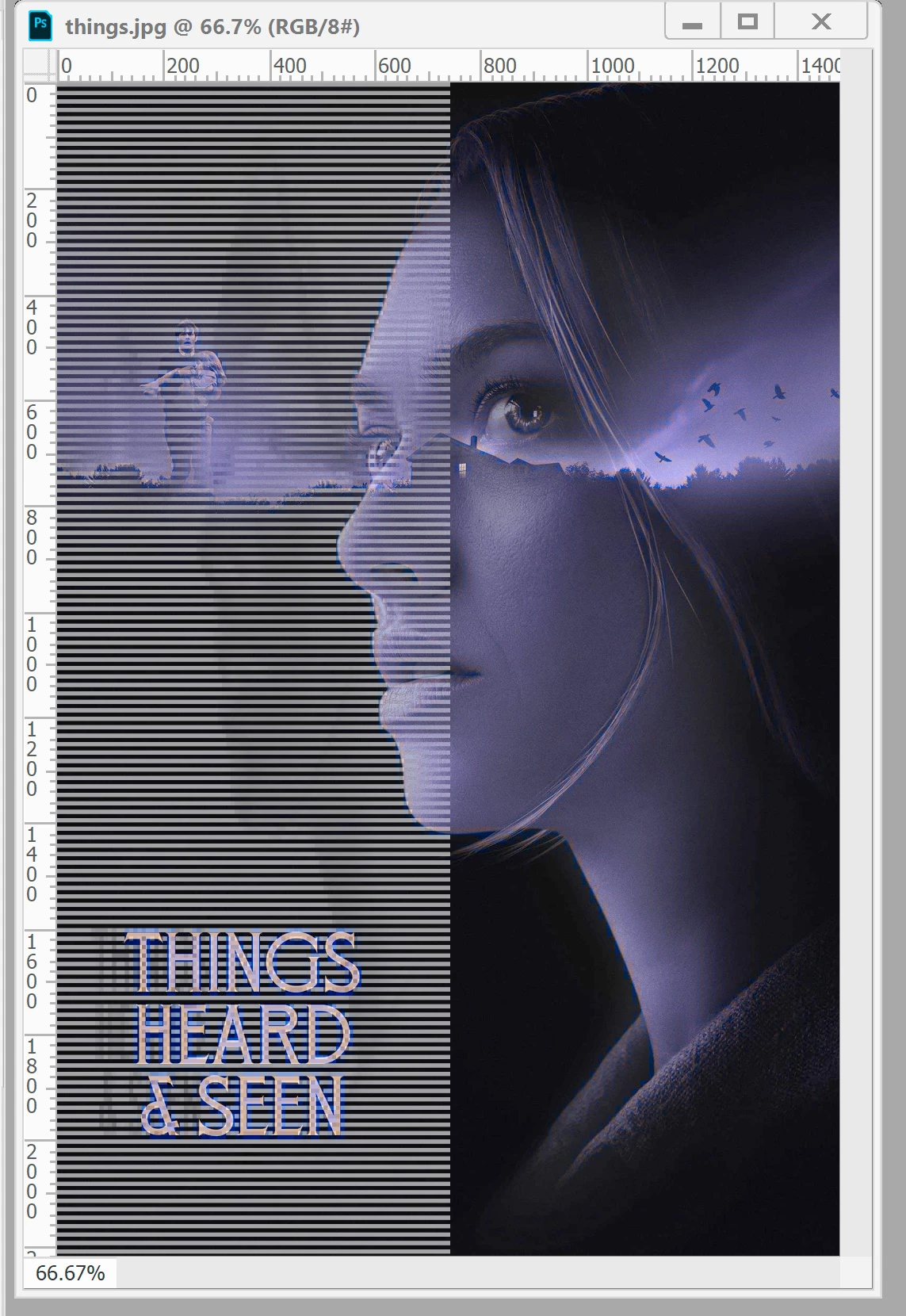
Sorry about the ridiculous thread title, but I literally don't know how to describe this. I'm attaching an image from PS upon opening. This doesn't happen on every JPG, but it happens only on JPGs, and has started in the past six months or so. I'm using version 20. The pictures are not alike, but they all look the same: there's an overall purple cast to the image, with the horizontal lines on the left side stopping at the center. Under the lines, the image seems inversed, but it's hard to say. As far as I know, the images are RGB, and they look fine in File Explorer. The quick fix is opening it and then saving it in Paint and then everything is fine, but as it's happening more and more, I'm getting tired of doing that. Has anyone seen this? Do I need to reinstall? Update? I generally don't like updating as it seems to always have more bugs and the version I have has been working fine otherwise. I'm stumped by this one. Any help would be greatly appreciated. Thanks!
17 replies

Participating Frequently
May 9, 2025

@CMassnot sure if you were replying to me or the other account, I had already tired the solution provided Before leaving my comment.  It never worked. I ended up saving the photo from my files as a png instead of a jpeg and then it displayed as it should.
It was just that one jpeg photo so maybe there was something off about it ¯\_(ツ)_/¯

CMass
Legend
May 9, 2025

Hey @Dana21959534y3a0

Yes, the response was intended for you. I apologize for that. This information is helpful. If you haven't already, please follow the other post and add your vote there. We'll be keeping that post updated. 


^CM

Participating Frequently
May 8, 2025

May 2025 and this solution is not working for me, it says "file format module cannot parse the file"

All other images seem to be fine. Except one image, it comes out purple with left aligned broken lines through it...

CMass
Legend
May 9, 2025

Hey @Petrofff-96

Can you try the solution provided here and let us know if that helped: https://adobe.ly/4iZmL2L


^CM

merjoicem59503483
Participant
January 19, 2025

The "preferences > camera raw JPEG handling" works. I just tried it myself. Finally got Roman Holiday poster in full color.


If you are using Mac, click Photoshop 2024/2025 > Settings > Camera Raw. This took me a while to find cos it's worded differently and wasn't under Edit.

Participant
January 15, 2025

Thanks for the work around, but sucks that this happens sometimes (still happening as of Jan 2025 now). I've had several different JPEGs do this but always images I get from the same source. Is the fault on whoever made the image that put bad/corrupt data in the file headers or metadata? And why does this not happen when I open the same file in other image viewing software?

Participant
January 6, 2025

We are now in 2025 and the problem still exists wiith latest version of PS and most TMDB jpegs. 

Participant
January 18, 2022

I've been having the same issues for the past few months. About 70% of images downloaded from IMDB have this distorted issue when dropping into PS. I found a workaround until an update hopefully fixes the problem.


I downloaded "Image Resizer for Windows" to batch resize the images. I'm sure similar software can be found for Mac.I simply batch adjust the width of the images (1000 px in my case), they process in a few seconds. I then drop those into PS and the lines and discoloring is gone. This is a faster process then opening each image through Camera RAW, though that worked for me as well.


Just to note, I've only had this issue with images from IMDB.

Participant
January 9, 2022

I'm having the exact same issue. I'm using PS 22.3.1

Participant
November 25, 2021

Hi all,


So when I open images to work with, some of them open like this (attach).

Even when I export them they will keep this 'filter'.


Tried:

- Update Photoshop

- Reboot

- Local images v.s.  Google Drive images


Format: jpg


Anyone?


Original image:


How Photoshop opens it:


Participant
November 4, 2021

Thank you!

Participant
October 17, 2021

I've been experiencing this exact same issue for about the past 6 months or so.
Like OP the issue only occurs in PS (v 21.0.1)
Reset of PS preferences did not resolve. Uninstall/reinstall of PS and graphics drivers did not resolve. 
I have plenty of scratch disk space across multiple drives; clearing the cache does not resolve.
Have also been employing the workaround of opening/re-saving in Paint.
Issue persists in Windows 11, as well.