
Inspiring
Nov 7, 2019 7:49 AM UTC
Released

P: Layer Effects on Groups Clipping Error

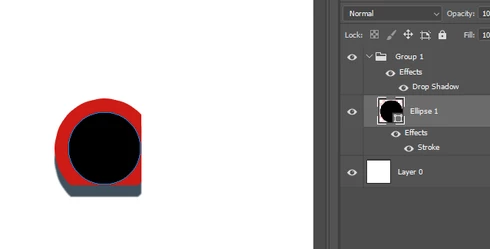
In the new Photoshop CC 2020 version, there's a bug with layer effects in groups. They seem to clip other layer effects within the group in a rectangular shape.

To reproduce:

- Create a new document
- Create a circular shape as a new layer
- Apply a stroke layer effect to the shape layer
- Put that shape layer in a group
- Apply a drop shadow layer effect to the group (play around with the distance value to make the effect more obvious)

Result: the layer effects are cropped in a rectangular shape

I tested it in Photoshop CC 2019, it works fine there.
This topic is closed to new replies. Start a new post to keep the conversation going.

40 replies

Feb 21, 2020 10:35 AM UTC
This seems fixed in the 21.1.0 update
Translate
Participating Frequently
Feb 13, 2020 3:20 PM UTC
That's a very interesting question Alexander.  I'll have to confirm with the other engineers.  But from what I gather in the link you provided, that is rendering performance, not compositing performance.  The new compositing tech focuses on the combining of our various layer types and how they are blended, clipped, and adjusted.
Translate
Inspiring
Feb 13, 2020 2:54 PM UTC
Participating Frequently
Feb 4, 2020 2:45 PM UTC
Hi Piotr,
Thank you for sharing your copy1.rar file.  I am an engineer for Photoshop and checked the layer effects in your copy1.psd file is working in the upcoming version 21.1.0.  I apologize for the wait, in the meantime you can enable Preferences -> Performance -> Legacy Compositing to get your layer effects fully redered.
Thank you for your patience.

Sincerely,
Andrew
Translate
Known Participant
Feb 4, 2020 1:46 PM UTC
There is another case.
https://www.dropbox.com/s/5459u5vke4aetvm/copy1.rar?dl=0
It seems that one effect (group effect) affects other effect (layer effect in this group). If i turn off group effect, layer effect is OK.


Translate
Legend
Jan 30, 2020 10:41 PM UTC
Confirmed engineering has a fix forthcoming for the issue in your file.
Translate
Legend
Jan 30, 2020 9:34 PM UTC
Thanks. I'll confirm this is fixed for the next release.
Translate
Known Participant
Jan 30, 2020 7:19 AM UTC
OK, but, as i said, it's quite a joyful creativity. 🙂
https://www.dropbox.com/s/96458pvwika4nye/copy.rar?dl=0

Translate
Legend
Jan 29, 2020 8:13 PM UTC
Can you post a file that's not rendering correctly in 21.0.3?
Translate
Known Participant
Jan 29, 2020 8:06 AM UTC
In 21.0.3 it's still bad, but it's quite a mess made by designer - Stroke (Group) applied to Drop Shadow (Int. Objects).


However it's OK with Legacy Compositing.


After cleaning up and with Drop Shadow (Spread 100%, Opacity 100%) apllied to Stroke it's OK. And with Stroke or Drop Shadow only it's OK (it was bad in earlier versions of PS).
So generally it's success. 🙂

Translate