


Inspiring
November 7, 2019

P: Layer Effects on Groups Clipping Error

  • November 7, 2019
  • 40 replies
  • 2757 views

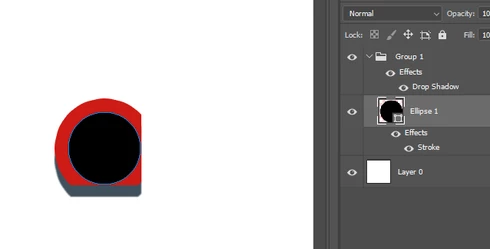
In the new Photoshop CC 2020 version, there's a bug with layer effects in groups. They seem to clip other layer effects within the group in a rectangular shape.

To reproduce:

- Create a new document
- Create a circular shape as a new layer
- Apply a stroke layer effect to the shape layer
- Put that shape layer in a group
- Apply a drop shadow layer effect to the group (play around with the distance value to make the effect more obvious)

Result: the layer effects are cropped in a rectangular shape

I tested it in Photoshop CC 2019, it works fine there.
This topic has been closed for replies.

40 replies

Legend
January 28, 2020
Hi Piotr, can you post a file that's not rendering correctly in 21.0.3? I can make sure it's fixed.
Legend
January 28, 2020
Thanks for sending. This will be fixed in the next update.
garethw48589654
Participant
January 28, 2020
Sure. Here's a link to a PSD...
https://www.dropbox.com/s/0x22rtcteaup7m2/compositingbug.psd?dl=0

It looks like this with 'Legacy Compositing' turned off

Known Participant
January 28, 2020
In PS 21.0.2 still doesn't work without Legacy Compositing. Smart objects made from a few raster objects.


Legend
January 27, 2020
Hi Gareth, can you post a file that's not rendering correctly in 21.0.3? Sounds like we have something to fix.
garethw48589654
Participant
January 24, 2020
JEA, Yes. I'm the OP on that. Thanks to c_pfaffenbichler for the solution (turning on legacy compositing). I can confirm, the bug is definitely in 21.0.3.
January 24, 2020
Legend
December 17, 2019
Can you post a PSD that exhibits the behavior in 21.0.2? (Link to CC files or Dropbox)
Inspiring
December 17, 2019
I have version 21.0.2, and I'm experiencing the same issue as David Kozma above.
Legend
December 12, 2019
Separate issue

Please reference the new conversation here: Photoshop: Compositing issue with groups and vector masks