


Inspiring
November 7, 2019

P: Layer Effects on Groups Clipping Error

  • November 7, 2019
  • 40 replies
  • 2757 views

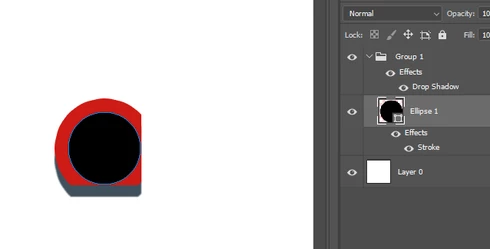
In the new Photoshop CC 2020 version, there's a bug with layer effects in groups. They seem to clip other layer effects within the group in a rectangular shape.

To reproduce:

- Create a new document
- Create a circular shape as a new layer
- Apply a stroke layer effect to the shape layer
- Put that shape layer in a group
- Apply a drop shadow layer effect to the group (play around with the distance value to make the effect more obvious)

Result: the layer effects are cropped in a rectangular shape

I tested it in Photoshop CC 2019, it works fine there.
This topic has been closed for replies.

40 replies

February 21, 2020
This seems fixed in the 21.1.0 update
Participating Frequently
February 13, 2020
That's a very interesting question Alexander.  I'll have to confirm with the other engineers.  But from what I gather in the link you provided, that is rendering performance, not compositing performance.  The new compositing tech focuses on the combining of our various layer types and how they are blended, clipped, and adjusted.
Inspiring
February 13, 2020
Participating Frequently
February 4, 2020
Hi Piotr,
Thank you for sharing your copy1.rar file.  I am an engineer for Photoshop and checked the layer effects in your copy1.psd file is working in the upcoming version 21.1.0.  I apologize for the wait, in the meantime you can enable Preferences -> Performance -> Legacy Compositing to get your layer effects fully redered.
Thank you for your patience.

Sincerely,
Andrew
Known Participant
February 4, 2020
There is another case.
https://www.dropbox.com/s/5459u5vke4aetvm/copy1.rar?dl=0
It seems that one effect (group effect) affects other effect (layer effect in this group). If i turn off group effect, layer effect is OK.


Legend
January 30, 2020
Confirmed engineering has a fix forthcoming for the issue in your file.
Legend
January 30, 2020
Thanks. I'll confirm this is fixed for the next release.
Known Participant
January 30, 2020
OK, but, as i said, it's quite a joyful creativity. 🙂
https://www.dropbox.com/s/96458pvwika4nye/copy.rar?dl=0

Legend
January 29, 2020
Can you post a file that's not rendering correctly in 21.0.3?
Known Participant
January 29, 2020
In 21.0.3 it's still bad, but it's quite a mess made by designer - Stroke (Group) applied to Drop Shadow (Int. Objects).


However it's OK with Legacy Compositing.


After cleaning up and with Drop Shadow (Spread 100%, Opacity 100%) apllied to Stroke it's OK. And with Stroke or Drop Shadow only it's OK (it was bad in earlier versions of PS).
So generally it's success. 🙂