


Inspiring
November 7, 2019

P: Layer Effects on Groups Clipping Error

  • November 7, 2019
  • 40 replies
  • 2757 views

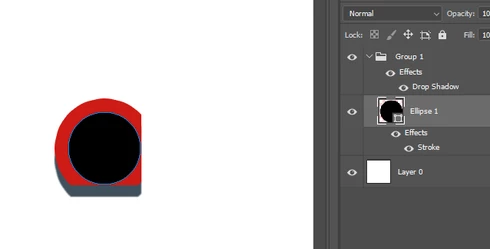
In the new Photoshop CC 2020 version, there's a bug with layer effects in groups. They seem to clip other layer effects within the group in a rectangular shape.

To reproduce:

- Create a new document
- Create a circular shape as a new layer
- Apply a stroke layer effect to the shape layer
- Put that shape layer in a group
- Apply a drop shadow layer effect to the group (play around with the distance value to make the effect more obvious)

Result: the layer effects are cropped in a rectangular shape

I tested it in Photoshop CC 2019, it works fine there.
This topic has been closed for replies.

40 replies

Inspiring
November 12, 2019
Just updated to PS 20.0.1, but it's still not working. Stroke on a text layer is still clipping. However, going to Preferences > Performance > Legacy Compositing still works.
Inspiring
November 12, 2019
macOS 10.15.1 PS 20.0.1 corrected error, thank you.

Yves Crausaz, Suisse, retraité actif dans le monde de la photo et des arts graphiques.
Participant
November 11, 2019


Hey there,

I was grouping some smartphones for an AppStore entry when I noticed the semitransparent square in the upper left corner which was caused by the shadow layer effect I placed on the group.

The was nothing painted in that area and even masking the whole group did not remove it. I could avoid it by removing the shadow from the group and apply the shadow to an element inside the grouped elements.

I never noticed this in Adobe Photoshop pre 2020. I tried to illustrate my experience with the picture below.

Cheers,
Dietrich


Inspiring
November 8, 2019


I have a Contour (with contour positioned outside) on a shape layer- then i group my shape layer - and then i add a adjustment-fill layer (color) and use it as clipping mask for my group, the contour inside my group gets cropped on the bottom and the right. The same settings worked well in previous photoshop versions
(the same file has no contour bug if opend f.e. in Photoshop 2019)
Inspiring
November 8, 2019
Hi everyone,

I encountered similar issue with effects applied to a group (inner shadow showing unwanted orthogonal lines...).

I did apply Jeffrey's tip by checking "Legacy Compositing" and now everything works as before.

But I suggest Adobe Photoshop's team fix the issue 😉

Thanks!

Clément
Legend
November 8, 2019
Thanks for reporting. I've asked engineering to take a look.

Workaround: Open Preferences > Performance... check "Legacy Compositing" and then close & reopen files; or restart Photoshop.
Inspiring
November 8, 2019


I'm encountering a clipping issue when I try to apply a stroke to a Group layer that has a nested layer with a stroke.  I'm pretty sure this is a bonafide bug with version 21.0.0.

Here are the repro steps:
  1. Create a layer with an image on it (the image should have some transparency around it
  2. Add a nice thick stroke (Outside)
  3. Create a group layer and put your image layer inside
  4. Add a nice thick stroke (Outside) to the group layer
  5. Notice the clipping that appears on the right side and the bottom
If you then rasterize the Layer effect on the layer image, the stroke applied to the group layer renders correctly:


However you shouldn't have to do this -- I know for certain that this was working in earlier versions of Photoshop because I use this feature regularly.

Hoping your team can reproduce this and patch it soon!

Thanks,
Matt
Inspiring
November 8, 2019
Yves Crausaz, Suisse, retraité actif dans le monde de la photo et des arts graphiques.
Wabber_HM
Inspiring
November 7, 2019
Just tried this out. Basically all layer styles on the group apply incorrectly if the shape has a stroke enabled. And if it's a rasterized shape, then it gets cut by the bottom right corner like in your example.

Here's what I got with a vector shape and a really thick border.
Inspiring
November 7, 2019
Good morning, on macOS 10.14.6, this seems to work, but on the contrary a strange thing if they like to encircle in outside of form, alone sides left and superiors are drawn, so centered, not ok?


Yves Crausaz, Suisse, retraité actif dans le monde de la photo et des arts graphiques.