


Doug.S
Inspiring
October 24, 2020

P: Legacy (CEP) panels/plug-ins scaled too large/cut-off
  • October 24, 2020
  • 41 replies
  • 2125 views

In Ps 2020 I had about 20 plugins which I told PsCC2021 to install like in Ps2020; and it did install them, But...


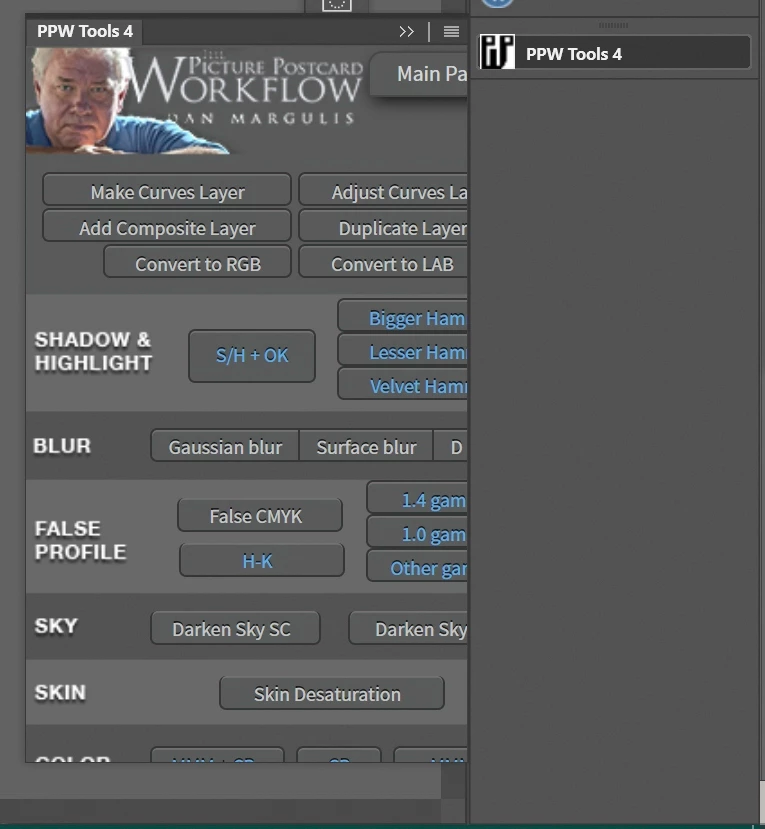
Of the 20 only 2 work OK; and then only partly. Basic issue is all are sized too big so only some of the panel is shown and panels cannot be re-sized. The 2 that I can re-size work OK but the size does not stick and are wrong old size when Ps 2021 is opened again.


Plugin developers say Adobe made a new code set for the legacy apps and broke the plugins?


I went to Adobe store and found a legacy plugin, installed OK, but same problem of panel size wrong/broken/does not work.


I am using 4K monitors. Ps 2020 was working just fine with them, and still is. Why break legacy stuff? I appreciate new plugins but nothing I use is there.


Please fix the legacy plugins i/f code...it should be as simple as copy/use what worked in Ps 2020.


Now I use Ps2020 for most things and Ps 2021 for any new features

41 replies

Inspiring
March 19, 2021

Hi..I encounter the same issue about crop Panel with photoshop. I am using Laptop....hope this will help by ....

Inspiring
March 12, 2021

Hi! I don't want to steal your post. I see you have a lot of experience working with panels. I just developed one for Real Estate. It's working perfectly but I'm a little bit lost trying to sign it and create the distribution file. Do you have any advice or tips to help me with this ? Thanks!

Inspiring
March 9, 2021

It works, Thank you David

Inspiring
February 5, 2021

Having the same problem here, with Adobe Color Legacy extension. What is the solution (is there one) for mac? When I restart Photoshop, things return to normal size, so that's the workaround for now - thank you.

Doug.S
Doug.SAuthor
Inspiring
January 20, 2021

My "fix/workaround" and source of problem on 4K screen was not the general size setting for text etc. at windows 10 'scale and layout' @ 150% (I still keep this setting).

but,

I had also set (use win+u shortcut) ease of access above 100% (usually 124%)...which can be set to anything desired, on the fly.

So, for example, for all programs I use 124% but when using Ps 2021 and I need to use the plugin panels, I must set to 100%, apply, and Ps is all good. I simply change it back to 124% when I'm done with Ps. No restarts needed.

When set at 100% for Ps, all text across windows/programs is a bit too small; otherwise I'd leave it at that setting.

It should not be that way. I don't have to do so in Ps 2020 with same PC hardware, OS, and same 4K screens (I leave 150% and 124% set).

Adobe should fix 2021.

Inspiring
December 19, 2020

I have several panels I use with PS such as Lumenzia, TK Actions, Infinite Color. When I updated to PS 2021 several of these panels only show a portion of the interface making many of the options unusable. The window cant be resized. I do not have these issues with PS 2020 and I compared every setting from PS 2020 and 2021 and I haven't found a problem with a setting that is causing this. As you can see in the images the top is the full panel as it is shown in PS 2020 but the bottom photo shows the panel in PS 2021, the full interface is not visible and there is no way to enlarge the window or make the full window visible.  

Verto
Known Participant
December 12, 2020

And on desktop computers, have they fixed it?

Inspiring
December 11, 2020

The newest photoshop update didn't fix the problem on laptops.  

Verto
Known Participant
December 2, 2020

I am glad that, with the latest contribution, it has been possible to take another step in the search for the origin of the problem. Let's see if now, the guys at Adobe, get down to work and solve it. All those affected would appreciate it.