


P: Legacy (CEP) panels/plug-ins scaled too large/cut-off
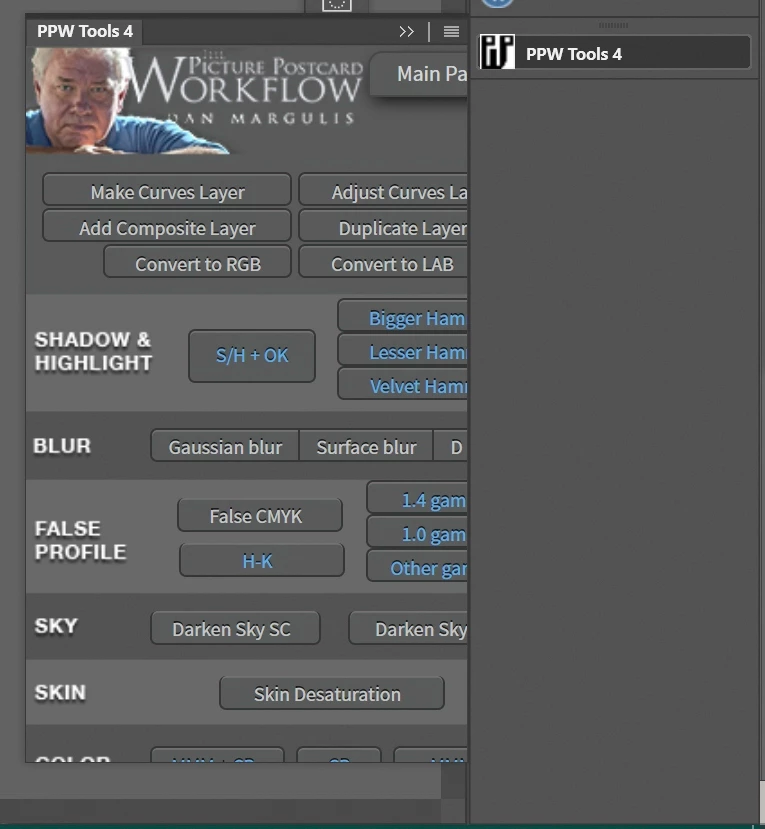
In Ps 2020 I had about 20 plugins which I told PsCC2021 to install like in Ps2020; and it did install them, But...
Of the 20 only 2 work OK; and then only partly. Basic issue is all are sized too big so only some of the panel is shown and panels cannot be re-sized. The 2 that I can re-size work OK but the size does not stick and are wrong old size when Ps 2021 is opened again.
Plugin developers say Adobe made a new code set for the legacy apps and broke the plugins?
I went to Adobe store and found a legacy plugin, installed OK, but same problem of panel size wrong/broken/does not work.
I am using 4K monitors. Ps 2020 was working just fine with them, and still is. Why break legacy stuff? I appreciate new plugins but nothing I use is there.
Please fix the legacy plugins i/f code...it should be as simple as copy/use what worked in Ps 2020.
Now I use Ps2020 for most things and Ps 2021 for any new features
 AdChoices