


Doug.S
Inspiring
October 24, 2020

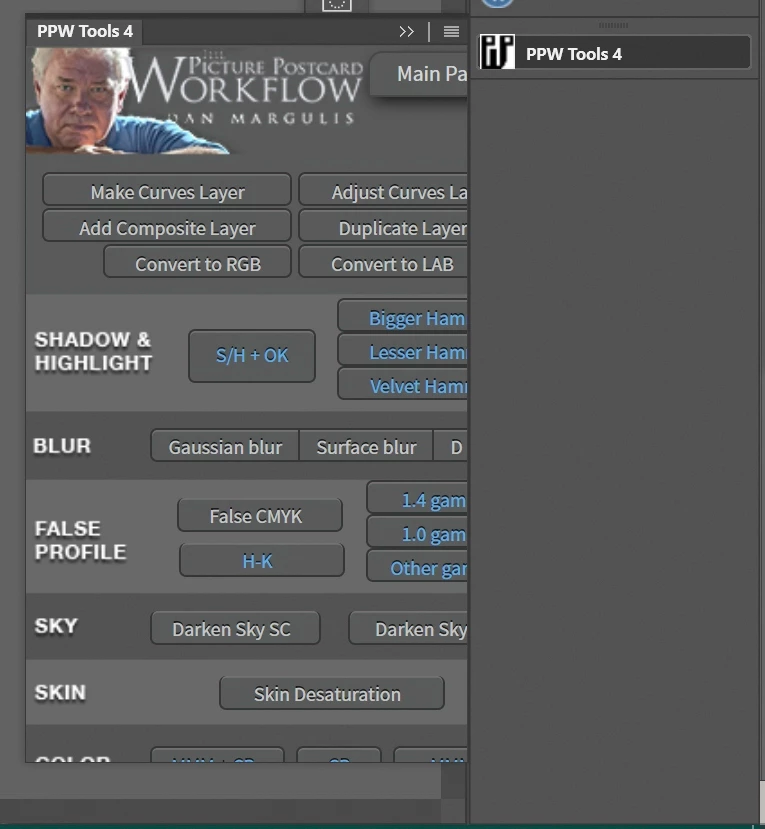
P: Legacy (CEP) panels/plug-ins scaled too large/cut-off
  • October 24, 2020
  • 41 replies
  • 2125 views

In Ps 2020 I had about 20 plugins which I told PsCC2021 to install like in Ps2020; and it did install them, But...


Of the 20 only 2 work OK; and then only partly. Basic issue is all are sized too big so only some of the panel is shown and panels cannot be re-sized. The 2 that I can re-size work OK but the size does not stick and are wrong old size when Ps 2021 is opened again.


Plugin developers say Adobe made a new code set for the legacy apps and broke the plugins?


I went to Adobe store and found a legacy plugin, installed OK, but same problem of panel size wrong/broken/does not work.


I am using 4K monitors. Ps 2020 was working just fine with them, and still is. Why break legacy stuff? I appreciate new plugins but nothing I use is there.


Please fix the legacy plugins i/f code...it should be as simple as copy/use what worked in Ps 2020.


Now I use Ps2020 for most things and Ps 2021 for any new features

41 replies

Verto
Known Participant
November 15, 2020

I have the same problem. I just opened a new topic commenting on it, without knowing that this topic was already dealing with the problem. My apologies for that.

https://feedback.photoshop.com/conversations/photoshop/extensions-panels-cropped-after-installing-photoshop-2021/5fb1aca8762a722b89c5fb08

I can add little more since I am in the same situation that other people have commented. 2560x1440 monitor and scale to 100%. I have tried various settings and none work. I have also consulted some authors of the extensions, but they have not been able to give me a solution. I am forced to continue working with the old version of Photoshop.

Verto
Known Participant
November 15, 2020

Hello.


After installing / updating photoshop to the new version of 2021 (in windows 10), some extension panels appear cropped, without being able to use the functions found in the cropped area.


I leave some image captures of one of the panels that offer that error. In this case it is Tony Kuyper's panel 7, but the same error appears in other panels.

The error occurs even with panels of Photoshop itself. For example, the "Adobe Color wheel" panel also has the same error, and it is not possible to resize it to show the cropped areas.

I have consulted the authors of the extensions and they have not been able to give me a solution. I have also checked the Adobe Support Community with the same negative result:
I leave a screenshot of the interface and workspaces configuration.
I have uninstalled and reinstalled Photoshop. I have restarted the workspaces. I have verified that the settings are the same as in the previous version of Photoshop, but nothing has solved the problem.

Can anyone help to solve this problem?

Thanks and sorry for my bad English.

Verto

Doug.S
Doug.SAuthor
Inspiring
November 15, 2020

I'm now on my other PC and also received a msg from TK. Seems the problem is on my 4K screens with windows not set at 100% that creates the problem...and is the fault of Adobe...because Ps cc 2021 has the problem and Ps cc 2020 on same PC does not have the problem. (When installing 2021 I had Ps import all the settings/prefs from 2020)

Now I am on my older PC (same win10 1909; different location) that has 1920x1200 screens (not 4K...but 4K's are on order) and...I just installed Ps cc 2021 (again has Ps import prefs from 2020) and all plugins look and act normal like they do in Ps cc 2020 on same PC.

Doug

Participating Frequently
November 15, 2020

My Windows 10 UI is set at 100%. I have tried various settings but this only displays  everything larger but still wrong.

I have tried the photoshop preference settings for interface and workspace.  I can get small fonts but the buttons, controls and panels remain the same size so the content is still partly concealed.

The screen shots were taken a few minutes apart in the same windows session and environment and with the same photoshop settings in both versions. The only variable was the Photoshop version.

I have run both versions on my native laptop screen (1920 x 1080)  and my monitor ( 2560 x 1440) singly, extended and duplicated. I have also tried disabling my graphics card and running with the on board intel graphics.

In every instance the Panels are the same size. V21.2.4 scales the contents to fit but v22 does not.

Eddie

Legend
November 13, 2020

I tried 100%, 125%, 150%, 175% and 200% - can't repro so far.

Legend
November 13, 2020

I see. They are scaled differently. What is your UI scaling set to in Windows 10?

Participating Frequently
November 13, 2020

All CEP Panels are showing incorrectly. The Width is wrong on all of them and some can be expanded on length and but most can't.

Two screen shots attached one from v 21.2.4 the  other from v 22. taken within minutes of each other

Adobe Color Themes can be adjusted for length but not width

Tony Kuyper's TK7 can't be adjusted at all


Eddie

Legend
November 13, 2020

Are any CEP panels showing correctly? Or only specific ones?

Legend
November 13, 2020

Adobe Color Themes isn's displaying correctly? It should work fine in the current version. I had one other thread where a graphics card was making CEP panels look empty/see through.

Do you have a screenshot of what it looks like?

Participating Frequently
November 13, 2020

Hi Jeffrey, I have the same problem with all my extensions and I am having to use v 21.2.4 which works perfectly. I am using Adobe Color Themes extension which doesn't display properly. I assume this an Adobe product. Is this being updated?