


Doug.S
Inspiring
October 24, 2020

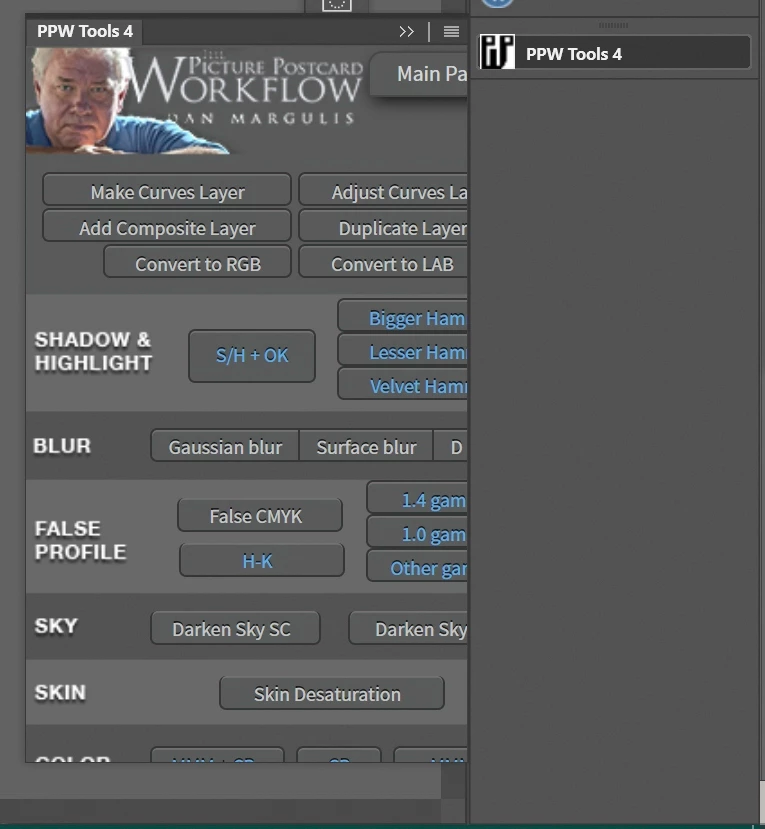
P: Legacy (CEP) panels/plug-ins scaled too large/cut-off
  • October 24, 2020
  • 41 replies
  • 2125 views

In Ps 2020 I had about 20 plugins which I told PsCC2021 to install like in Ps2020; and it did install them, But...


Of the 20 only 2 work OK; and then only partly. Basic issue is all are sized too big so only some of the panel is shown and panels cannot be re-sized. The 2 that I can re-size work OK but the size does not stick and are wrong old size when Ps 2021 is opened again.


Plugin developers say Adobe made a new code set for the legacy apps and broke the plugins?


I went to Adobe store and found a legacy plugin, installed OK, but same problem of panel size wrong/broken/does not work.


I am using 4K monitors. Ps 2020 was working just fine with them, and still is. Why break legacy stuff? I appreciate new plugins but nothing I use is there.


Please fix the legacy plugins i/f code...it should be as simple as copy/use what worked in Ps 2020.


Now I use Ps2020 for most things and Ps 2021 for any new features

41 replies

Verto
Known Participant
November 23, 2020

Thank you very much for the input from david_tyler_7846865.

I've also followed the steps David gave us to fix the problem, and everything works fine again:

  • Right click on the Photoshop 2021 executable.
  • Select properties.
  • Select compatibility tab.
  • Click on "Change settings to all users"

  • Then, in the new open tab, click on "Change high DPI settings"
  • Finally, in the menu at the bottom of the new tab, check "Override high DPI scaling behavior. Scaling performed by:" and select in the menu: "System (Enhaced)"
  • Accept and apply the changes, and open Photoshop. Everything works correctly again:

Thanks again to david_tyler_7846865 for helping us to temporarily resolve the problem, until Adobe fixes the bug in a new update.

Participating Frequently
November 21, 2020

Thanks David, it worked for me

Participating Frequently
November 21, 2020

Found a solution.  Problem is a scaling compatibility with Windows.                                                                                                                                                                            Right click on photoshop icon > properties> compatibility > Change for all users Check: Override High DPI Scaling Behavior AND drop down to be determined by SYSTEM (not application which is the default)

Participating Frequently
November 21, 2020

Another example cc21 Panel extension incomplete

Participating Frequently
November 21, 2020

I have exact same problem with cc21. Adobe color theme ext panel incomplete. cc20 works fine

Participating Frequently
November 17, 2020

Hi Verto, our recent postings crossed in the ether.  I agree with your interpretation. I got slightly better results by using the far right column. TK Panels were a big problem. I’m stuck with v21.2.4 for now.

Verto
Known Participant
November 17, 2020

When the panels are docked, in some you can change the width, but not the height. Anyway, it doesn't work with all panels.

Below is a screenshot, which summarizes what floating panels, open panels, and docked panels look like.


Note: The panels are outlined in red.

Participating Frequently
November 17, 2020

False hopes. It sort of works if you dock in the far right column and expand the column width. For some extension panels this works fine but for others you still lose the bottom  part of the interface because the depth cant be extended. Adobe Color Themes is OK, Raya Pro 5 is usable and TK7 loses the bottom of the panels.

None of this should matter since everything worked fine in v21.2.4 

Participating Frequently
November 17, 2020

The CEP extensions open as floating panels which hide part of the interface, I have just discovered by accident that if you dock the panel in the workspace it adjusts itself and reveals all the interface. If you undock it the problem reappears. It doesn't suit my workflow but it is a simple workaround until Adobe sort out the problem. Hope this works for everybody

Eddie

Inspiring
November 17, 2020

I have the same issue.

Everything was perfect on my 3 screens (1440p @ 125%, 4k @150% and 1080p @100%) in Photoshop 21; however, Photoshop 22 breaks everything and all of my precious panels are now good for nothing as I can't even see 1/3 of their interface. Most of them don't exist (yet) in the new plugin form.

I can't believe that in 2020 we still have broken HIDPI support with Adobe software... I'll have to run the older version for now I guess.