


Inspiring
December 1, 2015

P: Liquify lightens result on 16 bit/channel images

  • December 1, 2015
  • 231 replies
  • 4091 views

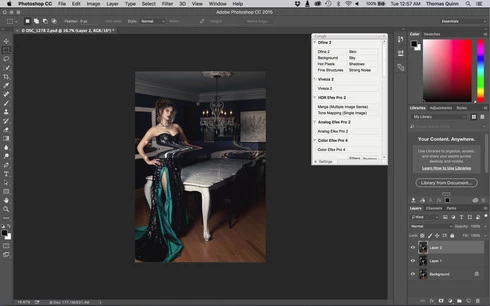
I am having issues with the new upgrade to Photoshop CC 2015 on Mac El Captain. The only thing I did was upgrade from a working CC 2015 to the new version. Using the liquify tool give the following look. There is a box around the area liquified that is lighter than the other areas. When I turn of Use Acceleration in Graphics Processor, it is better but .... I didn't have to do this in the prior version i.e.. Yesterday.

New Update: The Squiggly waist is the liquified:
This topic has been closed for replies.

231 replies

Inspiring
December 9, 2015


Sorry for my english...but after update of Photoshop CC2015.1 I get problems by using liquify filter it comes to extremely light in the picture.

Inspiring
December 9, 2015


After latest update of Photoshop (09.december 2015) I have problem with Liquify tool. Changed areas of picture are in different colour rectangles 😞
Inspiring
December 9, 2015
Exactly my thoughts! Adobe never been so bad!
If it's continues, or I'm switching to other software, or I'm back to old good Pirate versions.
I don't want to pay for crap adobe is doing!
Inspiring
December 9, 2015
Not really. It's an update for other things in Photoshop. Nobody doubts they are working towards fixing the bugs, but the whole process is still unacceptable for various reasons:

-This is subscription software. It's not like we've bought it and it's ours. We're still paying while the bugs aren't fixed.

-The main fix that lead to 2015.1 was the healing brush bug. While they fixed the healing brush, they introduced another more serious bug.

This all means that, with the new subscription model, they're not taking development as seriously as they should. Every now and then, they add functionality that nobody really needs, because it expands on capabilities that Photoshop is not directed to. Professionals who use those capabilities, already use specific software for it. If every time they add or improve something and a new serious bug is introduced upon release (who could miss the liquify problem!), that means that we're not only paying subscribers, but actual beta testers.

They release something. Then they wait for us to find bugs. Then they shut up about it and all the feedback we receive is "acknowledged" or "in progress" just like in most beta test programs. Like "thank you for your bug finding service". Then after a couple months, they fix the problem while they introduce new ones. It's an endless loop.
Known Participant
December 9, 2015
it's an update for camera raw , that's normal
seems that they are working on the bug but nobody knows when it'll be out
anyway, they have all interest to be as quick as they can
Inspiring
December 9, 2015
today's PS update and still doesn't work!! ADOBE!!!!!!!!!!!!!!!!!
Inspiring
December 9, 2015
Participant
December 9, 2015
I am so Frustrated! I am having the same issues, with 8 bit it makes it wavy!
Can we just have the earlier version!
Disappointed!
Inspiring
December 9, 2015
Ok, the question is it a defect in liquify or liquify has a defect that is shared with other functions like patterns. I think the defect is broader than liquify.
Inspiring
December 9, 2015
If your workflow doesn't allow for wasting bitdepth then just roll back to the previous version and you can keep working normally