


Inspiring
December 1, 2015

P: Liquify lightens result on 16 bit/channel images

  • December 1, 2015
  • 231 replies
  • 4091 views

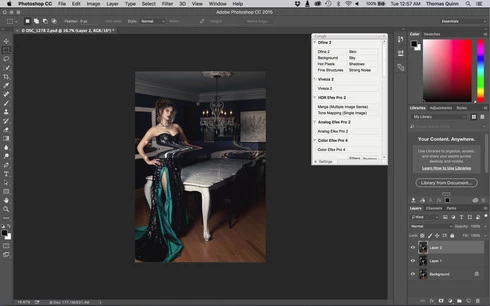
I am having issues with the new upgrade to Photoshop CC 2015 on Mac El Captain. The only thing I did was upgrade from a working CC 2015 to the new version. Using the liquify tool give the following look. There is a box around the area liquified that is lighter than the other areas. When I turn of Use Acceleration in Graphics Processor, it is better but .... I didn't have to do this in the prior version i.e.. Yesterday.

New Update: The Squiggly waist is the liquified:
This topic has been closed for replies.

231 replies

Inspiring
December 8, 2015
Wanna know something even more strange that happens in 8 bit transparent and 16 bit as well...

The brightening only happens when there's a value other than zero in 2 channels or more. If you do it on a pure red, blue or green valued raster, it doesn't happen.

In this example, the left doodle only contains values in the red channel. The one on the right has red green and blue. This particular image is a 2 layer 8 bit image. The bottom layer is black and the top layer contains the strokes on transparency. This is the result after liquify.

Inspiring
December 8, 2015
In fact there is one more bug: if you try to freeze some area with Freeze Mask in order to keep it untouched with Forward Wrap Tool, Photoshop crushes even if you launch Liquify with pressed Alt (option) button.

Dear Adobe, give us two small things:
1. fix these bugs;
2. give your subscribers of CC 1 month free of charge/
Be a kind Santa 🙂
Inspiring
December 8, 2015


Liquify is also broken under 8bit mode with transparency. Instead of brightening the image, it adds a glow in transparent areas.

As you can see, the image is in 8bit RGB mode. Sorry but my installation is in Chinese.

Only disabling GPU acceleration would completely work around the issue.
Inspiring
December 8, 2015
Thank U, Samantha!
Participating Frequently
December 8, 2015
convert to 8 bit
Inspiring
December 8, 2015


After updating PS CC today, liquify filter no longer works properly. Anyone know of a fix?

Robert Wilkinson
Participating Frequently
December 8, 2015
Totally agree ... I feel like an unpaid beta tester (well, I guess I'm actually paying them!). The lightroom update was terrible and it seems PS isn't too great either.
Inspiring
December 8, 2015
Every new update worse than previous!
Adobe , stopped to care about quality of the products, since realise of CC. Just money making!
Participating Frequently
December 8, 2015
I updated to El Capitain and latest cloud version of PS yesterday and now I have this annoying problem.
David Sutphin
Participating Frequently
December 8, 2015
Updated this morning 12/8 and now I have same problem.