


Inspiring
December 1, 2015

P: Liquify lightens result on 16 bit/channel images

  • December 1, 2015
  • 231 replies
  • 4091 views

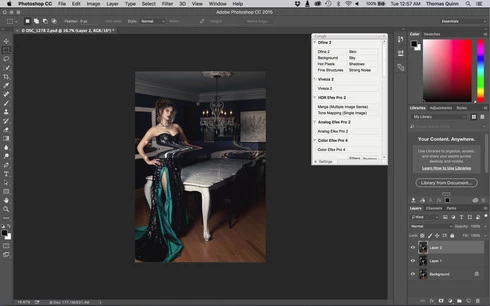
I am having issues with the new upgrade to Photoshop CC 2015 on Mac El Captain. The only thing I did was upgrade from a working CC 2015 to the new version. Using the liquify tool give the following look. There is a box around the area liquified that is lighter than the other areas. When I turn of Use Acceleration in Graphics Processor, it is better but .... I didn't have to do this in the prior version i.e.. Yesterday.

New Update: The Squiggly waist is the liquified:
This topic has been closed for replies.

231 replies

Inspiring
December 8, 2015
Today's update did not fix the issue.
Adobe, work harder!
Participating Frequently
December 8, 2015
Sorry ... misunderstanding = =!!!
Inspiring
December 8, 2015
I agree with everyone else. The work around while simple is not realistic when processing a large number of files on a big team of people or contractors possibly using different versions of software. This needs a fix RIGHT NOW.
Inspiring
December 8, 2015


Known Participant
December 8, 2015
Sorry Adobe, your fix did not work! Same issues.
Inspiring
December 8, 2015
I just updated. True, it fixes nothing. When I read what today's update is supposed to fix I couldn't believe it... really? Color precision needed fixing? COLOR PRECISION?
Robert Wilkinson
Participating Frequently
December 8, 2015
Yep, me too ... just tried it in 16bit and exactly the same problem
Inspiring
December 8, 2015
That is why I will give it a few days after the fix is announced
Participant
December 8, 2015
after update today (08-12-2015) Liquify still doesn't work properly on 16 bit images
Inspiring
December 8, 2015
Thanks for letting us know. But I'll give it a couple of days just in case