


Inspiring
December 1, 2015

P: Liquify lightens result on 16 bit/channel images

  • December 1, 2015
  • 231 replies
  • 4090 views

I am having issues with the new upgrade to Photoshop CC 2015 on Mac El Captain. The only thing I did was upgrade from a working CC 2015 to the new version. Using the liquify tool give the following look. There is a box around the area liquified that is lighter than the other areas. When I turn of Use Acceleration in Graphics Processor, it is better but .... I didn't have to do this in the prior version i.e.. Yesterday.

New Update: The Squiggly waist is the liquified:
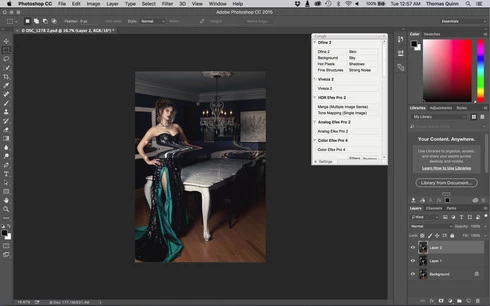
This topic has been closed for replies.

231 replies

Participating Frequently
December 8, 2015
Adobe just release a Photoshop update fix this bug, just update by Creative Cloud.
Inspiring
December 8, 2015


When you use the liquify filter I get a much brighter rectangle field since the update to the latest version. So I can ́t use the filter to correct some parts of the picture
Inspiring
December 8, 2015


Liquify Tool (Intel Core i7-2600k @ 3.4GHz & 16gb of RAM)

The latest update of Photoshop CC (that was just updated with a new interface) does not render the liquefied results properly. The liquefied area ends up very bright with a rigid square around the affected areas.

I made sure to update my graphics card (Quadro K4000) and it happens with PSD and TIFF files (16bit).....once you change the file to 8bit the rendering issue resolves itself.

Inspiring
December 8, 2015
That has nothing to do with this topic, which is just about Liquify.
Inspiring
December 7, 2015
I noticed the same defect in creating a pattern and using a pattern. I opened a gold foil jpg, made it a pattern, then added type, selected the newly made pattern applied to the type and saw the same results I did when I tried liquidy the day before. Strange...
Inspiring
December 7, 2015


hallo zusammen. nach dem gestrigen PS CC update hatte ich beim "verflüssigen" bzw. nach der Rückkehr in den "Ebenen Modus" das Problem, dass das Bild von mehreren hellen Quadraten im Bereich der "Verflüssigen-Bearbeitung" überlagert war ... Hat sich durch den Update irgendwas an den Grundeinstellungen am PC getan ... oder ?? lg.Werner
Participant
December 7, 2015


After reinstall program things not changed .
When I manipulate picture in liquify window /auto or advanced -same/ all looks normal.After I push OK ,final result looks like this photo.
Robert Wilkinson
Participating Frequently
December 7, 2015


Latest Photoshop CC after update. The Liquify tool works but does not save properly. Leaves large area underexposed (see pic).
Mac (10.9.5).
Happens every time.

Known Participant
December 7, 2015


I have two problem. One is that after Liquify on a 16bit image, the result is very odd. I have to convert to 8bit, and than apply liquify filter. I'm on a macbook pro 15" 2012. The second problem, it's... where is the sync settings panel?
Inspiring
December 7, 2015
Did this work around and the Bur gallery does not work now..just amazing how at the busiest time of the year you release a new version that this many problems