


Inspiring
December 1, 2015

P: Liquify lightens result on 16 bit/channel images

  • December 1, 2015
  • 231 replies
  • 4088 views

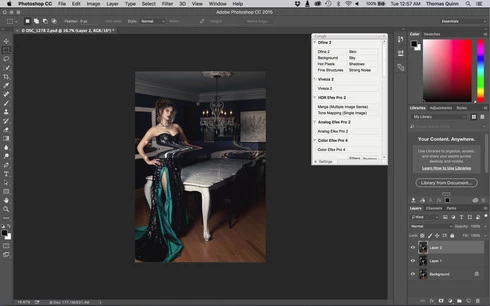
I am having issues with the new upgrade to Photoshop CC 2015 on Mac El Captain. The only thing I did was upgrade from a working CC 2015 to the new version. Using the liquify tool give the following look. There is a box around the area liquified that is lighter than the other areas. When I turn of Use Acceleration in Graphics Processor, it is better but .... I didn't have to do this in the prior version i.e.. Yesterday.

New Update: The Squiggly waist is the liquified:
This topic has been closed for replies.

231 replies

Inspiring
December 7, 2015
after all the edits finished but only liquify left I turn to 8 bit.. the only solution worked for me was this..
Inspiring
December 7, 2015
Or you could just roll back to cc 2015 0.1 and just work normally
Inspiring
December 7, 2015
There is if you intend to create more adjustment layers that use 16 bits, like curves, although, for most, standard workflow is to liquify as the last step.

So you could duplicate the document, flatten and convert to 8 bits for liquifying and then move the liquified 8bit layer to your complete 16bit document.
Inspiring
December 7, 2015
If I can suggest a solution just roll back to the previous version of Photoshop and you can continue working normally
Inspiring
December 7, 2015
I'm having the same problem, and I just found this topic after quite some searching. So this is not my computer but a software problem, we do need this fixed asap.
I can't touch anything without changing the contrast locally.
Changing to 8-bit doesn't do much, only completely disabling the GPU works 😕😕
Inspiring
December 7, 2015
If you convert to 8 bit there is no point on going back to 16
Inspiring
December 7, 2015
The only way it works for me is finishing everything and using liquify at the end.. I make the image 8 bit than liquify then make it 16 bit again and save.. this is heavy workload when you work with 1000 raws.. Fix it please..
Inspiring
December 7, 2015
make 8 bit liquify then 16 bit again.. nothing but workload..
Inspiring
December 7, 2015


After I installed the latest photoshop update, the liquify tool start having issue with 16 bit images.
I was editing 16bit Tiff file and whenever I use liquify on any part of the image, it will linear dodge the section modified and generate a lightened rectangular section. I tried on 8bit images, and this issue didn't occur.
I saw in another post, people suggested using Alt + Liquify to disable GPU and the problem didn't occur.
Hope to see update fixing this issue soon...

Inspiring
December 7, 2015
Do as I did and roll back to the previous release until they get their act together