


Inspiring
December 1, 2015

P: Liquify lightens result on 16 bit/channel images

  • December 1, 2015
  • 231 replies
  • 4090 views

I am having issues with the new upgrade to Photoshop CC 2015 on Mac El Captain. The only thing I did was upgrade from a working CC 2015 to the new version. Using the liquify tool give the following look. There is a box around the area liquified that is lighter than the other areas. When I turn of Use Acceleration in Graphics Processor, it is better but .... I didn't have to do this in the prior version i.e.. Yesterday.

New Update: The Squiggly waist is the liquified:
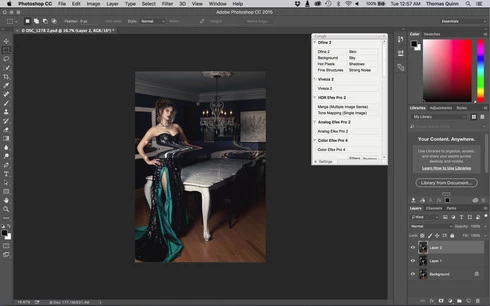
This topic has been closed for replies.

231 replies

Inspiring
December 7, 2015
This is creating a huge headache for me... now when I use Liquify in the update of CC2015 I get this bright box on my original picture once I complete the liquify. 😞
Inspiring
December 7, 2015
Problem is. If I ALT liquify Photoshop crashes. So the workaround is rubbish.

Roll back is my choice of solution for the time being.
Inspiring
December 6, 2015
doesn't work for me either. Also crashes ps
Participant
December 6, 2015
Inspiring
December 6, 2015
Yet another reason not to upgrade from CC 2014 😞

First the botched healing brush update which, although it's now much better in this release, still requires a fiddly config file to allow us to use the legacy healing brush (a feature that was promised would be switchable in the UI in this forum)... and now this!!!??

Seriously Adobe, your assurances that you test your software before releasing it to the public are ringing pretty hollow these days. Any proper regression testing would have spotted this problem with Liquify in 16 bit IMMEDIATELY.

Very disappointing 😞
Inspiring
December 6, 2015
Agree 100%. Proper regression testing would have picked this up immediately.
Inspiring
December 6, 2015
What I would like to know is WHY this wasn't picked up in testing? Chris has previously assured us that all releases are fully tested, but surely any comprehensive automated regression test suite would have picked up a problem as basic and obvious as this?

Not good enough Adobe, really not good enough....
Inspiring
December 6, 2015
Problem is. If I ALT liquify Photoshop crashes. So the workaround is rubbish.

Roll back is my choice of solution for the time being.
Inspiring
December 6, 2015
The workaround is not so complicated. Just liquify in 16bit like normal, but instead of accepting, save the mesh and cancel. Then, ALT-Liquify only to load the mesh and accept.

(while you're at it, notice the other bug I've reported for about a year now, the cursor disappears when you save and load a mesh)
Inspiring
December 6, 2015
Using 8bit files is not a workaround for people who require 16bit files and shouldn't even be suggested by Adobe. I hope Adobe fixes this issue quickly.

Did nobody test liquify in 16bit mode? That is a big miss.