


Inspiring
December 1, 2015

P: Liquify lightens result on 16 bit/channel images

  • December 1, 2015
  • 231 replies
  • 4091 views

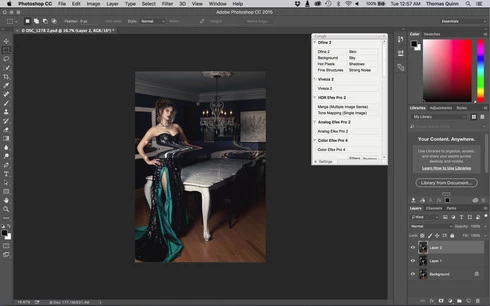
I am having issues with the new upgrade to Photoshop CC 2015 on Mac El Captain. The only thing I did was upgrade from a working CC 2015 to the new version. Using the liquify tool give the following look. There is a box around the area liquified that is lighter than the other areas. When I turn of Use Acceleration in Graphics Processor, it is better but .... I didn't have to do this in the prior version i.e.. Yesterday.

New Update: The Squiggly waist is the liquified:
This topic has been closed for replies.

231 replies

Inspiring
December 6, 2015
My advice would be to roll back photoshop to the previous release until this is sorted out.
Inspiring
December 6, 2015
That "workaround" is clumsy at most.

The best solution is to roll back to the previous release so people can get on with editing they way thy always have done.

Althought mostly imperceptible downsamppling to 8-bit wastes a lot of information from the RAW file and turning off graphics acceleration is silly. Why would people spend money on better more capable graphic cards not to use them?
Known Participant
December 6, 2015
alt + clik liquify should work or use 8 bits image
Inspiring
December 6, 2015
I just lost an hour of retouching. Highly UNPROFESSIONAL Adobe!!!
Inspiring
December 6, 2015


Liquify: Upon accepting changes within the liquify filter, an odd, inverted colored square shape appears on the original photo in the locations wherever I worked on in liquify. This began happening after updating Photoshop to the newest release about three days ago (12/2/2015)
Known Participant
December 5, 2015
on mac osx push alt while selecting liquify in the menu works or use 8 bits image
Inspiring
December 5, 2015


When using the Liquify filter on a 16bpp image, it creates block of higher brightness when used with graphics card acceleration. Using an 8bpp image or disabling OpenCL acceleration works fine.

System:
Windows 7 x64
AMD HD7870 w/ newest Radeon Crimson driver
Photoshop 2015.1
Known Participant
December 5, 2015
Yes, they have a post near the top of this message feed.
Professor Panda
Inspiring
December 5, 2015
Has Adobe acknowledged that they are aware and working on this bug yet?
Professor Panda
Inspiring
December 5, 2015
Has Adobe acknowledged that they are aware and working on this bug yet?