


Inspiring
December 1, 2015

P: Liquify lightens result on 16 bit/channel images

  • December 1, 2015
  • 231 replies
  • 3989 views

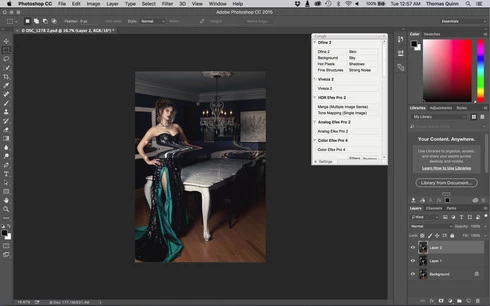
I am having issues with the new upgrade to Photoshop CC 2015 on Mac El Captain. The only thing I did was upgrade from a working CC 2015 to the new version. Using the liquify tool give the following look. There is a box around the area liquified that is lighter than the other areas. When I turn of Use Acceleration in Graphics Processor, it is better but .... I didn't have to do this in the prior version i.e.. Yesterday.

New Update: The Squiggly waist is the liquified:
This topic has been closed for replies.

231 replies

Inspiring
December 15, 2015
I encountered the same issues using Liquify. This is the easiest solution I found which avoids crashing and is pretty efficient.

Use Liquify on a 16 bit file as normal. Click the "OK" button to leave the liquify window. You will now see your file with the lighted boxes (TheProblem). In your history panel click back by one step. Now hold down "ALT KEY" continously while selecting Liquify from the filter menu with your mouse. When the window opens click the click the "LOAD LAST MESH" button and click "OK". You now have applied your Liquify work with no light boxes. It's only a few extra mouse clicks and I just finished 20 files using this method and it was a pretty smooth work around and it avoided the crashes of trying to use the liquify tool without GPU acceleration. Hope it helps someone. Have an awesome day!
Participant
December 14, 2015
Awesome! I'll try that out. Thanks
Inspiring
December 14, 2015
-Liquify in 16 bits and accept.
-Undo the brightened liquify.
-Hold alt/option and open liquify again (alt/option disables gpu processing)
-Hit Load last used mesh, and accept.
Inspiring
December 14, 2015
You don't need to disable GPU accelearation entirely. You can access a non-accelerated version of liquify by holding the option/alt key and then opening the liquify filter.
Participant
December 14, 2015
Disabling "Use Graphics Processor" works for now. I'm at least able to liquefy even though things are slower.
Robert Wilkinson
Participating Frequently
December 14, 2015
As Adobe haven't yet found a fix for these bugs .. does anyone know of another software program that can 'liquify' 16bit while we wait.
I have work I need to complete!
Inspiring
December 14, 2015
This is not only when using liquify filter. I have the same Problem after using some layers and adjustment layers in a 16-bit file and then try to select colors/lights with the menu in a selected area (that ́s the way I reproduce the error). All layers will have squares in different areas after that. Seems they changed something in managing GPU. Disable GPU and everything is solved. But there are disadvantages without GPU (user Interface, Display Bitmaps not in 100%, SPEED!).

Tried with INTEL HD 4600 onboard and nVidia GTX750

I think at this time this is the most important bug to be fixed.

(sorry, not native english Speaker)
Inspiring
December 14, 2015
Inspiring
December 14, 2015
ADOBE!! I've got work to do! Please fix!!!
Participant
December 14, 2015
This sucks!