


Inspiring
December 1, 2015

P: Liquify lightens result on 16 bit/channel images

  • December 1, 2015
  • 231 replies
  • 3989 views

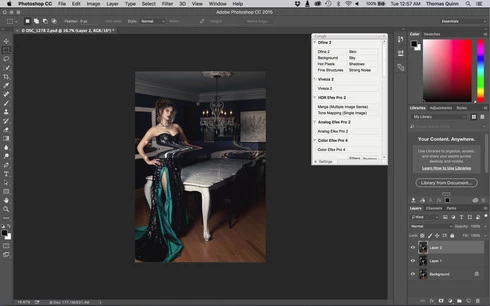
I am having issues with the new upgrade to Photoshop CC 2015 on Mac El Captain. The only thing I did was upgrade from a working CC 2015 to the new version. Using the liquify tool give the following look. There is a box around the area liquified that is lighter than the other areas. When I turn of Use Acceleration in Graphics Processor, it is better but .... I didn't have to do this in the prior version i.e.. Yesterday.

New Update: The Squiggly waist is the liquified:
This topic has been closed for replies.

231 replies

Inspiring
December 15, 2015
Wow, you guys at Adobe are truly amazing. Didn't expect an update quite this fast. Thank you!
Inspiring
December 15, 2015
hi
can't find Export Options update or Adobe Preview update
is it normal ?
cpt richardv33207078
Participant
December 15, 2015
Thank you it looks like it is working well.
atelier-3021
Participating Frequently
December 15, 2015
Thank you guys
Participating Frequently
December 15, 2015
Participating Frequently
December 15, 2015
thank you for letting us know.
Participating Frequently
December 15, 2015
Legend
December 15, 2015
This issue should be solved by the 2015.1.1 update released tonight: https://blogs.adobe.com/crawlspace/20...
Participating Frequently
December 15, 2015


a new update release, anyone can chack it?
Inspiring
December 15, 2015


Every time I make an adjustment to my painting using Liquify within Photoshop CC, a bright yellow square appears on the spot where I made the adjustment. I've never had this problem until the recent update.