


Inspiring
December 1, 2015

P: Liquify lightens result on 16 bit/channel images

  • December 1, 2015
  • 231 replies
  • 4088 views

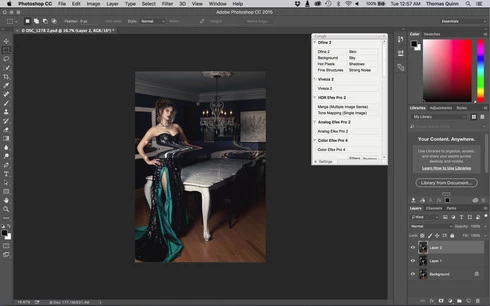
I am having issues with the new upgrade to Photoshop CC 2015 on Mac El Captain. The only thing I did was upgrade from a working CC 2015 to the new version. Using the liquify tool give the following look. There is a box around the area liquified that is lighter than the other areas. When I turn of Use Acceleration in Graphics Processor, it is better but .... I didn't have to do this in the prior version i.e.. Yesterday.

New Update: The Squiggly waist is the liquified:
This topic has been closed for replies.

231 replies

Participant
December 12, 2015
Its a complete differnt problem! Nothing is resolved!!! Problem stil exist!
Inspiring
December 12, 2015


In the LR , if the choice ProPhoto RGB & 16 bit with the choice PScc2015 to enter edit pictures directly (using adobe RGB), use the Liquify filter , the use of color unknown Back LR occur . Request resolved.
Inspiring
December 12, 2015
Can someone check if it works on Macs?
I mean in latest Photoshop version replace the file Liquify.plugin located in
Applications\Adobe Photoshop CC 2015\Adobe Photoshop CC 2015.app (right button click on application and chose Show Package Contents)\Contents\Required\Plug-Ins\Filters
Inspiring
December 12, 2015
Twelve days and no fix...........if you simply substitute Liquify.8bf in C:\Program Files\Adobe\Adobe Photoshop CC 2015\Required\Plug-Ins\Filters with previous version one, everything works well (other bugs apart....).
Why Adobe doesn't follow this way?
Inspiring
December 12, 2015
Hold Alt before you start the clicking sequence.
Known Participant
December 12, 2015
How are you supposed to start Liquify with ALT pressed? As soon as I press ALT, the menu closes and I can't select Liquify! I usually do CTRL-SHIFT-X to start Liquify, but CTRL-ALT-SHIFT-X does nothing.
Participant
December 12, 2015
I am still having lots of issues! I can't get my work done! It is kind of a time crush right now!
atelier-3021
Participating Frequently
December 12, 2015
Hope the model won't notice
Participating Frequently
December 12, 2015
I got it to work now, the first time I tried it only CC2014 showed in the list. I refreshed and tried again and got 2015.0.0 release to work. Thanks for your post - I would never have found it without.
Inspiring
December 12, 2015
Samantha.

I went back to the June 2015 release using that method and it works fine.