


Inspiring
December 1, 2015

P: Liquify lightens result on 16 bit/channel images

  • December 1, 2015
  • 231 replies
  • 4088 views

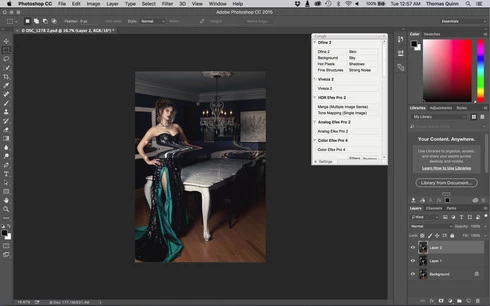
I am having issues with the new upgrade to Photoshop CC 2015 on Mac El Captain. The only thing I did was upgrade from a working CC 2015 to the new version. Using the liquify tool give the following look. There is a box around the area liquified that is lighter than the other areas. When I turn of Use Acceleration in Graphics Processor, it is better but .... I didn't have to do this in the prior version i.e.. Yesterday.

New Update: The Squiggly waist is the liquified:
This topic has been closed for replies.

231 replies

Participating Frequently
December 12, 2015
Currently I have a job where switching to 8bit will not be good enough. I've been trying to hold off but it needs to get delivered. The other work around of disabling the GPU caused PS to crash and lock up my machine. So my only other option is to revert back to a previous version so that I can use liquify, but let me get this straight - after checking on Willmer's post above (thanks Willmer) this means I have to go all the way back to the 2014 version of CC rather than to the 2015 version from just before the latest update? Adam - it's been 10 days, it's about time we were given an update on the ETA and the plan for fixing this please?
Inspiring
December 12, 2015
Same issue. Very disappointing. Disable GPU for Liquify cause PS crash when try to use Freeze mask tool.
Is it NVIDIA specific?
Participating Frequently
December 11, 2015
It crashed for me when I tried that route.
Inspiring
December 11, 2015
It is not. Several of us have issues with Photoshop crashing when trying to open Liquify with graphic acceleration disabled.

The only real solution is to roll back to previous Release
Inspiring
December 11, 2015
uga cpu so slow
Inspiring
December 11, 2015
for now use the CPU instead of GPU I know it is slower but it's the only real solution till adobe fixes it
Inspiring
December 11, 2015
the issue occurs on 8 bit images too if they are transparent and large enough
Inspiring
December 11, 2015
This is not acceptable. The last update is simply a mess.
Inspiring
December 11, 2015
Please , please waiter bring my food out, I paid for it ROFL
Inspiring
December 11, 2015
Stop begging like dogs! We are not here playing, we have work to do! Photography is my profession, not a hobby, and it is not like I need updates every week, I just need a program that works. Unless this is fixed soon, I will take it down from my machine and reinstall my older versions. At least they work!