


Inspiring
December 1, 2015

P: Liquify lightens result on 16 bit/channel images

  • December 1, 2015
  • 231 replies
  • 4089 views

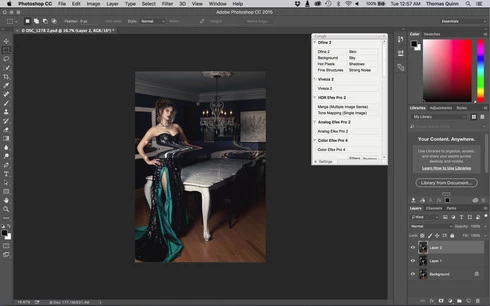
I am having issues with the new upgrade to Photoshop CC 2015 on Mac El Captain. The only thing I did was upgrade from a working CC 2015 to the new version. Using the liquify tool give the following look. There is a box around the area liquified that is lighter than the other areas. When I turn of Use Acceleration in Graphics Processor, it is better but .... I didn't have to do this in the prior version i.e.. Yesterday.

New Update: The Squiggly waist is the liquified:
This topic has been closed for replies.

231 replies

Robert Wilkinson
Participating Frequently
December 11, 2015
Adobe please please fix these bugs. I spent hours rolling back to a previous version of Lightroom already this year while that horrendous upgrade was sorted and now it appears that my only option is to roll back a version of Photoshop to get round this Liquify problem.
I pay a monthly subscription to be able to use your software for my business but so far it doesn't seem 'fit for purpose' and it is costing my business time and money to find ways to work around problems that should have been discovered and sorted long before going public with the upgrade.
Please let us know when this is going to be sorted out (or maybe even a refund on our sub!).
Inspiring
December 11, 2015
hi
yes i got the same problem , with others bugs like cc 2015.1 doesn't record actions correctly

it's a shame , seems to use a nightly builds !

when will adobe release a update to fix at least the most nasty bugs
Known Participant
December 11, 2015
Using the officially recommended fix works on smart objects. However, when I open, edit, save and update the smart object with the liquify effect on it returns to original error.

CC 2015.1
El Cap 10.11.1
Inspiring
December 11, 2015
That would be like making $100 bills by adding a 0 to a tenner
Participant
December 10, 2015
Making "it 16 bit again" does nothing. You lost 8 bits when you made it 8 bit. They are gone. You can't get them back without reverting to the original.
Inspiring
December 10, 2015
And then why would photographers spend thousands of dollars in cameras which raw is 14bit just to throw away the information in the computer.

Converting to 8bit? Not good enough.
atelier-3021
Participating Frequently
December 10, 2015
Okay, Chris, thank you.
It's hard to get directly to one of your team, so I'll take the opportunity:
I have another proposal, not linked to this thread, for your consideration. I've posted it here:
http://feedback.photoshop.com/photosh...
Inspiring
December 10, 2015
Inspiring
December 10, 2015
I found in fstoppers website that changing from 16 bits to 8 bits works for now.
Inspiring
December 10, 2015
There are a few of us whose computers crash when opening Liquify with a disabled graphics acceleration.

So that workaround is just that a workaround for some not all