


Inspiring
December 1, 2015

P: Liquify lightens result on 16 bit/channel images

  • December 1, 2015
  • 231 replies
  • 4091 views

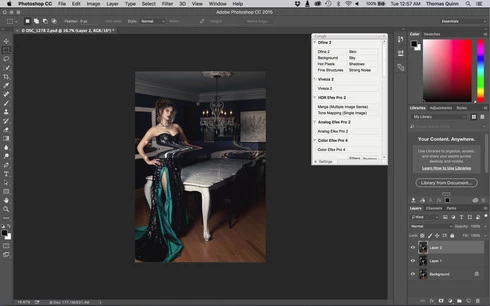
I am having issues with the new upgrade to Photoshop CC 2015 on Mac El Captain. The only thing I did was upgrade from a working CC 2015 to the new version. Using the liquify tool give the following look. There is a box around the area liquified that is lighter than the other areas. When I turn of Use Acceleration in Graphics Processor, it is better but .... I didn't have to do this in the prior version i.e.. Yesterday.

New Update: The Squiggly waist is the liquified:
This topic has been closed for replies.

231 replies

Inspiring
December 10, 2015


After new update yesterday I can no longer use the liquify tool.

There is a problem with the liquify tool. After exiting the tool, there is a solid highlight rectangle area around the area that the liquify tool was applied.

Inspiring
December 10, 2015
Just the thought to have tools and have to work around is ridiculous. The liquify tool working. You do one update and screw the other tools? Don't bring updates if they are not ready!!!! As simple as that!
Inspiring
December 10, 2015
Adam's #2 work-around worked well for me and is pretty easy (no need to save last mesh and then go back in). Now if they can get us an updated CC that won't need any work-arounds!

"Disable GPU for Liquify by holding the Option key down as you select the Liquify filter from the filter menu"
Inspiring
December 10, 2015
And best part, what Adobe does, deleting bad comments from here. In their opinion, that's gonna make users more happy!
Let's delete comments, that's mean problem doesn't exists!
Inspiring
December 10, 2015
I am pissed! This is ridiculous!
Participant
December 10, 2015
Apparently not long enough...

Is ok I work in 8-bit for now

Thank you !
Participant
December 10, 2015
Same problem here. 2012 RMBP - latest CC 2015, Yosemite. Liquify doesn't work in 16 bit or 8 bit on my system. Leaves well defined halo in 8 bit mode and even worst in 16 bit mode. Neither of the suggested work arounds helped the situation. I then tried shutting the graphics card off. The liquify tool worked on 16 and 8 bit files but if I tried to paint a freeze mask in liquify Photoshop crashed and that resulted in a total loss of the file and after reopening, Photoshop had no history of that file ever being opened. I'm not a pro and don't rely on Photoshop for my living but liquify is totally broken.
Inspiring
December 10, 2015
Hello Valerie.

How long have you been in the cc for?

I have written some Instructions on how to roll back.

www.comeseemy.photos/blog/2015/12/4/r...

I think it only goes as far back add You have been subscribed for.
Participant
December 10, 2015
I tried to roll back, but on my Creative Cloud app I don't have a previous Photoshop....only Lightroom
Participant
December 10, 2015
yes! totally agree too ( adobe work harder!!!