


Participant
September 15, 2026

P: (macOS 27) Photoshop 2026: "There was a problem with Generator" at launch

  • September 15, 2026
  • 15 replies
  • 825 views

Environment

Adobe Photoshop 2026 27.10 (ARM64)
Mac mini 2024, Apple M4 Pro, 24 GB RAM
macOS 27.0 Golden Gate

Problem

Immediately after enabling Preferences > Plugins > Enable Generator, Photoshop displays the message:

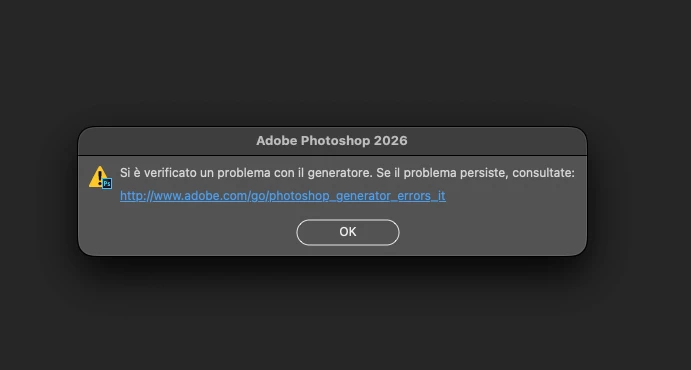
“There is a problem with Generator.”

I checked the Node executable bundled with Photoshop:

/Applications/Adobe Photoshop 2026/Adobe Photoshop 2026.app/Contents/MacOS/node

Running:

file "/Applications/Adobe Photoshop 2026/Adobe Photoshop 2026.app/Contents/MacOS/node"

returns:

Mach-O 64-bit executable x86_64

Therefore, Photoshop itself is ARM64, but the Node executable used by Generator is still Intel x86_64-only.

Before Rosetta 2 was installed, running:

"/Applications/Adobe Photoshop 2026/Adobe Photoshop 2026.app/Contents/MacOS/node" --version

returned:

zsh: bad CPU type in executable

I then installed Rosetta 2 with:

softwareupdate --install-rosetta --agree-to-license

macOS reported:

Install of Rosetta 2 finished successfully

After installing Rosetta 2, the Photoshop Generator error disappeared.

Expected behavior

Photoshop ARM64 on Apple Silicon should include an ARM64 or Universal Node runtime for Generator and should not depend on an x86_64-only executable.

Workaround

Installing Rosetta 2 restores Generator functionality.

Additional confirmation

As a further diagnostic confirmation, the issue was resolved immediately after reinstalling Rosetta 2 with:

softwareupdate --install-rosetta --agree-to-license

macOS confirmed:

Install of Rosetta 2 finished successfully

After restarting Photoshop with Generator enabled, the Generator error no longer appeared and Generator worked normally.

This provides a reproducible correlation:

Rosetta 2 unavailable → bundled x86_64 Node cannot execute (bad CPU type in executable) → Generator fails.

Rosetta 2 reinstalled → the same x86_64 Node can execute → Generator works again.

This strongly suggests that the current Photoshop 27.10 Generator implementation on Apple Silicon still has a runtime dependency on Rosetta 2 because the bundled Node executable is x86_64-only.
 

    Pinned Reply By Anshul_Saini

    Hi ​@gillesenvrac,

    Thank you for reaching out. I understand the concern, seeing an "End of support for Intel-based apps" notification on a brand new M4 Mac is understandably confusing!

    Photoshop runs natively on Apple Silicon, including M4. I just wanted to let you know that your version of Photoshop is not the problem. What's happening is that this notification is coming from macOS itself (not from Adobe). Starting with macOS 26.4, Apple displays a system-level alert whenever an app or any of its components, such as a plug-in, extension, or add-on, uses Rosetta (Apple's Intel translation layer).
     

    The most likely cause is that you have one or more legacy plug-ins or extensions installed that still rely on Intel code. Even though Photoshop itself is fully native for Apple Silicon, an older plug-in running through Rosetta can trigger this macOS notification.
     

    Here's what you can do:

    • In Finder, locate the Photoshop application, press Command-I (Get Info), and look at the Kind field. It should say "Application (Universal)" or "Application (Apple silicon)." If "Open using Rosetta" is checked, uncheck it.

    • Review your installed plug-ins. Older plug-ins (especially CEP-based or non-UXP plug-ins) may require Rosetta. Check with each plug-in developer to see if an Apple Silicon-native or UXP version is available.


    If the notification persists even after confirming that Photoshop is not in Rosetta mode and you have no legacy plug-ins installed, please let us know; we can look into this further.
     

    Best regards,
    Anshul Saini

    15 replies

    zebra7228140
    Inspiring
    October 9, 2026

    I was seeing this error message about Generator after updating to Mac 27. This may not help anyone using generator to output there layers to individual files (jpg, gif, png), but since i don’t export layers, I went to the dropdown menu: Photoshop>Settings>Plugins and unchecked “Enable Generator.” Quit photoshop and never saw that error message again on every new app launch (same error with previous version of Photoshop which I also have loaded, same fix, same success). Now I know this is no help for those who use generator and I hope Adobe supplies a fix for this, and for anyone else seeing that error window who does not use generator, this worked to my satisfaction (for now). ;) 

    Ernesto_CH
    Inspiring
    October 6, 2026

    Hello!
    I jump on this thread since I am a HEAVY user of that feature. (Gigs of files where this is enabled to generate in realtime multiple artboards formats).

    I received this message after updating to MacOS 27 on my 2021 Macbook Pro M1 Max


    Do you know how I can fix it ?
    Thank you very much

    Anshul_Saini
    Community Manager
    Community Manager
    October 9, 2026

    Hi @Ernesto_CH,

    Thanks for reaching out. Since this started after upgrading from macOS Tahoe to macOS 27 Golden Gate, could you please confirm whether you’ve installed Rosetta 2 after the OS upgrade?

    As mentioned in the pinned reply above, the current Photoshop Generator component requires Rosetta 2 on Apple Silicon. We’ve seen this “There was a problem with Generator” message after upgrading to macOS 27 when Rosetta 2 isn’t available.

    Since you rely heavily on Generator, I would not recommend disabling it as a workaround. Please install Rosetta 2, restart Photoshop, and try your Generator workflow again.

    If you’ve already installed Rosetta 2 and are still receiving the error, let me know, and we’ll continue investigating from there.

    Best,
    Anshul Saini

    Jeff Arola
    Community Expert
    Community Expert
    October 5, 2026

    If you go to Apple>System Information>Software>Rosetta Software maybe you can determine what is triggering the Apple warning message about Intel support when running Photoshop 2026.

    An easy way to get to System Information is to hold the Option key while clicking on the Apple menu.

    Ged_Traynor
    Community Expert
    Community Expert
    September 24, 2026
    Participant
    September 24, 2026

    System information:

    • Mac: Apple M1
    • macOS: 27.0 (26A428)
    • Adobe Photoshop: 2026 – Version 27.10.0

    Before updating macOS, I was not experiencing this Generator error.

    After updating the operating system to macOS 27.0, I launched Photoshop and immediately received the following message:

    “There was a problem with Generator. If the problem persists, please see:”

    I have attached a screenshot of the error message.

    Since this started immediately after the macOS update, I would like to know whether this is a known compatibility issue between macOS 27 / Apple Silicon and Photoshop 27.10.0, particularly the Generator component.

    I also noticed that other users are reporting similar Generator issues after upgrading to macOS 27.

    Could Adobe please confirm:

    1. Is this a known issue with Photoshop 27.10.0 on macOS 27.0?
    2. Is there currently a recommended fix specifically for Apple Silicon Macs?
    3. Is Adobe working on an update to make Generator fully native/compatible with Apple Silicon and macOS 27?
    4. If an official fix is planned, will it be included in an upcoming Photoshop update?

    I would appreciate any information from the Photoshop team regarding the cause of this issue and the expected solution.

    Thank you.


    Sameer K
    Community Manager
    Community Manager
    September 16, 2026

    Hey, @JustCallMeDrew. Welcome to the Photoshop Community. I'll clarify this for you.

    You see the pop-up because the Generator is still Intel x86_64 architecture, and the support for Apple-Silicon is arriving soon. For the time being, unchecking 'Enable Generator' from Photoshop > Settings > Plugins is a valid workaround.


    Thanks!
    Sameer K
    (Type '@' and type my name to mention me when you reply)

    Known Participant
    September 16, 2026

    I upgraded to macOS 27 Golden Gate yesterday and now an error message comes up when I launch Photoshop 27.9.1 saying “There was a problem with Generator...”.

    When I disable “Generator” in “Settings - Plugins” the error goes away but once I enable it, the popup comes back straight away.

    Any idea how to get rid of it without disabling the Generator plugins?


    Srishti Bali
    Community Manager
    Community Manager
    September 15, 2026

    Hi ​@UgoM 

    Thank you for your feedback. You’re right. Currently, Generator requires Rosetta 2 to run on macOS. I will update this thread once we have confirmation on the native ARM build. 

    Moving your post to questions, as this is an expected behavior, not a bug. 

    Thanks, Srishti Bali | Community & Engagement Strategist, Digital Imaging | Adobe
    Participant
    October 1, 2026

    ​@Srishti Bali No. Photoshop recommends ARM-based Apple Silicon processors. Even so, the fact that Rosetta 2 is required is something that should be called a “BUG”.

    gillesenvrac
    Participating Frequently
    September 4, 2026

    Thanks for your reply,

    I checked the “rosetta” stuff before, and it is still OK : it is unchecked.

    For the plugins, I checked the few places where it is supposed to be listed, and as you can see with the screen grabs, at one place, there is no plugin. and at the other place, there is two plugins : Camera Raw and something I didn’t know : Adobe Substance 3D Viewer (Beta) 

    This is the only plugin that I can think of… but I don’t see where I could unload it.

    Under the “plugin” subdirectory of Photoshop on my computer, there is no plugin, just an empty directory called Generator. 

    Thanks for your time,

    Gilles

    Abhishek Rao
    Community Manager
    Community Manager
    October 5, 2026

    Hi ​@gillesenvrac,


    Thank you for sharing the additional screenshots, and apologies for the delayed response. Are you still experiencing this issue, or has it been resolved?

    If the issue persists, could you please go to Photoshop > Settings > Plug-ins, uncheck Enable Generator, click OK, and then restart Photoshop? After relaunching, please check whether the notification appears again.

    If the notification still appears with Generator disabled, please let us know so we can investigate whether another component may be invoking Rosetta.


    Thanks for your patience!

    Abhishek

    gillesenvrac
    Participating Frequently
    October 5, 2026

    Thanks Abhishek, 

    There was no message about Intel based app when opening Photoshop. But there was a message about the Generator (see the screen grab). After unchecking the “Enable Generator”, the message was no more there at the reopening of PS. 

    So this Generator is disabled. Will this be of any consequence for the operation of PS ?

    Thanks.

    Gilles

    Anshul_Saini
    Community Manager
    Community Manager
    September 4, 2026

    Hi ​@gillesenvrac,

    Thank you for reaching out. I understand the concern, seeing an "End of support for Intel-based apps" notification on a brand new M4 Mac is understandably confusing!

    Photoshop runs natively on Apple Silicon, including M4. I just wanted to let you know that your version of Photoshop is not the problem. What's happening is that this notification is coming from macOS itself (not from Adobe). Starting with macOS 26.4, Apple displays a system-level alert whenever an app or any of its components, such as a plug-in, extension, or add-on, uses Rosetta (Apple's Intel translation layer).
     

    The most likely cause is that you have one or more legacy plug-ins or extensions installed that still rely on Intel code. Even though Photoshop itself is fully native for Apple Silicon, an older plug-in running through Rosetta can trigger this macOS notification.
     

    Here's what you can do:

    • In Finder, locate the Photoshop application, press Command-I (Get Info), and look at the Kind field. It should say "Application (Universal)" or "Application (Apple silicon)." If "Open using Rosetta" is checked, uncheck it.

    • Review your installed plug-ins. Older plug-ins (especially CEP-based or non-UXP plug-ins) may require Rosetta. Check with each plug-in developer to see if an Apple Silicon-native or UXP version is available.


    If the notification persists even after confirming that Photoshop is not in Rosetta mode and you have no legacy plug-ins installed, please let us know; we can look into this further.
     

    Best regards,
    Anshul Saini