
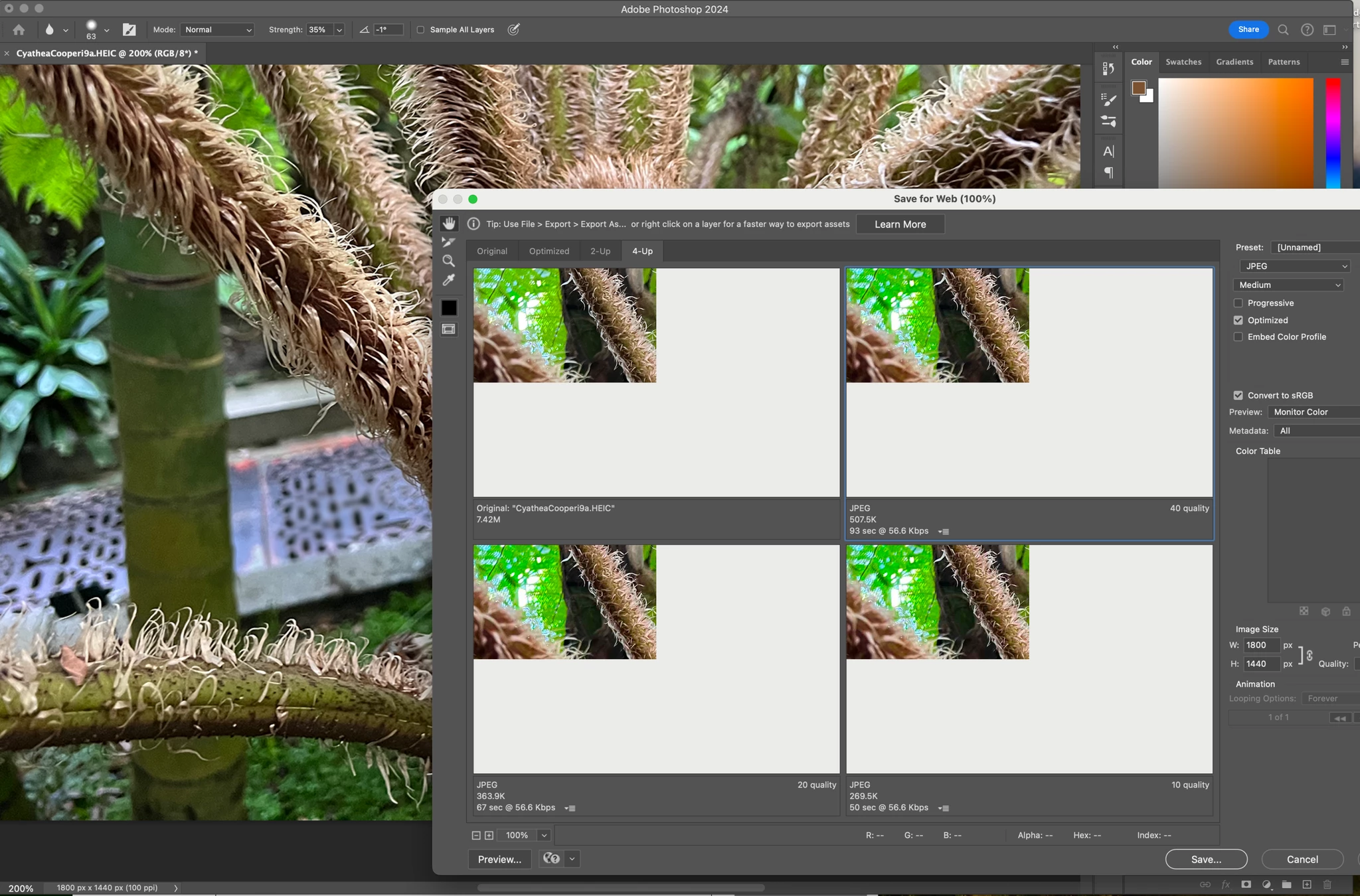
Have just updated to Photoshop 2024 and my save to web panel is now not displaying correctly - see screengrab. How can I adjust it to have the full image fill the four windows? cheers, Bob
I get this same issue as well. I recently updated my 14" MBP to a minor revision of Monterey. 12.6.9 to 12.7.
Completely bricked my laptop. Had to take it in to an Apple store. Where they tried all the same stuff and agreed it was hosed. They could only wipe and reinstall. And thanks to the synchronicitous timing of the universe, meant I was being forced on to Sonoma the week it was released! Thankfully I have backups.
So I am able to get back all the work that only resided on the Mac. However, I cannot downgrade my OS from Sonoma to Monterey. Something they did replaces the firmware with Sonoma firmware and it won't let me use a bootable installer or anything. So I am stuck on Sonoma. (I know not an Adobe problem just saying downgrade may not be possible for a lot of us as a solution)
Just updated Photoshop to 24.7.1, still getting this problem.
Can I just say I really don't appreciate the 'legacy' next to Save for Web. Nothing else in Photoshop does what it does. Export as comes close but no check box to constrain proportion? No Blur? It's crucial to generating assets for various workflows. I have a ton of automations built around the save as dialogue. For those I do not need preview obviously, since it's batching stuff. But the 'legacy' status of Save for Web when there is no replacement nearly as feature rich has me nervous. Especially with a problem this big.
I have this issue as well after upgrading to Sonoma. A similar glitch happens when using Vanishing Point as well (top 25% gets highlighted when re-sizing image within Vanishing Point and doesn't function properly).
Though Portraiture isn't an Adobe product, I think this post just indicates that the problem is bigger than just the Adobe product and that it shares something in common with Photoshop's glitch perhaps caused by Apple.
@peterd7899774 Portaiture 4 is not an Adobe product - if you are having issues with that plugin please reach out to the developer directly. As for the Save for Web, obviously that has been noted by Adobe already in this thread.
@D Fosse@silk-m Let me explain in terms that you understand, because you are missing the point. As an end-user I'm using a product and I'm expecting from that product to work as expected because my livelihood depends on it (for better or worse). As an end-user I don't (and shouldn't) care if the bug is introduced by Apple or not; it is presented in an Adobe app and it's part of my user experience. If the bug was in MacOS, I would make my complaints to Apple. As an end-user I have the liberty to upgrade my machine as I see fit.
At the end of the day, as an end-user I pay a hefty monthly fee to Adobe (not Apple) for a product I cannot use. Stating that it's not a good policy or that I'm asking for trouble it's an unacceptable (to say the least).
For the record, I've been using Photoshop since 1995; I'm working in a med tech company that creates software as parf of medical device and I'm well aware that there's no software without bugs. However, with all the major MacOS upgrades, from all the apps I'm using, only the Adobe apps have major bugs that prevent me from using them in the first place.
I've searched the web for this issue and found nothing, does anyone else have/had this issue before? It only aprears in the Save for Web window.
From the screenshot: The preview apears to be partialy loading, that's why I can only see the top right corner, the rest of the preview is a shade of gray. Note that the exported file is ok, only the preview is broken.
As a troubleshooting step I've reset all preferences for Photoshop and the problem still persists.
Using Photoshop 2024 v25 (v24.7.1 same issue) on MacBook M1 Pro 2021 MacOS Sonoma 14.0 (23A344)