


Participant
Sep 16, 2023 3:39 PM UTC
Released

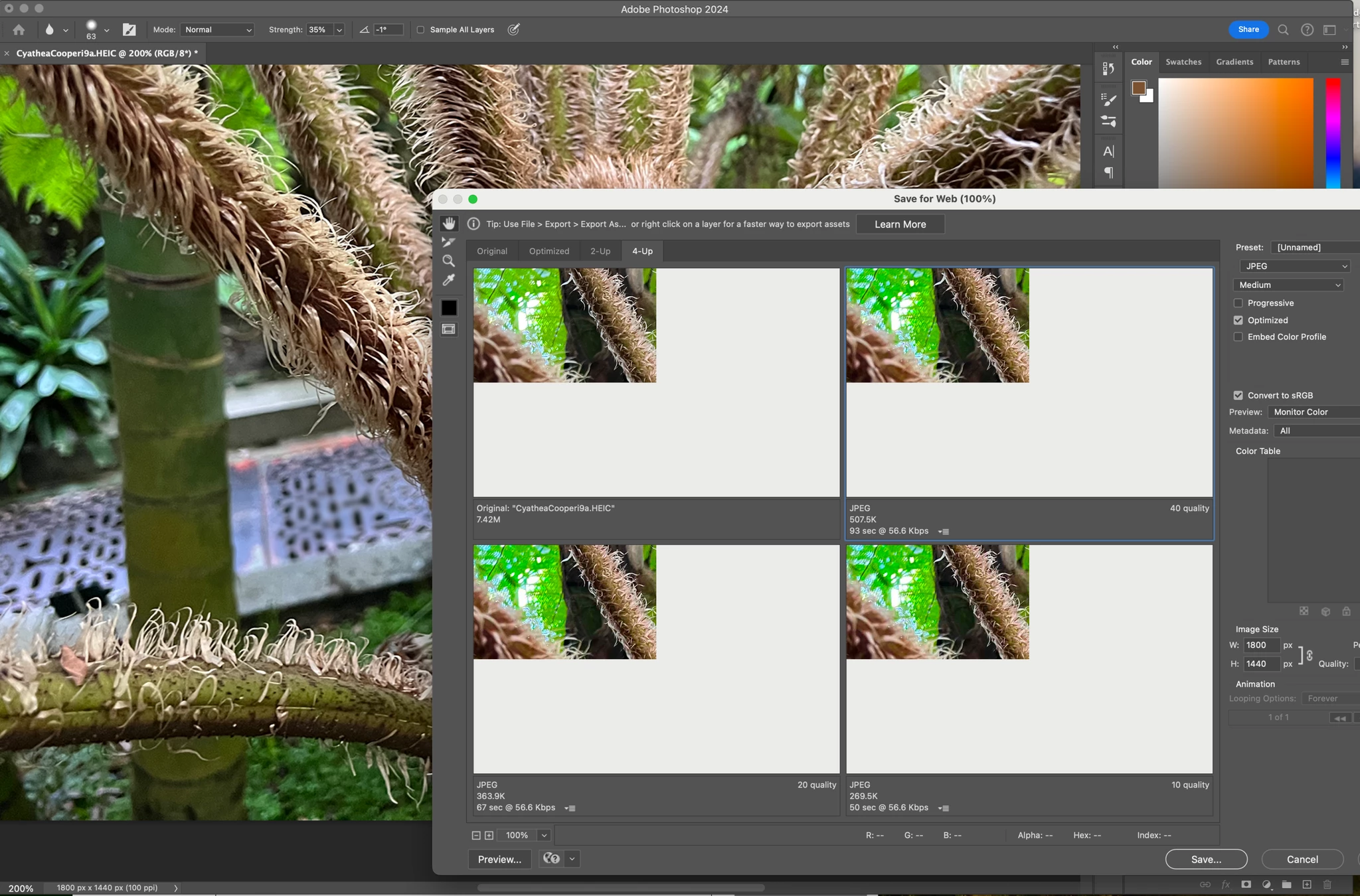
P: (macOS Sonoma) Photoshop 2023/2024 Save for Web shows incomplete preview

Have just updated to Photoshop 2024 and my save to web panel is now not displaying correctly - see screengrab.  How can I adjust it to have the full image fill the four windows?  cheers, Bob


224 replies

Participant
Sep 28, 2023 7:52 PM UTC

Actualicé a Sonoma OSX y ahora también a Photoshop 2024 y ahora cuando quiero guardar para web no me previsualiza la imagen o bien la muestra rota, alguien sabe como solucionarlo? 


Translate
Participant
Sep 28, 2023 7:56 PM UTC


Translate
Participant
Sep 28, 2023 10:10 AM UTC

When I am exporting using save for web I am getting an issue where I can't see my work in the preview section. Instead it just shows as one big grey area. I have tried opening and saving these files in the same way on a colleagues computer and it is saving and previewing as it should be. I have tried uninstalling and reinstalling photoshop too and this hasn't fixed it. Please could someone help resolve this issue. Thanks.

Translate
user5584859
Participating Frequently
Sep 16, 2023 3:39 PM UTC

I just install photoshop on my new macbook pro, when I saving my image by save for web, the preview screen only part of it can be displayed, or even nothing can be displayed....


I tried to install again and not keep the old preference, or in Preferences click the "Reset Preferences On Quit", still no improvement, how can I fix it.... Thanks...

Translate
Stephen Marsh
Community Expert
Community Expert
Sep 16, 2023 11:33 PM UTC

Perhaps a GPU or other preference setting such as native canvas?


Save for Web (Legacy) uses very old code. Export As/Quick Export uses updated code, however, does not offer feature parity.


I also noticed that you are reducing the % of the exported image. What size in pixels is the original on the longest edge? Is the longest edge 8192 px or larger?

Translate
mglush
Community Expert
Community Expert
Sep 27, 2023 11:46 PM UTC

Hi Bob,

Are you using the Export>Save for Web (Legacy)? What happens when you cycle through the other options, does the image stay the same size in the top left hand corner? Can you use the hand tool to move it around, or zoom in with the magnifying glass?

Michelle

Translate
Participant
Sep 27, 2023 11:49 PM UTC

Yes Export for web (legacy).. Yes stays the samew when cycling through others.  Handtool no movement.  Magnifying glas zooms in on the image but it remains masked exactly the same e.g. 25% of available window.

Translate
mglush
Community Expert
Community Expert
Sep 28, 2023 12:51 AM UTC

Have you tried resetting your preferences? Here is a help doc that will walk you through the process. https://helpx.adobe.com/photoshop/using/preferences.html

I would suggest following the manual process.

Let us know if this works?

Michelle

Translate
Inspiring
Sep 27, 2023 12:06 PM UTC

Hello since the update this morning of Photoshop Beta (but it is also true on the "normal" version) there is a problem displaying the visual when we do "Export -> save for the web". It's very small and at the top left. As if the viewing window had been shifted! it's very painful.

I am on MAC version Sonoma 14.0
THANKS

Translate
Participant
Sep 27, 2023 1:54 PM UTC

I'm having the exact same problem on my fully spec'd M2 Macbook Pro using PS 2024

Translate
Inspiring
Oct 1, 2023 10:21 AM UTC

Still no news from Adobe about this problem !!!

Translate