


Participant
September 16, 2023

P: (macOS Sonoma) Photoshop 2023/2024 Save for Web shows incomplete preview

  • September 16, 2023
  • 184 replies
  • 37888 views

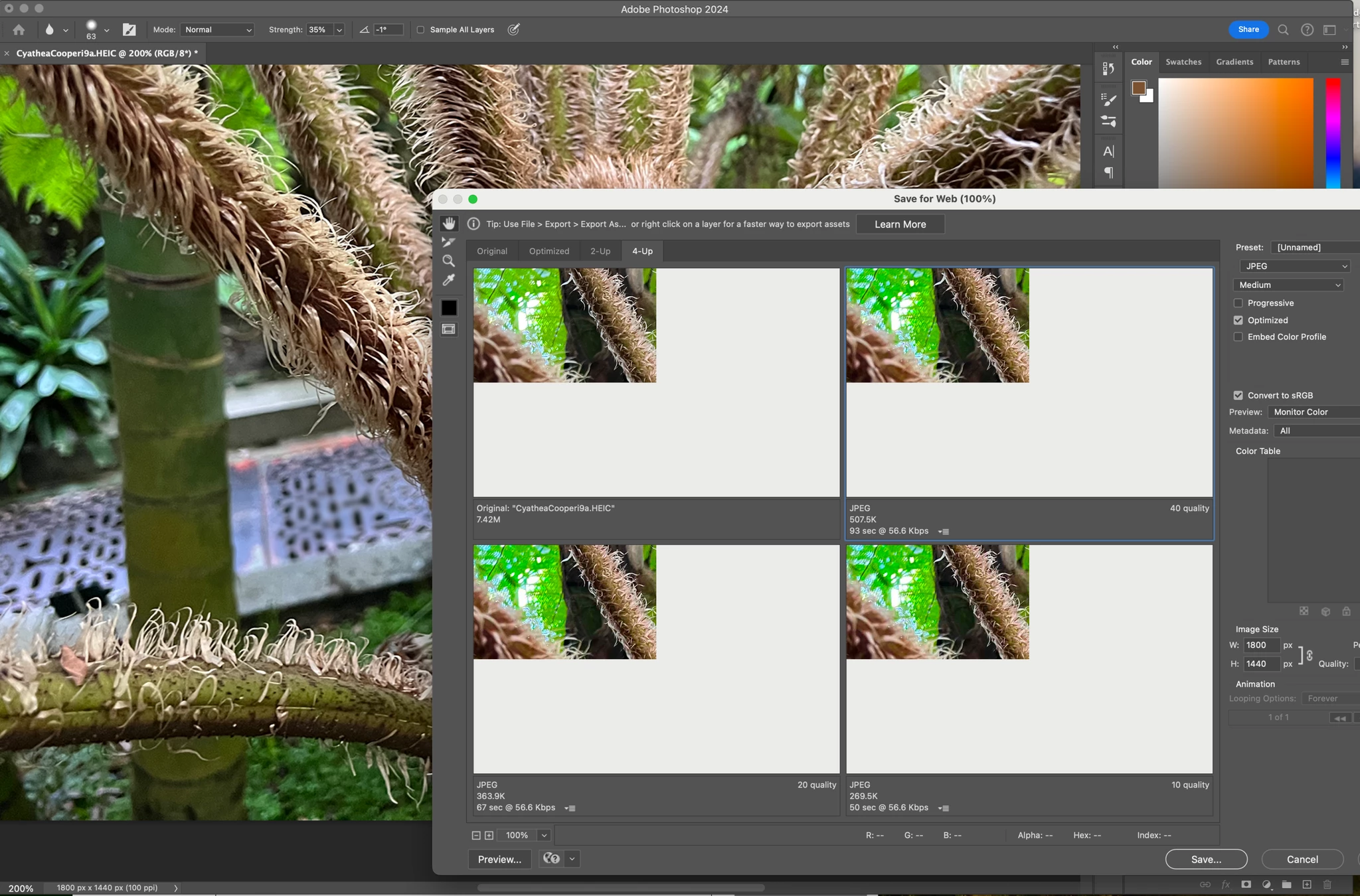
Have just updated to Photoshop 2024 and my save to web panel is now not displaying correctly - see screengrab.  How can I adjust it to have the full image fill the four windows?  cheers, Bob


184 replies

jane-e
Community Expert
Community Expert
November 7, 2023

@peterc2301432 


I'm glad that you got it sorted, but at some point you will want to know more about the hidden folders in macOS. Following the link in the NOTE will give you some information, but this article from MacWorld is much more detailed:

https://www.macworld.com/article/671158/how-to-show-hidden-files-on-a-mac.html


Jane


Participating Frequently
November 7, 2023
indeed I have.
jane-e
Community Expert
Community Expert
November 7, 2023


@peterc2301432 wrote: the diretory structure is different. I don't ahve Adobe Photoshop Settings in the Preferences


Peter, you may have missed the NOTE in Kevin's link telling you how to access the hidden files on macOS.


Jane


Participating Frequently
November 7, 2023

I reset the Preferences from the Photoshop/Preferences/General and it worked. Thanks.

Participating Frequently
November 7, 2023

Thanks Kevin, I am supposed to do this:


Navigate to Photoshop's Preferences folder.

macOS: Users/[user name]/Library/Preferences/Adobe Photoshop [version] Settings


But the diretory structure is different. I don't ahve Adobe Photoshop Settings in the Preferences. 


Kevin Stohlmeyer
Community Expert
Community Expert
November 7, 2023
Participating Frequently
November 7, 2023

nothing? nobody else has this problem?

Participating Frequently
November 6, 2023

Help! I cannot do any work at all! I cannot see any image at all on PS. Sonoma 14.1 with Ps 25.1. See attached screen grab.


Mohit Goyal
Community Manager
Community Manager
October 26, 2023

Hi all,


We are happy to announce the release of Photoshop version 25.1, which incorporates the resolution for this particular problem. To see the list of all fixed issues, click here


To update Photoshop to 25.1, click "Update" in the Creative Cloud desktop app next to Photoshop. More detailed instructions for updating


Let us know if the update resolves the problem for those affected, and share your feedback.


Thanks,

Mohit

Participant
October 25, 2023

Bug was fixed but it introduced a new bug. It fixed the Save for Web (Legacy) issue, but now when I try and click on tools in Adobe Photshop, it does not register and I click through to the Desktop. It is driving me crazy. I have tried resetting my workspace, trying different workspaces, dragging photoshop windows to my other displays, and it will not let me select a tool 100% of the time. I installed Photoshop Beta and it is fine.


macOS Sonoma 14.1 updater has been released. If you update, the problem with Save for Web (Legacy) will be resolved.