


Participant
September 16, 2023

P: (macOS Sonoma) Photoshop 2023/2024 Save for Web shows incomplete preview

  • September 16, 2023
  • 184 replies
  • 38261 views

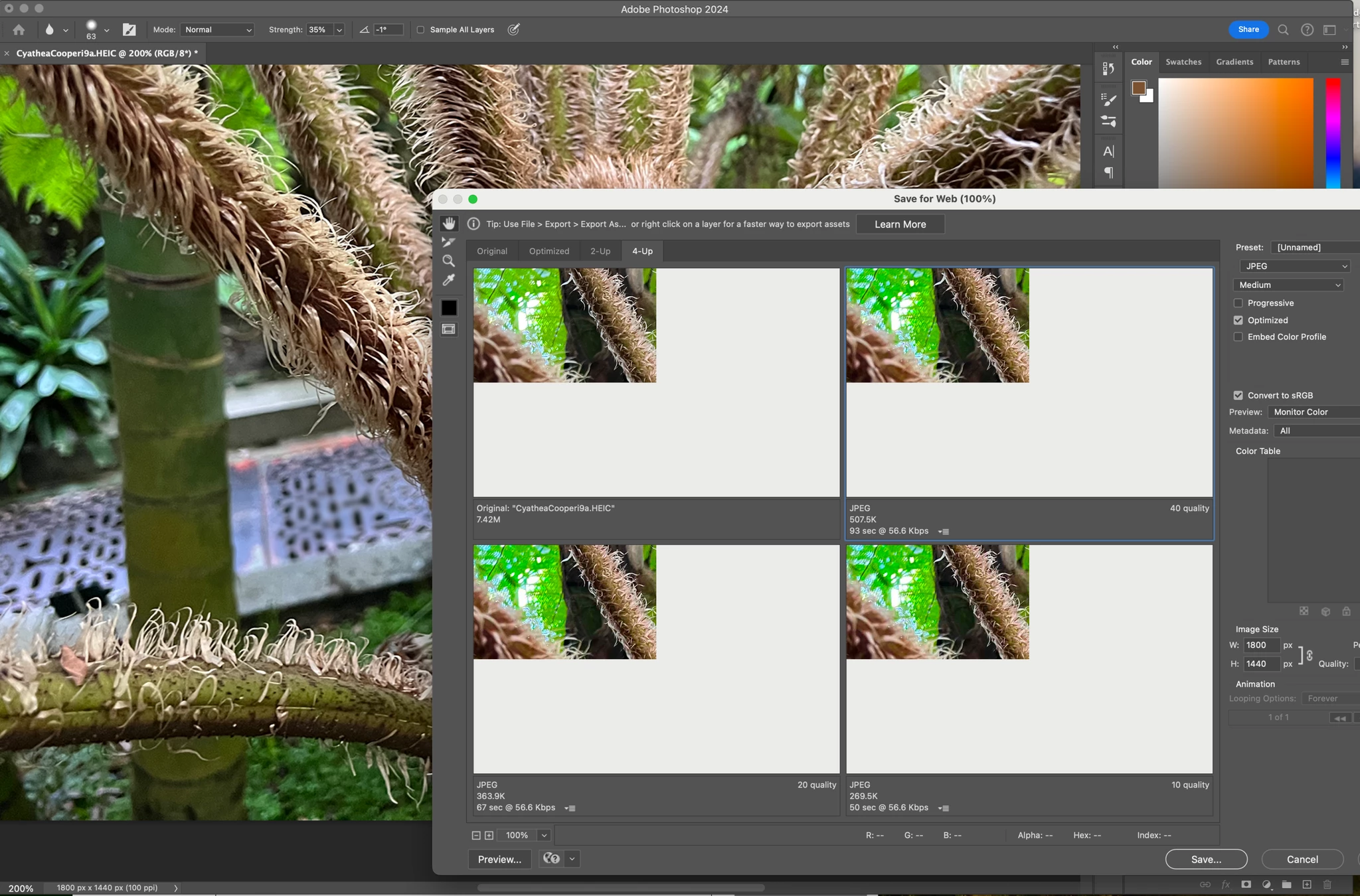
Have just updated to Photoshop 2024 and my save to web panel is now not displaying correctly - see screengrab.  How can I adjust it to have the full image fill the four windows?  cheers, Bob


184 replies

Participant
October 18, 2023

I agree to a point, but it is unique only to Photoshop 2023 and 2024. It doesn't occur in Illustrator Export to Web. So it is definitely some type of bug related to Sonoma, but seems to be Photoshop specific. So is it an Apple bug or an Adobe bug?

Kevin Stohlmeyer
Community Expert
Community Expert
October 18, 2023

@shanekartz actually your test points to be opposite. If it previews properly on one screen and not others - that is not software related and would be an OS issue from Apple.

Participant
October 18, 2023

I can also confirm that this bug exists in version 2023, but it doesn't occur in Illustrator's Export to Web.

Participant
October 18, 2023

I read your post and thought I would test it out on my setup. So I have my 16" M1 MacBook Pro Max connected via Thunderbolt 4 to a Lenovo P40w-20 Ultrawide running at 75Hz 5K2K resolution, also an Apple LED Cinema Display rotated to 1444x2560 plus the built-in retina XDR display with ProMotion enabled. The preview only displays when I slide the Save For Web window the Apple LED Cinema Display. It is blank white on the Lenovo and the Built-in display. Looks potentially like either a resolution or refresh rate bug in Photoshop.

Participant
October 18, 2023

For what it's worth, screen mirroring to a TV / AppleTV makes it work too. So bizarre.

Dave Z #225
Participating Frequently
October 18, 2023

Oh, one more thing (I can't edit my post) - go back to the very start of this thread and upvote the bug report. Currently at 164 upvotes.

Dave Z #225
Participating Frequently
October 18, 2023

I'm using a larger monitor without that resolution. It's scaled from default to 2304 x 1296. No love. 

As a reminder to people just joining, the other possible solutions are:

1) Reverting to Ventura, which is way too much work for many

2) Waiting for Sonoma .1 which is due next week, and hoping

3) Moving the Save As for Web dialogue box to a second screen - seems to work for everyone (I don't think anyone has tried this using an iPad for the second screen, but that would be an easy option - as would be using a spare TV as a second screen)

4) Using the newer Export dialogue (losing some of the Save As for Web options)

5) Probably easier than reverting to Ventura: finding your old copy of Photoshop CSx and installing it in a virtual machine running an old copy of the OS (Mojave or earlier)


I'm pretty much using 3 and 4 while doing 2.  

Participant
October 18, 2023

Problem Solved. Use this Resolution. Enjoy.

JordacheCF
Participant
October 18, 2023

Did a video to show an interesting bug about this... Photoshop 2024 Save for Web Preview Bug 

I think it's an Adobe Bug.
I did a test my minimizing the Photoshop Application, then did the Save-for-web shortcut while the Photoshop was still active (but minimized). Then closed the save-for-web window (clicked cancel). Then maximized the photoshop window and to my surprise, the layer blending was changed to Hard Mix.

It only happened when save for web was opened and closed during minimized window.

Participating Frequently
October 18, 2023

Now with this pattern that the issue exists after Sonoma Upgrade could be that Adobe investigates this with Apple engeneers too to figure our who should do what in order to make this fixed for good and be compilant with the most recent gpu system architecture specs so probably that's why it takes so long fo Adobe to fix this - could be that they are waiting for some Sonoma fix as well. Just speculating.